Objet260 User Guide 6 Operating and Maintaining the Objet260 3DPrinter
DOC-37004 Rev.E 6-29
Cleaning and
Replacing the
Wiper
Arubberwiperremovesexcessmaterialfromtheprintheadsafterthepurge
sequence.Thisisdoneautomaticallybeforeeachprintjob,andperformed
manuallyduringmaintenancetasks.Youshouldcleanthewiperand
surroundingareaatleastonceaweek.Ifthewiperisdamagedorworn,
replaceit.
Toinspectandcleanthewiper:
1. Prepare—
❒ isopropanol(IPA—isopropylalcohol)orethanol(ethylalcohol)
❒ disposablecleaninggloves
❒ asuppliedcleaningclothorequivalent
❒ asparewiper
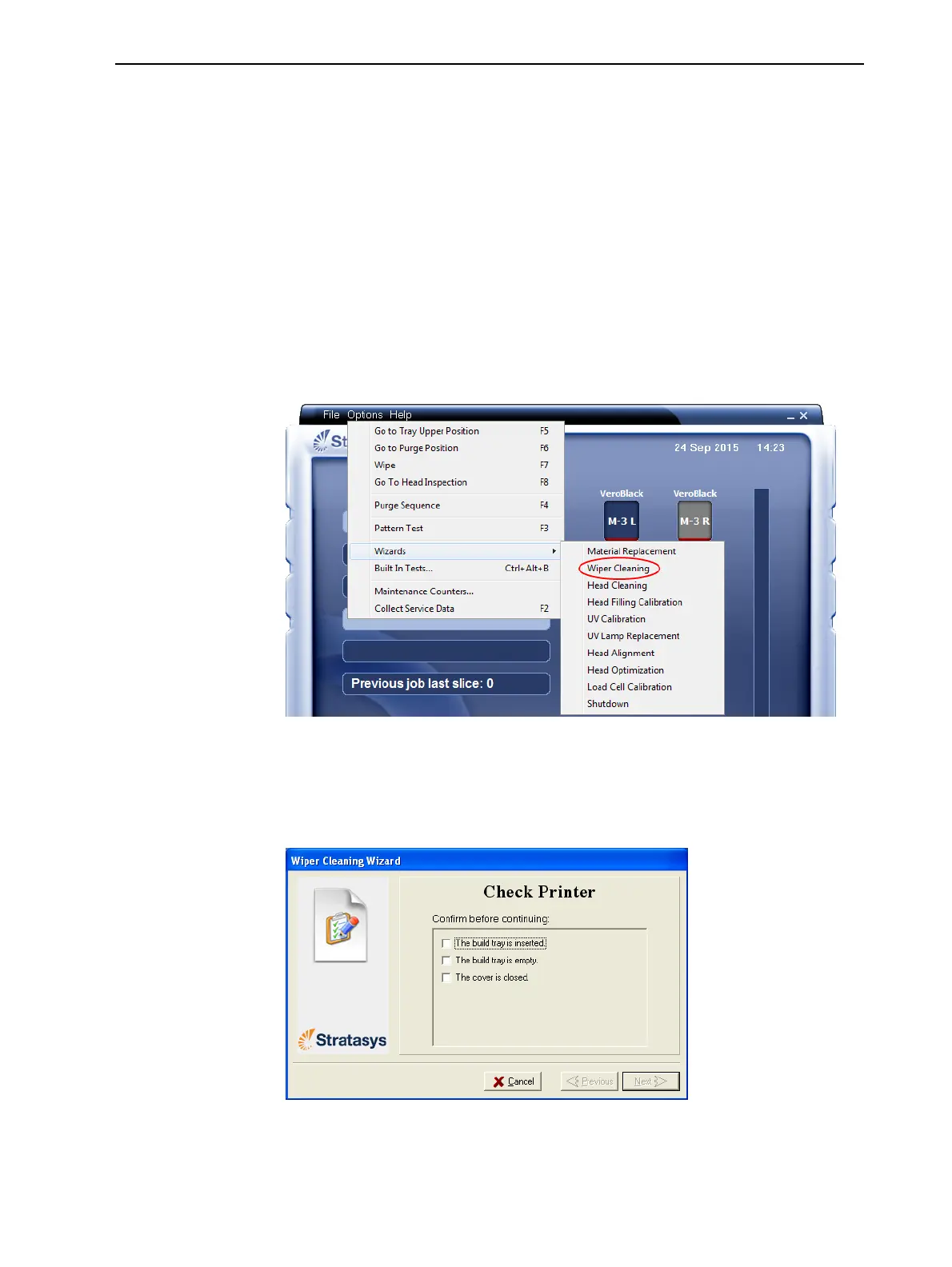
2. StarttheWiperCleaningwizardfromtheOptions menu.
Figure6-28StartingtheWiperCleaningwizard
3. Intheopeningwizardscreen,clickNext.
4. Makesurethatthebuildtrayisempty,andclosetheprintercover.
ConfirmthisinthewizardscreenandclickNext.
Figure6-29WiperCleaning—step4













 To Next Page