55
3.4 EXERCISING WITH QUICK START
3.4 Exercising with QUICK START
This function lets you start a workout with
display of the elapsed time, automatic setting
of the age and weight values by the software,
and the same initial effort level as during
Standby.
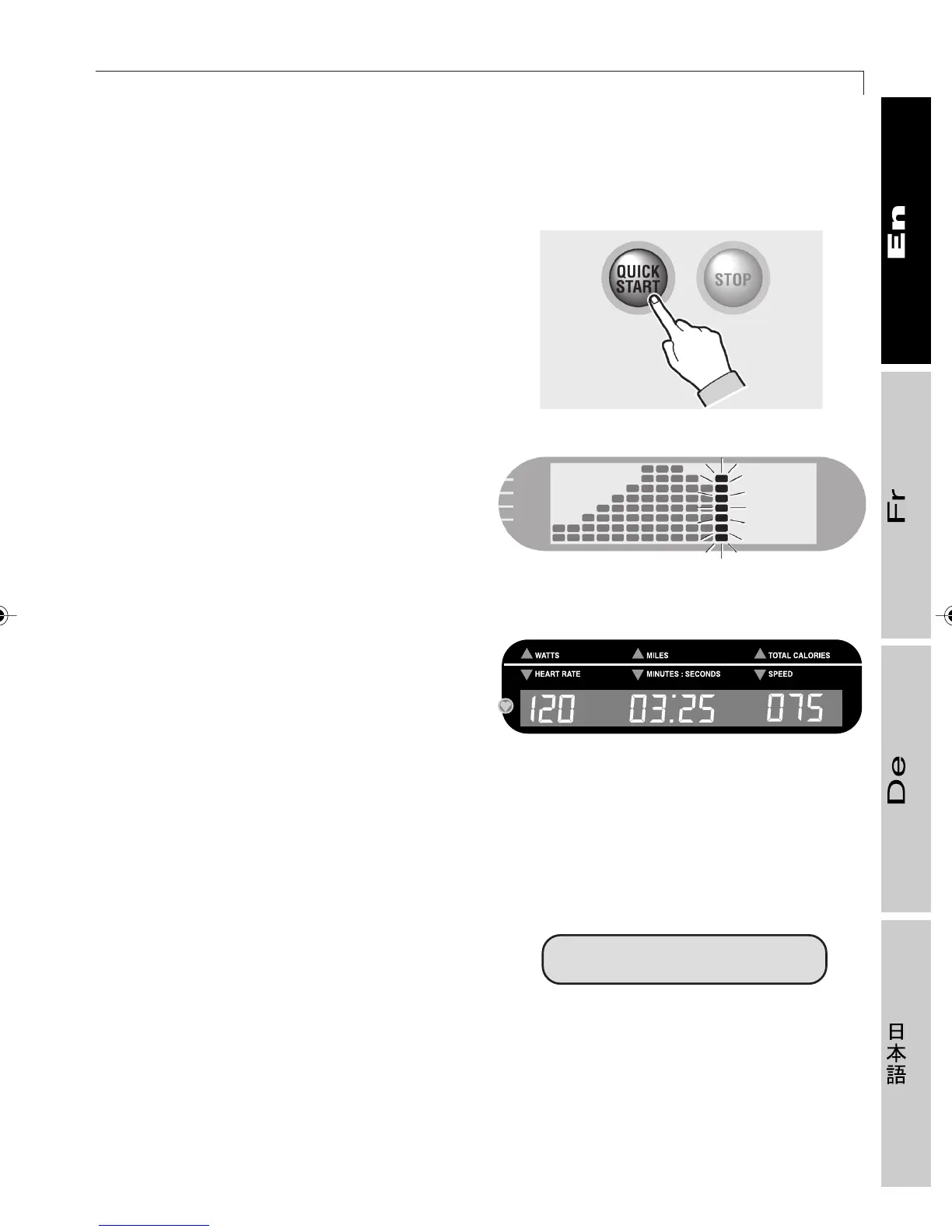
With the equipment in Standby, press the
QUICK START key. The equipment emits a
beep and the workout begins.
The graph on the alphanumeric display will
show a column for each minute. The last
illuminated column, corresponding to the
current minute, flashes. From the 19th minute
on, the columns will start moving towards
the left so that the column corresponding to
the current minute is always displayed.
During the workout, the digital display will
show: expressed power, miles (kilometers)
run, calories burned, heart rate, time elapsed,
and speed. You will also be able:
- to adjust the effort level by using the
corresponding keys;
- to stop the workout with the STOP key or
the CLEAR key.
At the end of the workout, you can insert the
Smartkey* to save the results.
If you have used the heart rate meter (chest
band) during the workout for at least 3
minutes, the Performance Index (P.I. see
section 3.10) will appear on the display at
the end of the workout.
P.I. = 6
41
19-2
01417011
2_Top_En.P65 30/05/2002, 13.5655










 To Next Page