63
3.9 EXERCISING WITH THE SMARTKEY*
3.9 Exercising with the Smartkey*
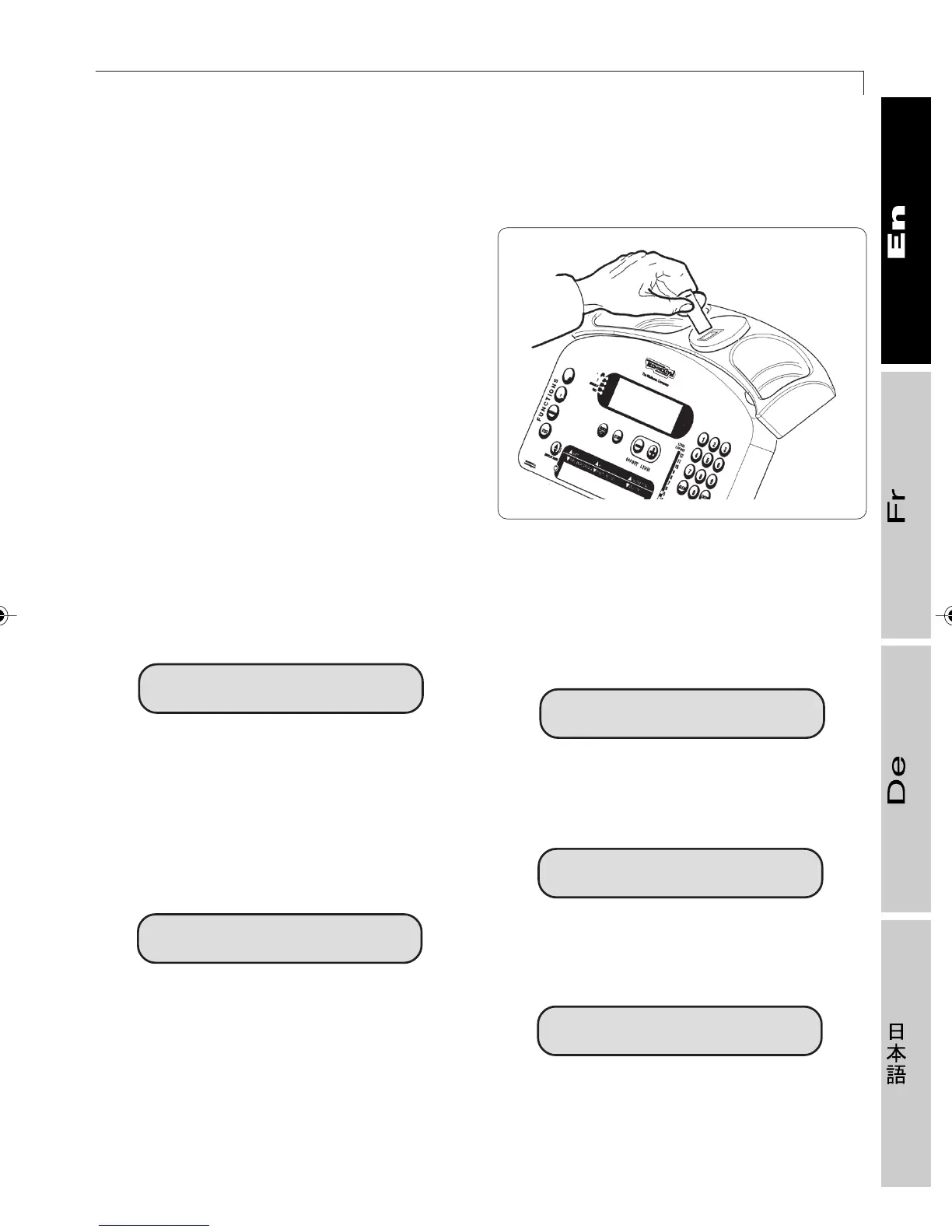
The Smartkey* is especially useful when
you are doing circuit exercises consisting of
identical workout sequences.
The Wellness Trainer eliminates the need to
enter personal data and exercise
parameters each time, since it memorizes
them. To start the exercise just slip the
Smartkey* into its slot; the display will first
show the user’s name, then the type of
planned exercise with associated
parameters.
For example, if a CHR type workout is
planned, when you insert the Smartkey*, this
message appears:
H.R. = 138
where H.R. = 138 indicates the value (138)
of the constant heart rate (H.R.) which must
be maintained during the exercise.
If you perform a workout at constant power,
this message appears:
WATT = 110
Afterwards, the equipment behaves exactly
as if the workout had been selected and set
from the control panel.
At the end of the workout, if other exercises
are not planned on the workout chart saved
on the Smartkey*, the following message
appears:
END OF WORKOUT
However, if other exercises are planned, the
display shows this message:
NEXT: CARDIO
At this point it is possible to remove the
Smartkey*, as indicated on the display:
REMOVE SMARTKEY
014170016
2_Top_En.P65 30/05/2002, 13.5663










 To Next Page