Appendix C: Performance Verification
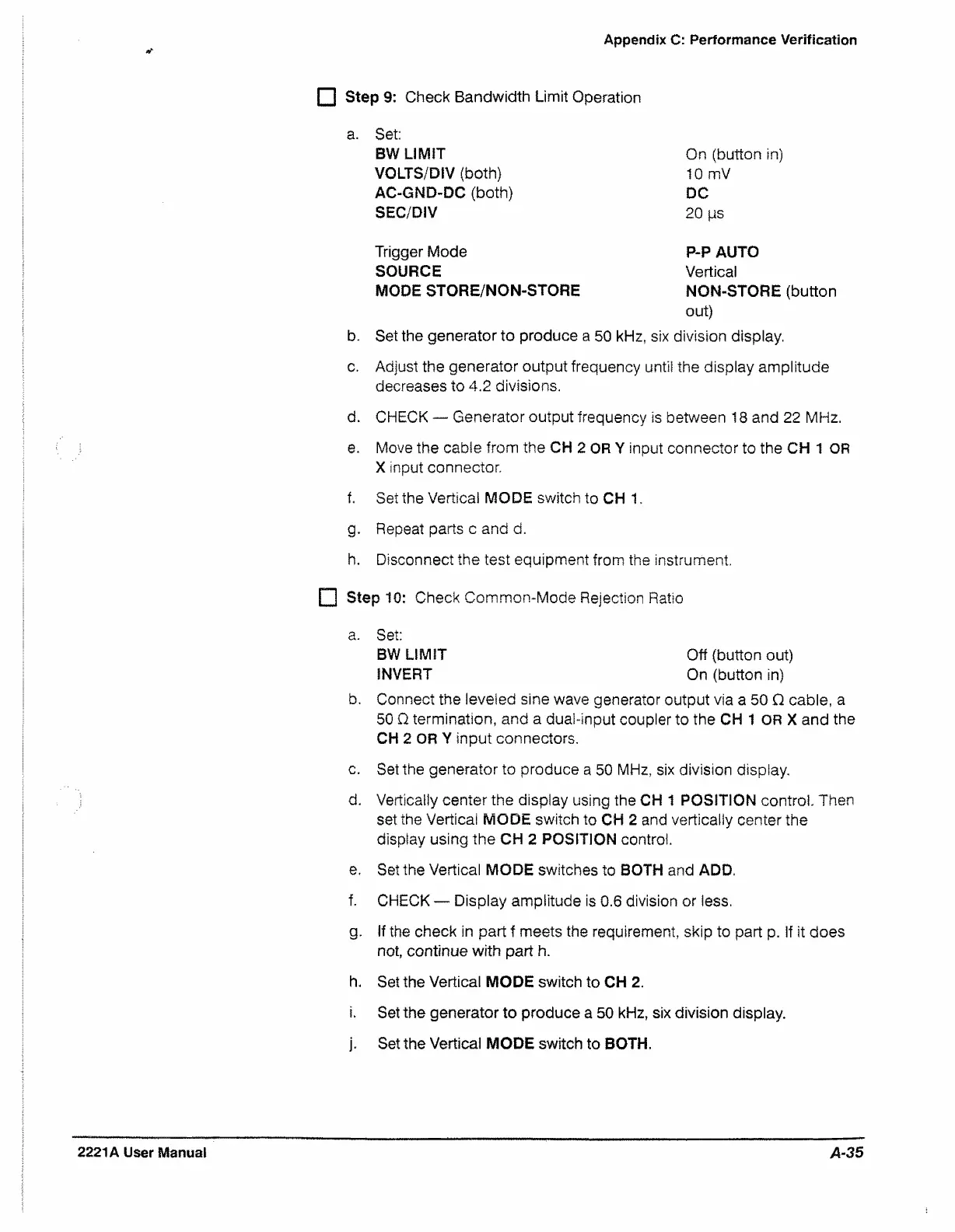
f~l Step 9: Check Bandwidth Limit Operation
a. Set:
BW LIMIT
VOLTS/DIV (both)
AC-GND-DC (both)
SEC/DIV
On (button in)
10 mV
DC
20 |us
Trigger Mode
SOURCE
MODE STORE/NON-STORE
P-P AUTO
Vertical
NON-STORE (button
out)
b. Set the generator to produce a 50 kHz, six division display.
c. Adjust the generator output frequency until the display amplitude
decreases to 4.2 divisions.
d. CHECK — Generator output frequency is between 18 and 22 MHz.
e. Move the cable from the CH 2 OR Y input connector to the CH 1 OR
X input connector.
f. Set the Vertical MODE switch to CH 1.
g. Repeat parts c and d.
h. Disconnect the test equipment from the instrument.
F I Step 10: Check Common-Mode Rejection Ratio
b. Connect the leveled sine wave generator output via a 50 Q cable, a
50 Q termination, and a dual-input coupler to the CH 1 OR X and the
CH 2 OR Y input connectors.
c. Set the generator to produce a 50 MHz, six division display.
d. Vertically center the display using the CH 1 POSITION control. Then
set the Vertical MODE switch to CH 2 and vertically center the
display using the CH 2 POSITION control.
e. Set the Vertical MODE switches to BOTH and ADD.
f. CHECK — Display amplitude is 0.6 division or less.
g. If the check in part f meets the requirement, skip to part p. if it does
not, continue with part h.
h. Set the Vertical MODE switch to CH 2.
i. Set the generator to produce a 50 kHz, six division display.
j. Set the Vertical MODE switch to BOTH.
a. Set:
BW LIMIT
INVERT
Off (button out)
On (button in)
2221A User Manual
A-35


 To Next Page
 Loading...