1. INTRODUCTION EO13-33002
1.2 Operation Panel
1- 2
1.2 Operation Panel
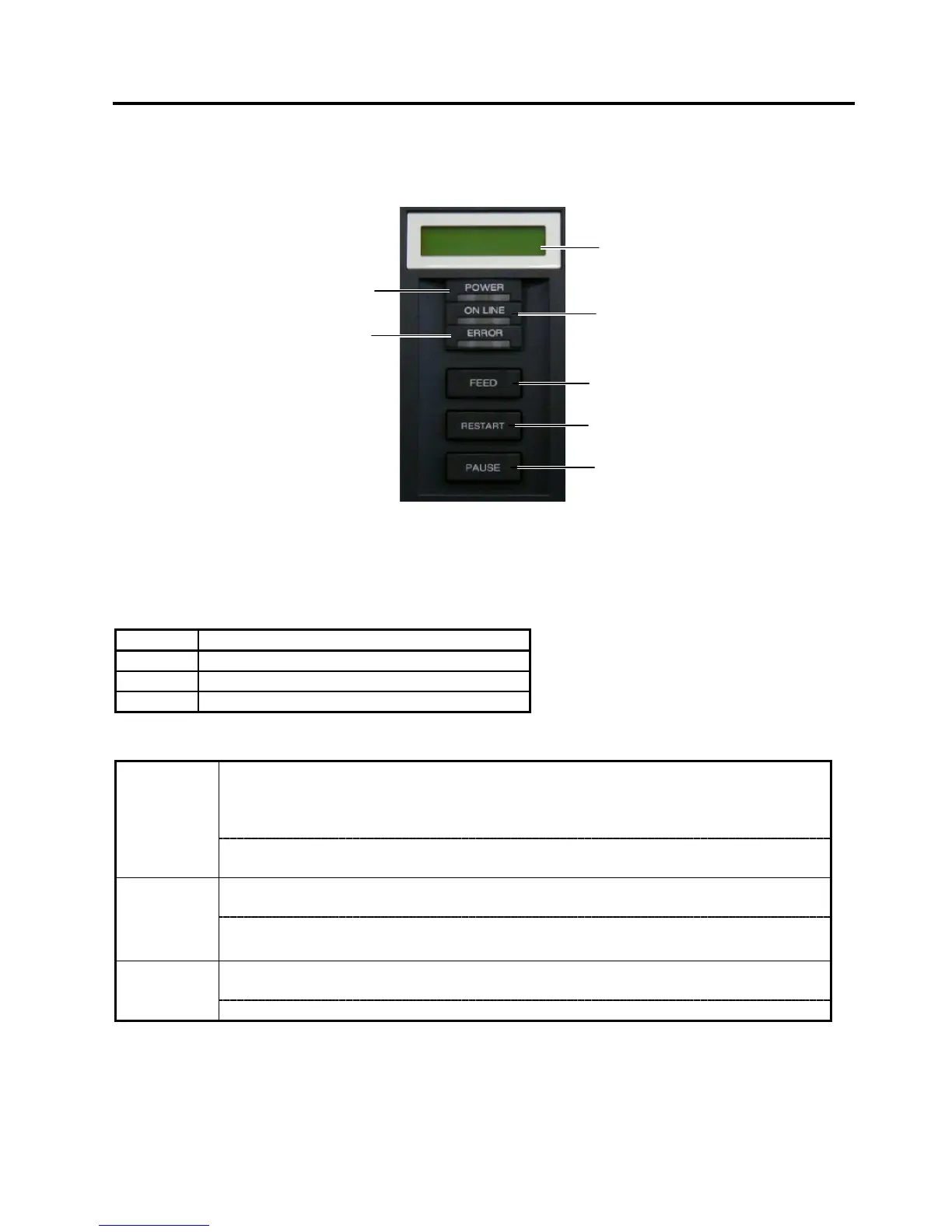
The figure below illustrates the Operation Panel and key functions.
The LCD Message Display is a 16-character x 2-line display, which shows messages in alphanumeric
characters and symbols to indicate the printer’s status. .
There are three LEDs on the Operation Panel.
LED Illuminates when…
POWER
The printer is turned on.
ON LINE The printer is ready to print.
ERROR The printer is in an error state.
The [FEED], [RESTART] and [PAUSE] keys function as described below.
Feeds or ejects one media.
Adjusts media to a proper position if the media is not properly positioned by feeding
one or two blank media before printing.
Prints data in the image buffer on one media according to the system mode setting.
FEED
In system mode, this key is used to select various parameters or to set a fine
adjustment value in the negative direction (-).
Resumes printing when the printer is in a pause state or an error state.
Restores the same state as when the power is turned off and on again.
RESTART
In system mode, this key is used to select various parameters or to set a fine
adjustment value in the positive direction (+).
Stops printing temporarily.
Programs threshold values.
PAUSE
In system mode, this key is used as an enter key.
LCD Message
Display
ON LINE LED
(Green)
ERROR LED
(Red)
[PAUSE] key
[FEED] key
[RESTART] key
POWER LED
(Green)



 To Next Page
 Loading...












