Home
TransAct
Printer
Printrex 980
Page 55
TransAct Printrex 980 - Page 55
297 pages
Manual
Save Page as PDF
To Next Page
To Next Page
To Previous Page
To Previous Page
Loading...
Step-
by
-Ste
p Installation Instructions
100
-11672 - Rev
D
Page
45
10
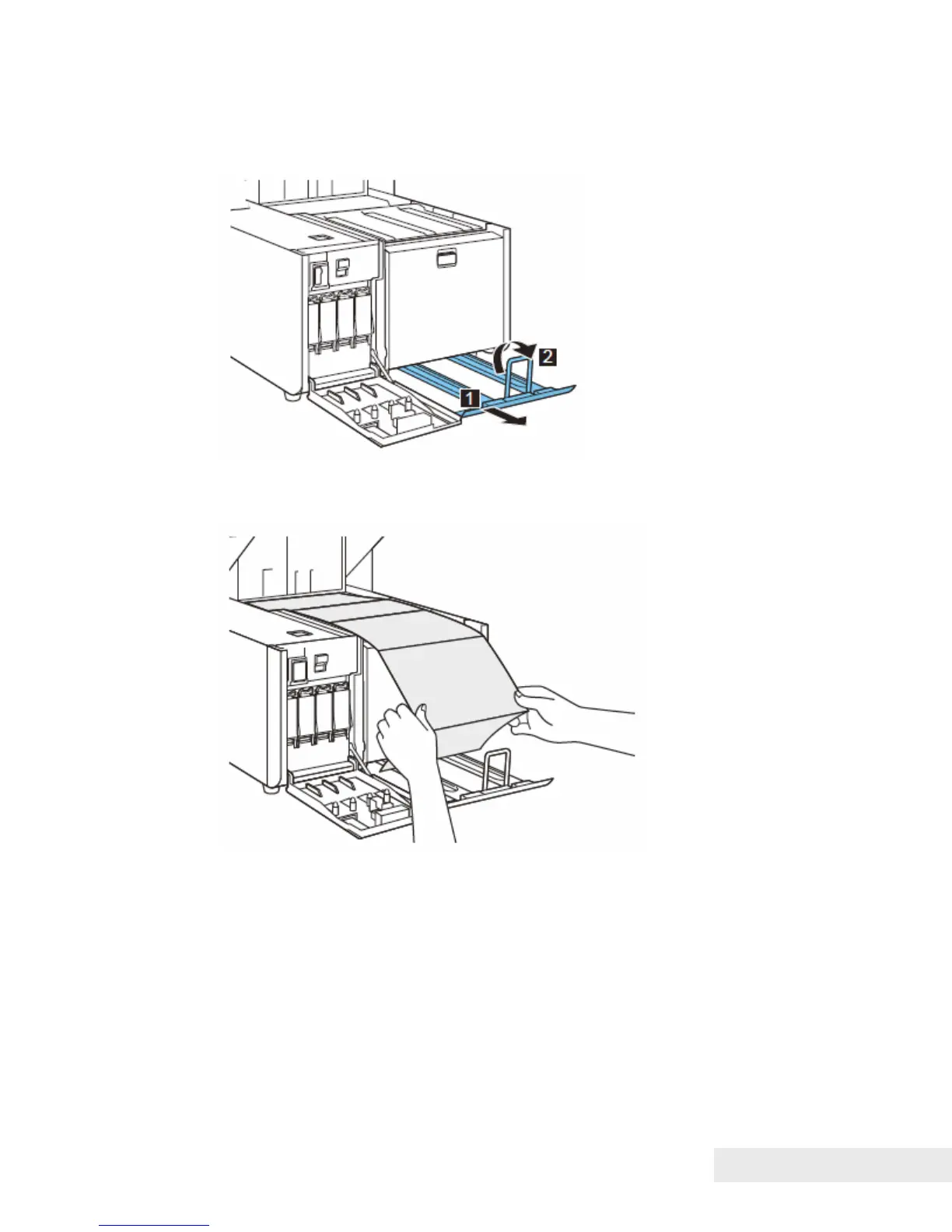
. When the paper t
ray has moved
down compl
etely, draw ou
t the stacker
unit, then rai
se the bar.
11
. Pull ou
t paper, and then pl
ace paper on the stacker uni
t.
54
56
Table of Contents
Main Page
Operators Guide
1
Change History
3
Copyright
6
Trademarks
6
Table of Contents
7
Introducing Your Printrex ® 980 Printer
11
About Your Printrex ® 980 Printer
13
Who Should Read this Guide
14
What Is Included in this Guide
14
Technical and Sales Support
15
On-Line Technical Support
15
Telephone Technical Support
15
Warranty Information
15
Return Materials Authorization and Return Policies
16
Shipping Printers
16
Sales Support
16
Contact Information
17
Safety Precautions
19
Important Safety Precautions
21
General Precautions
21
Power Supply and Power Cord
22
Handling the Printer and Accessories
23
Ink Tank and Maintenance Cartridges
24
Step-By-Step Installation Procedures
25
How to Read this Procedure
27
When Using the Included Parts
27
About the Symbols Used in Illustrations
27
Selecting the Installation Site
28
Checking the Installation Space
29
Installation Precautions
30
Unpacking Printer and Checking the Components
31
Unpacking the Printer and Removing the Fixtures
32
Mounting Rear Feeder Guide
37
Loading Ink Tanks
38
Initial Loading of Ink
40
Printer Part Names and Function
41
Front View
41
Back View
42
Inside the Printer
43
Operation Panel
44
Connecting the Communication Cable
46
Connect a USB Cable
46
Connect a LAN Cable
47
Switching the Printer on and off
47
Switching the Printer on
47
Switching the Printer off
49
Paper Loading Procedure (Inside)
50
Paper Loading Procedure (Rear)
58
Replacing Ink Tanks
64
Replacing the Maintenance Cartridge
69
Checking the Test Prints
72
Printing and Examining Nozzle Check Pattern
72
Cleaning Procedure
75
Printing TK-GAP Adjustment Pattern
77
Examining and Adjusting TK-GAP
78
Printing Slant Adjustment Pattern
81
Examining and Adjusting Slant
82
Printing Head Position Adjustment Pattern
85
Examining and Adjusting Printhead Position
87
Action of Relocating Printer
96
Specifications and Requirements
101
Printrex ® 980 Specifications and Requirements
103
Standard Features
103
Physical Printer Specifications
104
Environmental Conditions
104
Electrical Specifications
105
Media Specifications
105
Paper
105
USB Interface
105
Printer Maintenance
107
Cleaning the Printer
109
Clearing Paper Jams
114
Moving the Printer
116
Shipping the Printer
119
Troubleshooting
121
Initial Check Items
123
Checking the Installation Environment
123
Checking the Paper
123
Checking Settings
123
Procedures for Operation Failure
124
Rear Feeder Sensor Cleaning
124
Trailing Edge Sensor Cleaning
125
Image Defect Recovery
126
Vertical White Streak (Non-Discharge)
126
Faint Image (Distortion)
127
Void
128
Abnormal Discharge
129
Uneven Image (Cross Feeding Direction)
130
Uneven Image (Feeding Direction)
131
Relative Misregistration in Colors in X or y Direction
132
Misregistration (Leading Edge and Side Edge)
133
Blank Image
134
Paper Skew
135
Spur Marks (White Dotted Lines)
136
Ink Smearing (Due to Printhead Crash)
137
Spur Marks (Dotted Lines)
138
Ink Adhesion (Ink Dripping)
139
Defect Recovery Procedures
140
Adjustment
147
Adjustment When Replacing Parts
147
Head Position Adjustment
148
Print Module Replacement
149
Work at Printhead Replacement
154
Work at Purge Unit Replacement
154
Work at Transport Unit Replacement
155
Work at Rack Unit Replacement
158
Rear Feeder Sensor Adjustment
158
Work at Stacker Rail And/Or Front Tray Unit Replacement
161
Work at Printer Controller PCB Replacement
162
Work at DC Power Supply PCB Unit Replacement
163
Head Position Adjustment
164
TK-GAP Adjustment
164
Slant Adjustment
168
Head Position Adjustment
174
Backfeed Gap Adjustment
184
Head Position Fine Adjustment
188
Error Codes
194
Service Call Error(Fatal Error)
194
Operator Call Error
217
Warning
223
Installing the Maintenance Tool (Service Utility)
225
Operation Procedures
227
Start Procedure
227
Printer Information
228
Head Information
229
Cleaning, User Setting
230
Test Print, Adjustment
237
Head Position Fine Adjustment
259
Update, Time Setting
264
History
267
Self Diagnostics
268
Troubleshooting
269
Parts Replacement
270
Test Print
284
Setting Parameters
284
Nozzle Check Pattern
285
Paper Transport Pattern
286
100% Block Pattern
286
Image Position Pattern
287
Backfeed Pattern
291
Version Upgrade Procedure
291
Other Troubleshooting Issues
292
Power Is off
292
Printer Does Not Start or Stops During Print Jobs
292
Paper Is Not Feeding Correctly
293
Status Monitor Does Not Start
293
Random, Bizarre Characters Are Printed
294
100-11672 - Rev D
294
Slow to Print
294
Print Quality Is Poor
294
Appendix A: Ordering Supplies
295
Drivers Available
295
Index
297
Related product manuals
TransAct POSJET 1500
72 pages
TransAct Epic 880 100-88002
282 pages
TransAct Ithaca 280
318 pages
TransAct Epic 430
90 pages
TransAct EPIC 950
20 pages
TransAct Epic Edge
191 pages



 To Next Page