51
A B
1 3 54
2
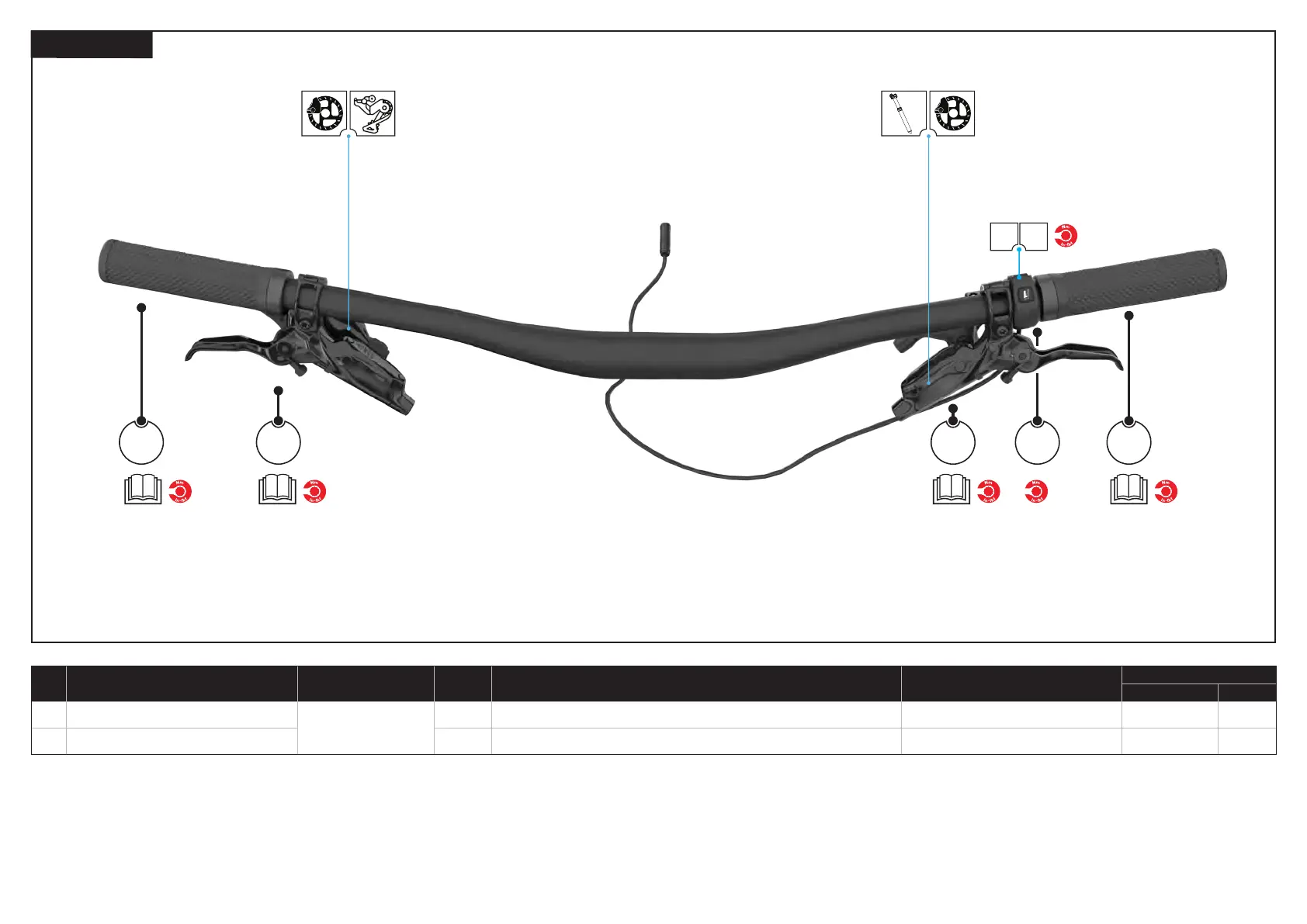
6.5.7. HANDLEBAR
# PART NAME
SERVICE PART
NUMBER
QTY SPEC / DESCRIPTION TOOL
TORQUE
Nm in-lbf
A
Trail remote
S216800019
1
ELE TRAIL REMOTE 2
N/A N/A N/A
B Trail remote bolt 1 Grub screw
2 mm hex 0.8 7
1. Install the drive side brake lever and shifter onto the bar and hand tighten only.
2. Install the drive side grip and torque to the manufacturer’s specification.
3. Install the non-drive side brake lever and dropper remote onto the bar and hand tighten only.
4. Install the trail remote (A) on the bar rotating it into your desired position. Use a 2 mm hex key to hand tighten
the bolt.
5. Install the non-drive side grip and torque to the manufacturer’s specification.



 To Next Page