Chapter 11 Smart Access Anywhere
Using Remote screen and File Transfer applications
User Manual 79000000203 Rev. 005 127
Transferring files from PC to T-BERD/MTS
1 On the T-BERD/MTS explorer, select the storage media, and if
wished the (sub-)directory into which file will be transferred.
2 On the PC file explorer, select the file to be transferred
3 Click on the button Upload .
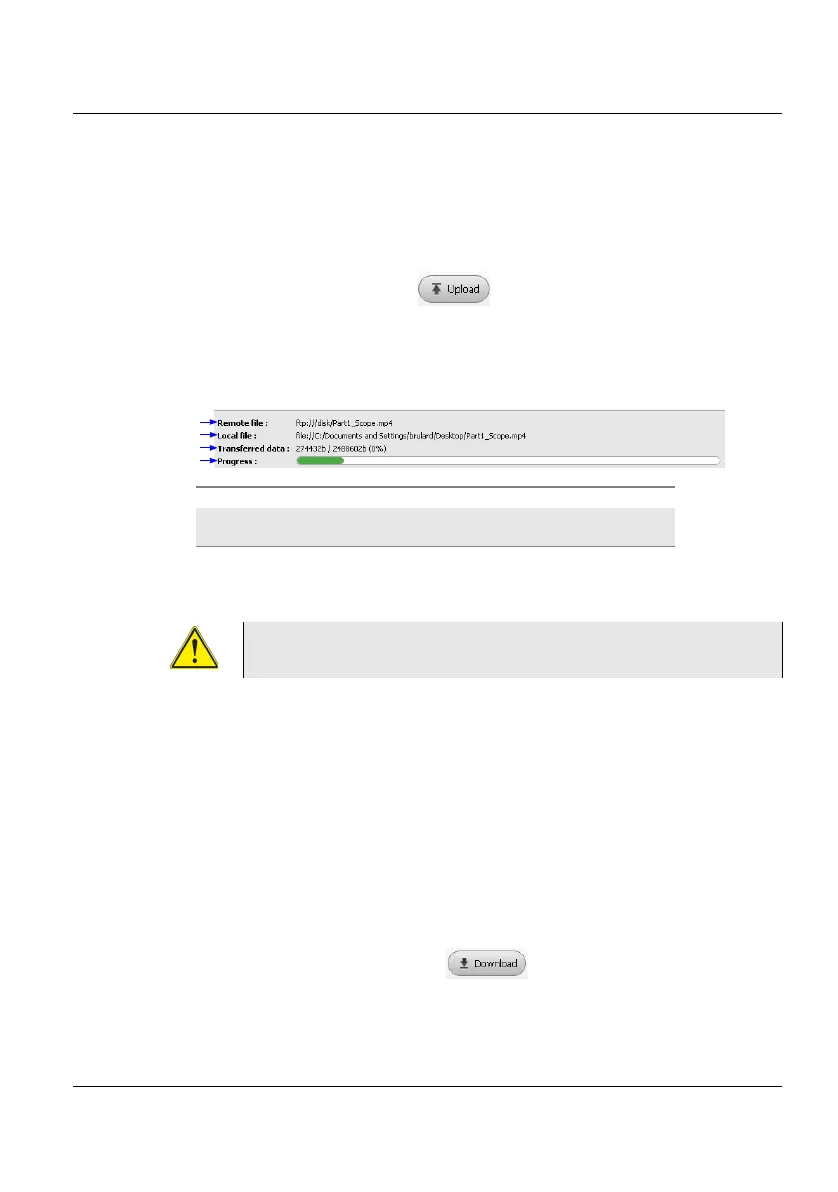
At the bottom of the screen, a new banner displays with information
on file transfer:
Once transfer is completed, the banner disappears and the transferred file
is underlined in blue on T-BERD/MTS explorer.
Transferring files from T-BERD/MTS-2000 to PC
1 On the PC explorer, select the storage media, and if wished the (sub-
)directory into which file will be transferred.
2 On the file explorer of the T-BERD/MTS, select the file to be trans-
ferred.
3 Click on the button Download .
A dialog box open, allowing to modify the location on PC of the file.
4 Select the directory into which file will be saved.
Figure 66 Information on file transfer
Only one file can be uploaded from PC to Platform at
the same time.
1
2
3
4
1: location of the uploaded file on PC 3: level of transferred data
2: location of the file on T-BERD/MTS
once transfer is completed
4: bar graph of the transfer in
progress





 To Next Page