Chapter 3 Starting up
Charging the battery
User Manual 79000000203 Rev. 005 19
• about 9.5 hours if the instrument is used during charging (On indi-
cator lit in fix green, Charge indicator lit in solid red).
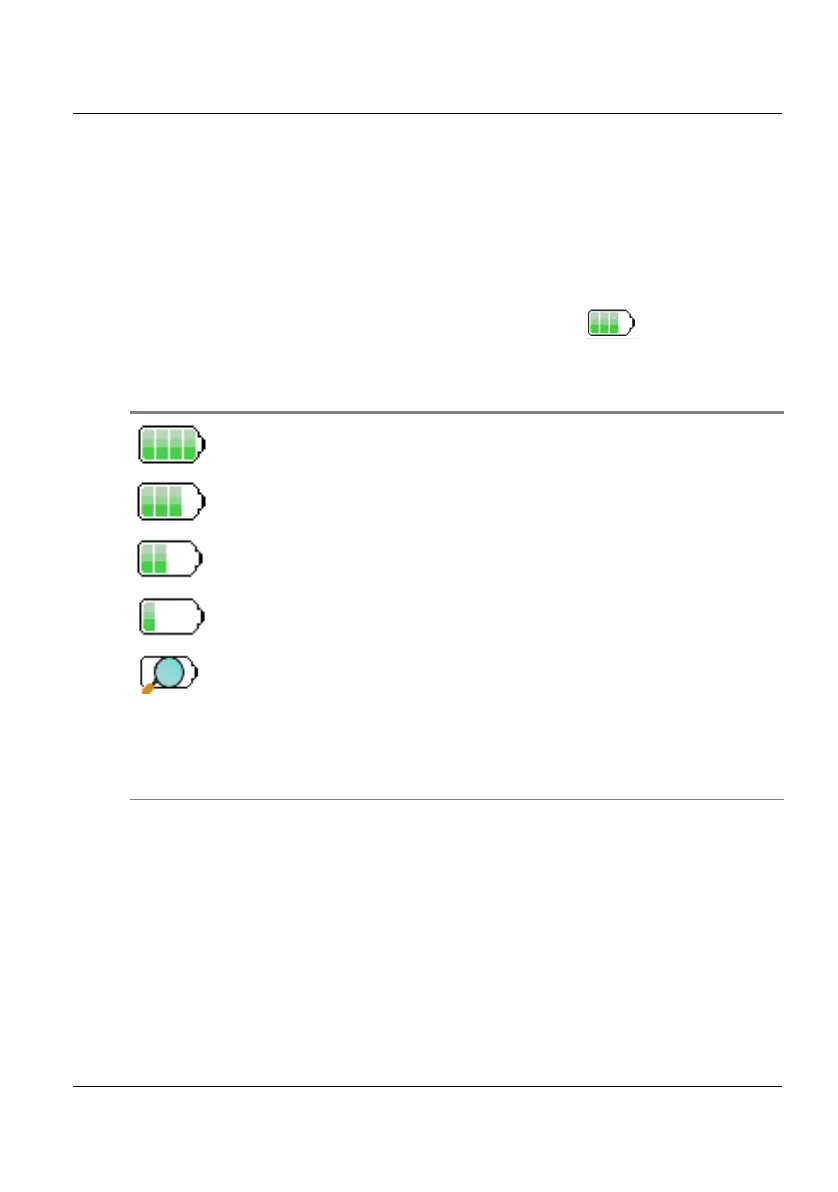
Battery charge level display
When the battery is installed in the instrument, a battery icon is displayed
in the top right-hand corner of the screen. Example: .
• When the level becomes too low, the instrument emits a beep ton
inform the user until it switches off automatically after saving the
current configuration and measurement.
Table 4 Battery icons
The battery capacity is superior to 75%
The battery capacity is set between 50% and 75%
The battery capacity is set between 25% and 50%
The battery capacity is inferior to 25%
The battery capacity is unknown. Perform a full charge/dis-
charge of the battery to get back to a valid indication.
This icon may appear if battery is changed or if the battery
auto discharges at a very low level (example: if a Platform
switches off as battery is empty, and the charge is not done
during several months (= auto discharge)).











 To Next Page