OTHER MODES OF OPERATION LOANER/ADVANCED REPLACEMENT MODE
129
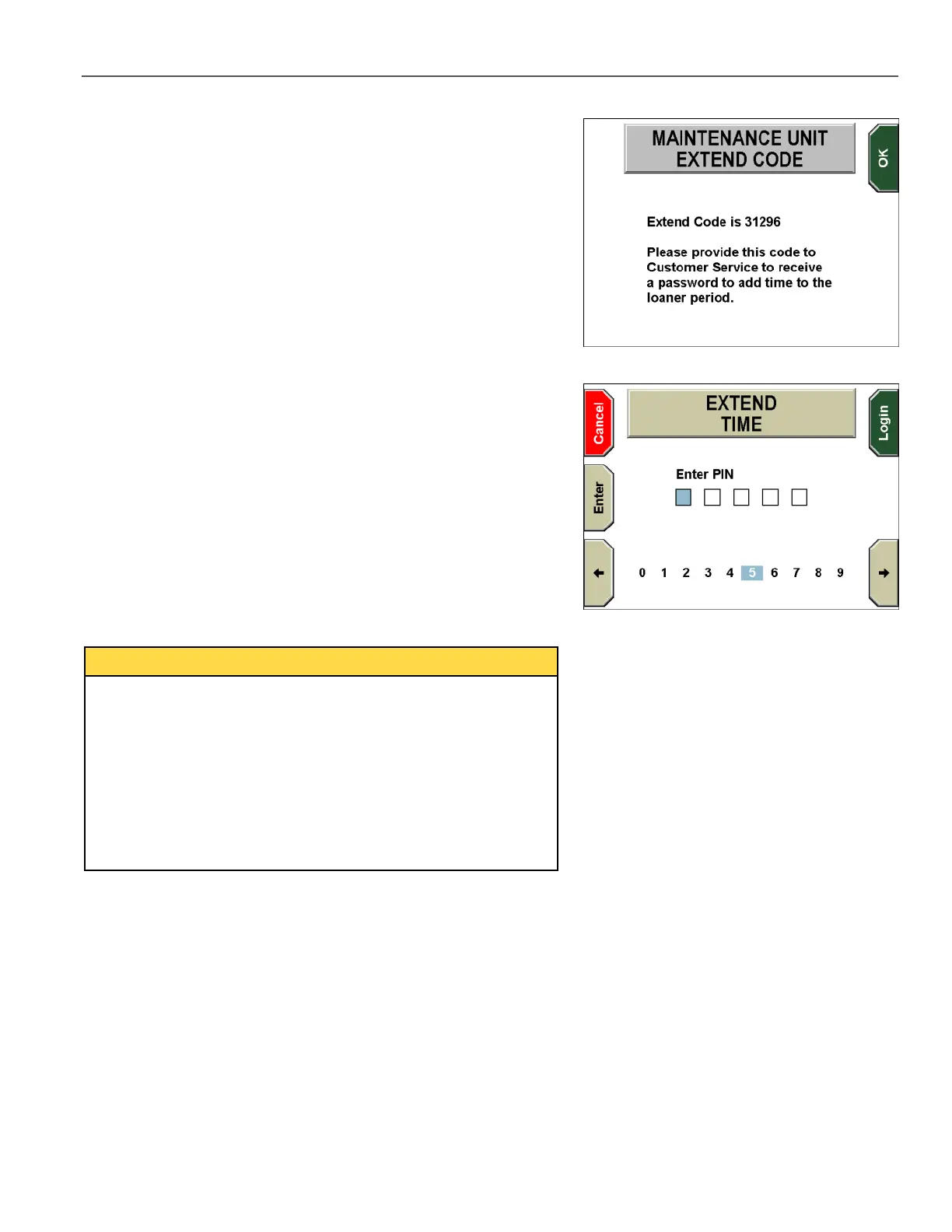
The MAINTENANCE UNIT EXTEND CODE screen is displayed.
Note the Extend Code, then call WatchGuard Video Customer
Service to request that the unit’s loaner time period be extended.
Give the Extend Code to the customer service representative. The
representative will give you a four- or five-digit Extend Time PIN.
Press the OK key.
The EXTEND TIME screen is displayed.
Use the arrow keys to move to a digit in the PIN, then press the
Enter key. Repeat as necessary to enter the entire PIN.
If the PIN has five digits, the Login key is pressed automatically
after you enter the last digit.
If the PIN has four digits, press the Login key after you enter the
fourth digit.
A brief message is displayed stating that the loaner time period has
been extended.
The Extend feature adds days relative to the Loaner expiration
date.
For example, if 3 days remain in the loaner time period, and 10
days are added with the Extend feature, the DV-1 unit will have 13
days remaining in the loaner time period (3 + 10 = 13).
If the loaner time period has been expired for 3 days, and 10 days
are added, the DV-1 unit will have 7 days remaining in the loaner
time period (-3 + 10 = 7).



 To Next Page