DV-1 CONFIGURATION RECORDING SETUP
37
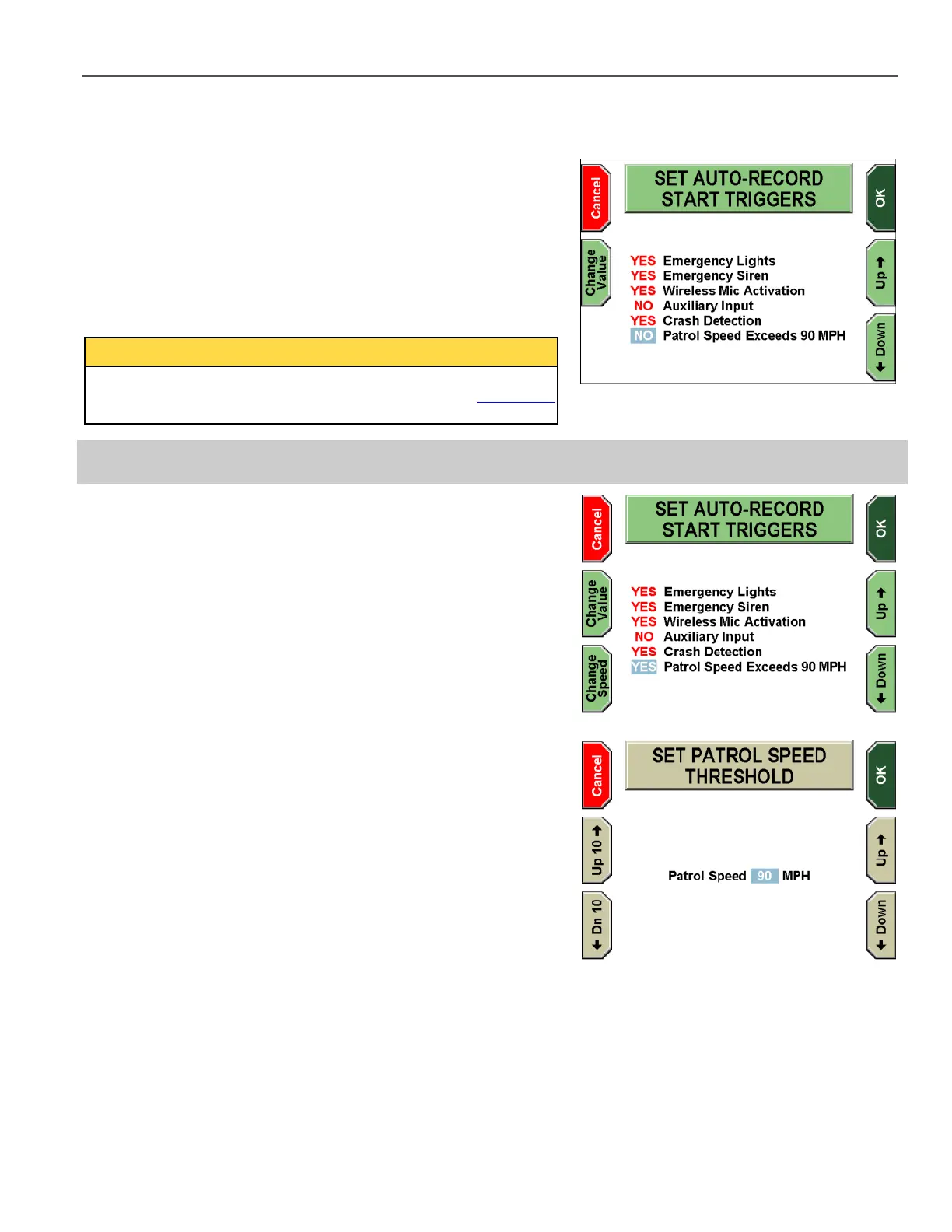
The SET AUTO-RECORD START TRIGGERS screen is displayed.
Press the Up & Down keys to select the start trigger setting.
Press the Change Value key to toggle between YES and NO for
the selected auto-record start trigger. Selecting YES instructs the
DV-1 to begin recording automatically when that trigger is activated.
Selecting NO means that automatic recording will not occur.
Press OK to confirm, or Cancel to exit without making changes.
The Patrol Speed trigger is only displayed if the GPS feature has
been configured to have a value other than NONE. See GPS Setup
on page 32 for information on setting up the GPS values.
4.7.2.1.1 Setup Patrol Speed Trigger
The Patrol Speed trigger needs a speed threshold to indicate when
the trigger should occur. When the Patrol Speed trigger is toggled to
YES, the Change Speed key is displayed on the bottom left.
Press Change Speed.
The SET PATROL SPEED THRESHOLD screen is displayed.
The Patrol Speed threshold can be set to any value from 1 to 150
MPH (1 to 240 KPH).
Press the Up 10 and Down 10 keys to adjust the speed
threshold by increments of +/- 10. Press the Up and Down keys
to adjust the speed threshold by increments of +/-1.
Press OK to confirm, or Cancel to exit without making changes.



 To Next Page