SUPERVISOR/ADMINISTRATOR FUNCTIONS MANAGE DVD AND HARD DRIVE
87
This feature provides the ability to make a copy of a previously
burned DVD. It is especially useful for creating a copy of a lost,
destroyed, or corrupted DVD.
Press MENU > SUPERVISOR MENU > Manage DVD and
Hard Drive > Burn DVD from Backup.
If prompted to login, follow the steps listed in Supervisor and
Administrator Login on page 78.
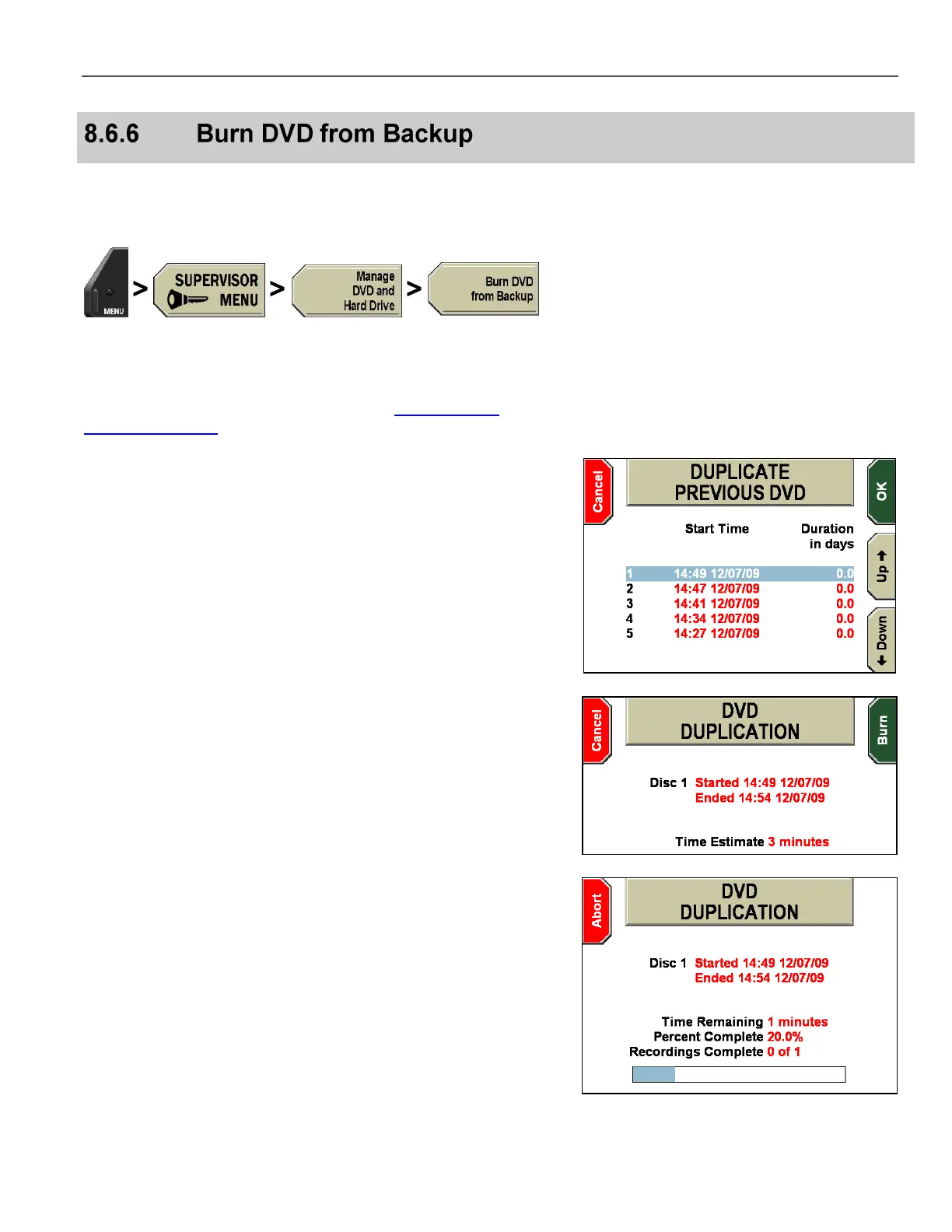
The DUPLICATE PREVIOUS DVD screen is displayed.
Press the Up & Down keys to select the DVD to duplicate.
Press OK to confirm, or Cancel to exit without making changes.
The screen lists the last n DVDs that the unit has produced, with the
most recent at the top of the list (where n is the number of DVDs that
have been set to be backed up).
The DVD DUPLICATION screen is displayed, showing the DVD’s
start/end times and the estimated time to duplicate the DVD.
Press Burn to duplicate the DVD, or Cancel to exit without making
changes.
The DVD duplication process begins.



 To Next Page