SUPERVISOR/ADMINISTRATOR FUNCTIONS UPDATING DV-1 FIRMWARE
93
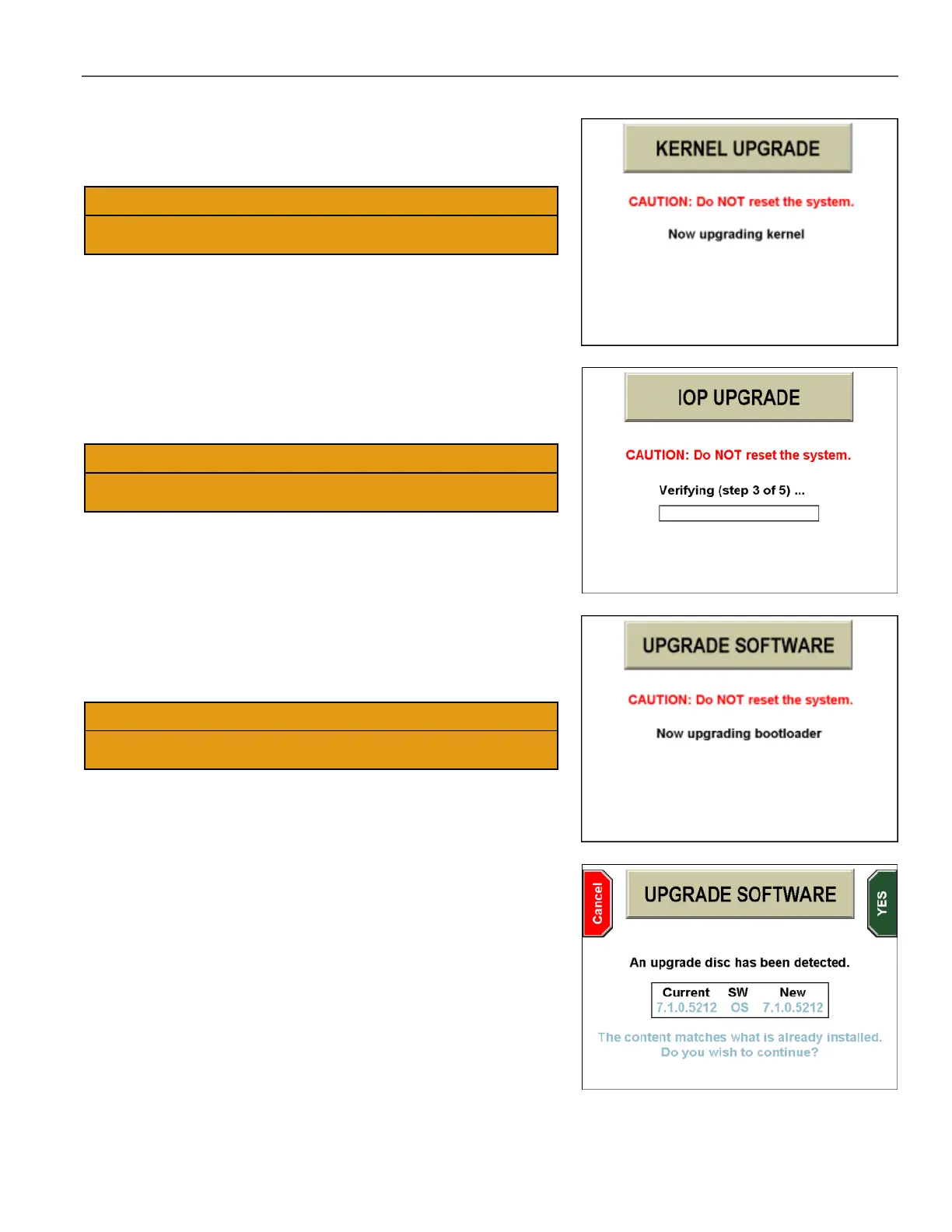
After a reboot, the Now upgrading the kernel screen may be
displayed.
DO NOT power off the system during this phase! Powering off the
system at this point could cause it to become unusable.
After about 2 minutes, the phase finishes and the system reboots
automatically.
After a reboot, the IOP UPGRADE screen may be displayed.
Multiple steps will occur during this phase of the upgrade.
DO NOT power off the system during this phase! Powering off the
system at this point could cause it to become unusable.
When the phase finishes, the system reboots automatically.
After a reboot, the Now Upgrading bootloader screen is displayed.
This phase may take from a few seconds to as long as 15 minutes
depending on the current version of software and the DV-1 type.
DO NOT power off the system during this phase! Powering off the
system at this point could cause it to become unusable.
When the phase finishes, the system reboots automatically.
After the entire upgrade process has finished, the UPGRADE
SOFTWARE screen is again displayed. The screen shows the
current and new software versions as the same version.
Press the Cancel key to eject the upgrade disc.



 To Next Page