SETUP INPUT DEVICES DV-1 CONFIGURATION
30
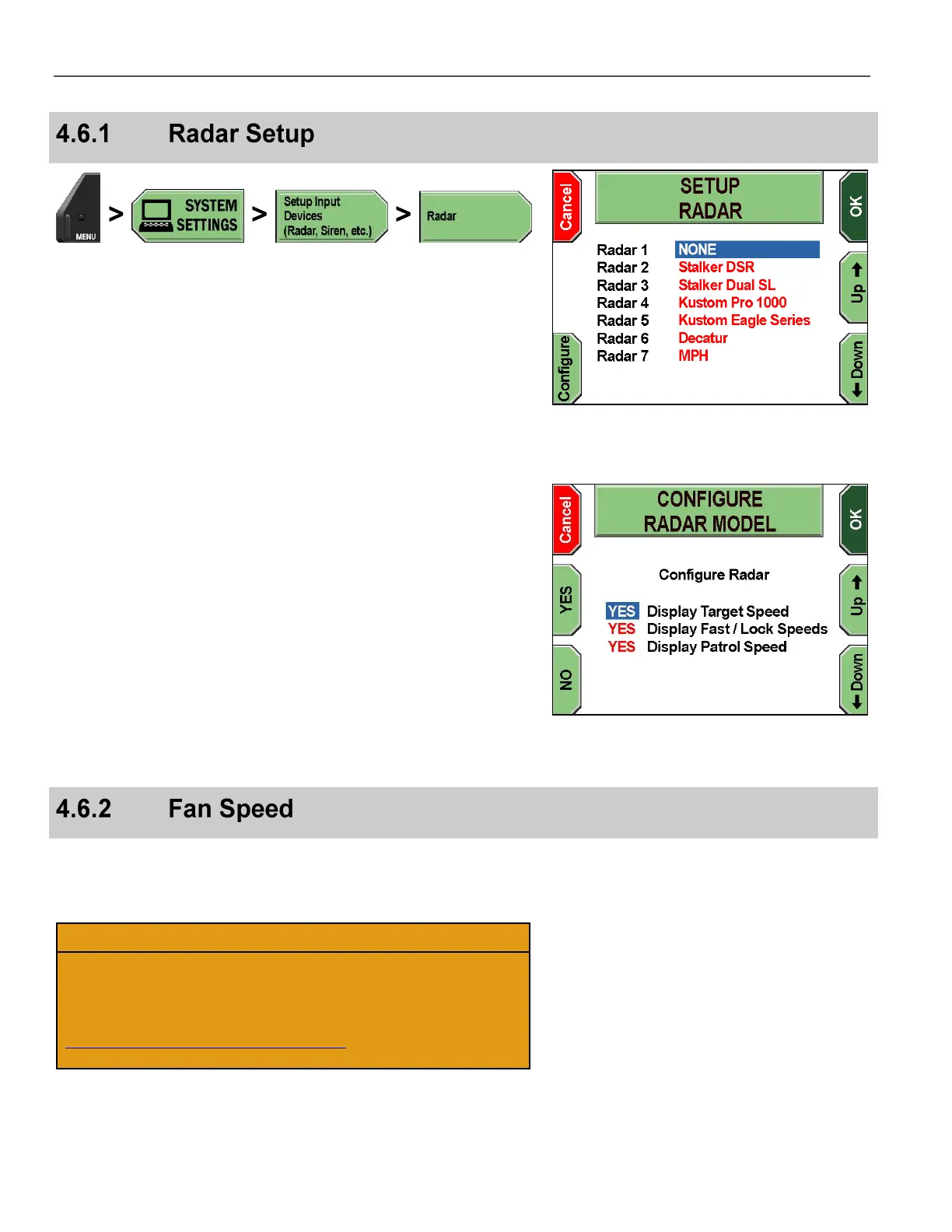
Press MENU > SYSTEM SETTINGS > Setup Input Devices
(Radar, Siren, etc.) > Radar.
The SETUP RADAR screen is displayed.
Press the Up & Down keys to select the radar system, and then
press Configure.
The CONFIGURE RADAR MODEL screen is displayed.
Press the Up & Down keys to select the display setting, and
then press YES or NO for each setting you wish to change.
YES displays the speed on-screen and in the closed-captioning on
the DVD. NO hides the speed from being shown on-screen and in
the closed-captioning.
On-screen terms are as follows:
Display Target Speed – Displays speed of target vehicle
Display Fast/Lock Speeds – Fast displays the fastest vehicle in
a group of cars; Lock displays the locked vehicle speed of the
radar.
Display Patrol Speed – Displays speed of patrol vehicle
Press OK to confirm, or Cancel to exit without making changes.
Increasing the fan speed provides additional cooling for the unit.
Decreasing the fan speed reduces cooling for the unit and may also
reduce the fan noise.
This operation should only be performed when instructed by
Customer Service personnel.
U.S. customers, call 1-800-605-6734 or email
customerservice@watchguardvideo.com prior to selecting this
option. International customers, contact your local distributor.



 To Next Page