Getting Started
2
Chapter
12
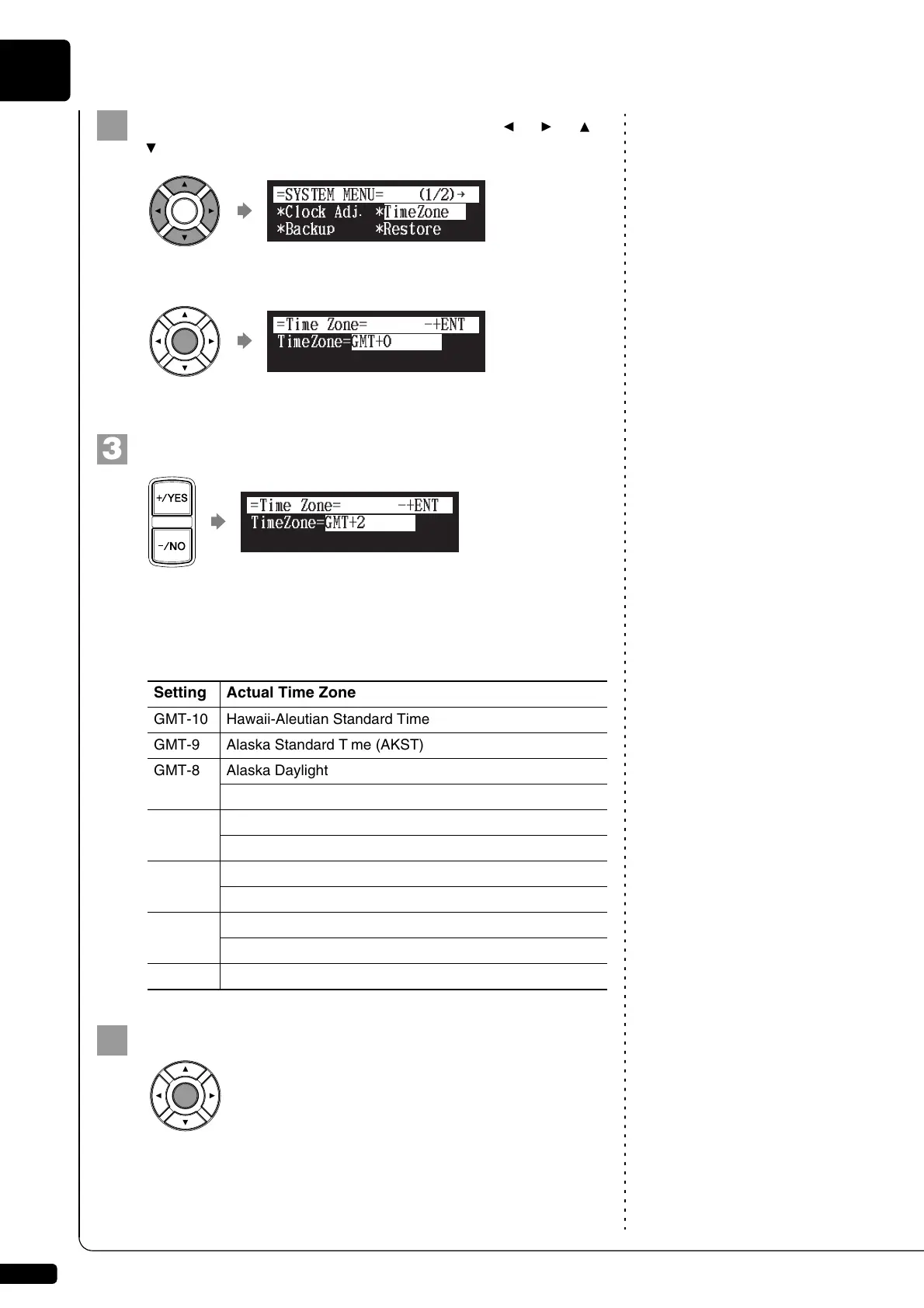
Select “TimeZone” with the cursor buttons ([ ] [ ] [ ]
[ ]), then press [ENTER].
The time zone setup screen appears.
Press [+/YES] and [–/NO] to change the time zone.
Note:
The time zone listed here should be
used only as a guide. For more
details, contact your local
observatories.
Examples of Time Zone
The chart below shows the correspondence between the time zone
setting on the Disklavier and actual time zone used in the U.S. and
Canada.
Press [ENTER].
The time zone is set, and the display returns to the system menu.
Proceed to the calendar setting.
!"#$%
{
Setting Actual Time Zone
GMT-10 Hawaii-Aleutian Standard Time
GMT-9 Alaska Standard Time (AKST)
GMT-8 Alaska Daylight Time (AKDT)
Pacific Standard Time (PST)
GMT-7 Pacific Daylight Time (PDT)
Mountain Standard Time (MST)
GMT-6 Mountain Daylight Time (MDT)
Central Standard Time (CST)
GMT-5 Central Daylight Time (CDT)
Eastern Standard Time (EST)
GMT-4 Eastern Daylight Time (EDT)







 To Next Page