OPERATION
Carl Zeiss Operating the motorized microscope via the touchscreen of the TFT display Axio Imager
134 430000-7344-001 M70-2-0020 e 06/2009
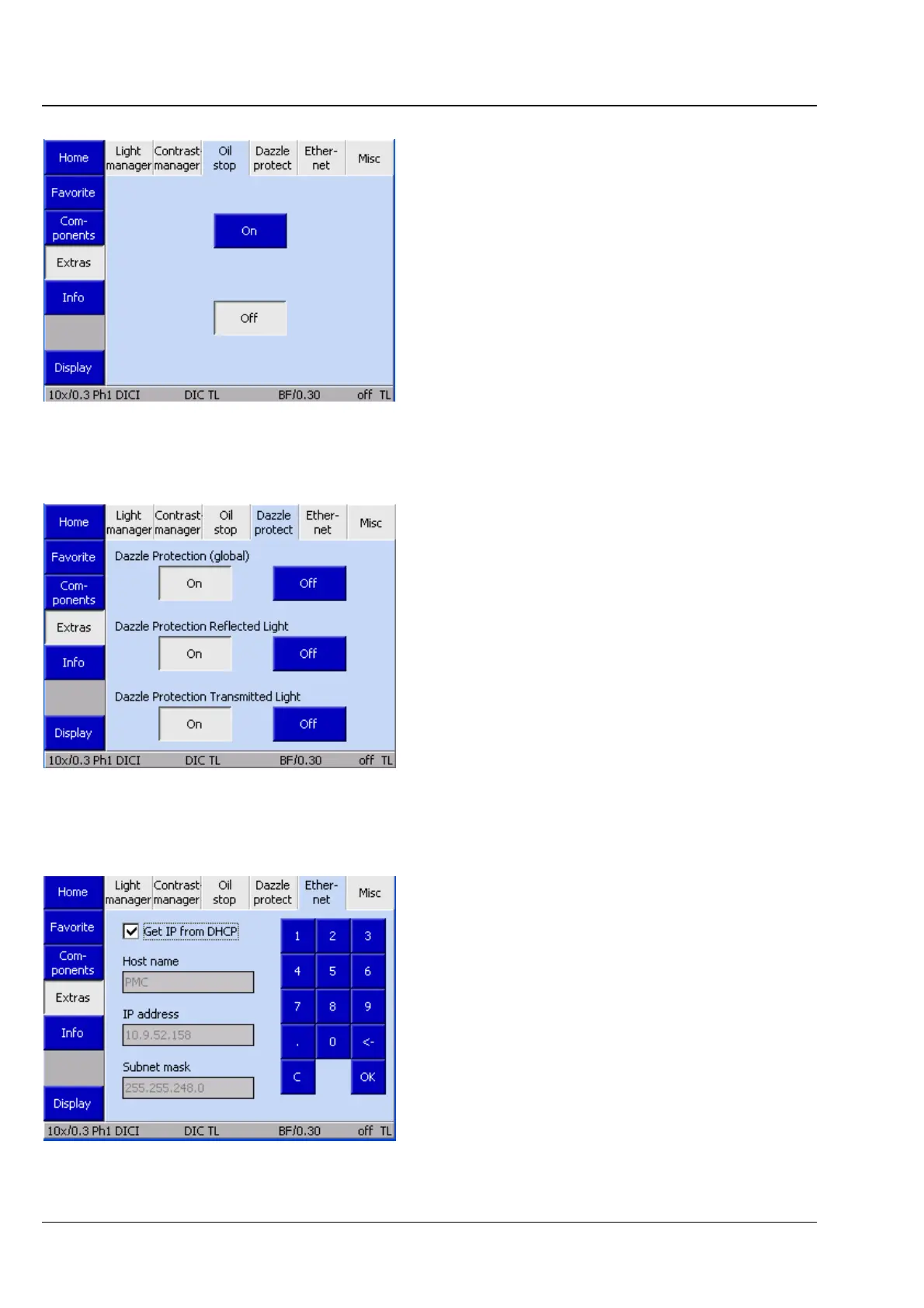
(3) Oil Stop tab
On this tab, you can activate or deactivate the Oil
Stop function. This function prevents a dry
objective from being swiveled into immersion
liquid by lowering the stage whenever you switch
from an immersion to a dry objective.
(4) Dazzle protection tab
When you deactivate the Dazzle Protection
function globally, all other options on this tab
appear grayed out.
If a Bino Shutter is installed and dazzle protection
has been activated, the two other dazzle
protection fields (TL/RL) are inactive. Dazzle
protection is, therefore, deactivated through these
components.
If one of the above components is not installed,
the corresponding buttons are not available.
(5) Ethernet
On this tab, you can choose settings for the
connection of the Axio Imager via Ethernet.
For a manually entered IP address to be accepted,
acknowledgment with OK is required.
Fig. 4-87 Microscope -> Settings -> Extras ->
Oil Stop
Fig. 4-88 Microscope -> Settings -> Extras ->
Dazzle Protect(ion)
Fig. 4-89 Microscope -> Settings -> Extras ->
Ethernet








 To Next Page