Need help?
Do you have a question about the Akuvox C315 Series and is the answer not in the manual?
Configures network connection for the device during initial startup.
Selects between Call list simple and Classic home screen display modes.
Navigates to the device's basic settings menu for configuration.
Accesses advanced device settings after entering the system code.
Connects to the device's web interface for configuration using IP address.
Configures device language display through device or web interface.
Manages time zone, date, and time format settings on device and web.
Configures display features like brightness, screen saver, and font size.
Customizes screen displays for visual and operational experience via web.
Sets up screen saver lock time, sleep timing, and enables the screen saver.
Uploads custom screen saver pictures or videos for the device.
Customizes the screen background picture for personalized display.
Customizes the device status bar color according to user preferences.
Uploads a custom image to be displayed during the device's booting process.
Customizes the web logo displayed on the upper left corner of the web interface.
Customizes icon display on home and more screens for user operation.
Adjusts ringtone, call, mic, and media volumes on the device.
Customizes doorbell sound and alarm ringtone via audio file upload.
Manages contact list, adds, edits, and blocks contacts on the device.
Configures local contacts, management, and import/export via web interface.
Configures DHCP or static IP for device network connection.
Checks network status and configures connection on the web interface.
Configures device location, operation mode, and extension numbers in the network.
Configures Network Address Translation for transparent connectivity.
Manages Bluetooth pairing and data transmission between devices.
Configures Wi-Fi connection for the device.
Configures direct IP call feature and port on the device.
Sets up SIP call parameters like account, server, and transport type.
Registers up to two SIP accounts for device communication.
Configures the SIP server for achieving call sessions between intercom devices.
Configures an outbound proxy server for routing call sessions.
Configures 'Do Not Disturb' settings and return codes for SIP calls.
Sets up RTP ports for exclusive data transmission in the network.
Selects transmission protocols like UDP, TCP, and TLS for SIP messages.
Enables or disables the auto-answer function for incoming calls.
Configures the allow list for auto-answer to specific SIP or IP numbers.
Allows viewing video images from calling devices during a call.
Enables incoming call preview function to see the image before answering.
Configures packet time length for media transmission in milliseconds.
Prevents SIP calls from being hacked or eavesdropped on.
Configures the display of the SOS softkey on the device interface.
Configures up to 3 SOS numbers for emergency calls.
Configures RF actions like unlocking or emergency calls with pendants.
Conducts one-to-many broadcasting via multicast function.
Configures call forwarding modes like always, busy, or no answer on the device.
Sets up call forwarding rules via the web interface.
Checks, creates, and clears text messages on the indoor monitor.
Selects audio codecs with different bandwidths and sample rates for call sessions.
Configures video codecs like H.264 for better video quality and bit rate.
Configures monitor settings, including IP/SIP, RTSP address, and display during calls.
Captures video images during monitor or video calls.
Sets up RTSP authentication for monitoring via RTSP audio stream.
Configures arming and disarm codes for alarm systems on the device.
Sets up location-based alarm sensors and trigger modes via the web interface.
Configures alarm sensors with location, type, and defense/alarm delay settings.
Customizes alarm text displayed on the screen when an alarm is triggered.
Switches arming modes and disarms the alarm on the Arming screen.
Uploads a customized alarm ringtone file in .wav format.
Configures actions like HTTP command, SIP message, or call for alarm triggers.
Checks and deletes the alarm log entries on the device.
Enables screen lock and requires a PIN code to unlock the device.
Configures encryption modes like SRTP or ZRTP for intercom call security.
Configures a specific server to send HTTP commands for device actions.
Sets the level of protection for device location tracking.
Uploads certificates for SSL protocol authentication and verification.
Uploads Web Server certificates for client authentication.
Uploads and configures client certificates for server verification.
Enables power output to serve as a power supply for the E10 door phone.
Configures local relays for door access and chime bell triggering.
Sets up DTMF codes for remote relay control during calls.
Controls door access using network-based web relay configurations.
Configures DTMF codes for unlocking doors remotely.
Unlocks doors remotely using HTTP commands via web browser.
Enables and configures the lift control feature with status, icon, label, and HTTP command.
Explains the principle of configuring or upgrading devices in batch using servers.
Describes general and MAC-based configuration files for auto-provisioning.
Sets up automatic provisioning schedules for the device.
Configures auto-provisioning using DHCP options for device setup.
Manually sets server URLs for firmware or configuration file downloads.
Teaches how to enter the APK interface through hidden operations.
Installs third-party applications (.apk files) on the device.
Controls home sensors through HTTP commands on the device web interface.
Configures the device to display a third-party webpage after booting up.
Sets up API authentication for integrating third-party devices.
Imports or exports configuration files to/from a local PC.
Changes the default system code for basic device settings.
Changes the password for accessing advanced device settings.
Modifies the login password for the device's web interface.
Sets a password to lock the device browser for unwanted applications.
Reboots the device system directly from the device settings screen.
Reboots the device system via the device web interface.
Resets the device system or configuration to factory settings.
Resets device configuration to factory settings via the web interface.
Checks, searches, and exports dial-out, received, and missed calls.
Exports system logs for debugging purposes to local PC or remote server.
Captures data packages for debugging and troubleshooting using PCAP.
Used for identification when analyzing SIP data packets.
Takes screenshots of specific device screens for troubleshooting.
 General
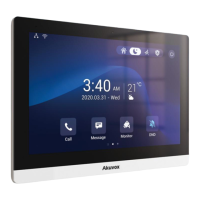
| Camera | 2MP |
|---|---|
| Audio | Built-in Microphone and Speaker |
| Aspect Ratio | 16:9 |
| Brightness | 250 cd/m² |
| Connectivity | Ethernet, Wi-Fi |
| Ethernet | 10/100Mbps |
| Wi-Fi | 802.11 b/g/n |
| Power | 12V DC |
| Installation | Wall-mounted |
| Operating Temperature | -10°C |
| Storage Temperature | -20°C to 60°C |

 To Next Page