5-6
P129390-106 Operator Manual Component Identification
Cycle status and control messages are shown on a 213 mm
(8-4/10 inch) color graphics display. Cycles can be started or
aborted using the touch screen pads. Cycles and cycle values can
be set using the Change Values procedure (accessible from the
sterilizer cycle select screen). If changing cycle values becomes
necessary, refer to S
ECTION 7, CYCLE AND CONTROL VALUE
PROGRAMMING.
5.6 Cycle Selection
Touch Pads
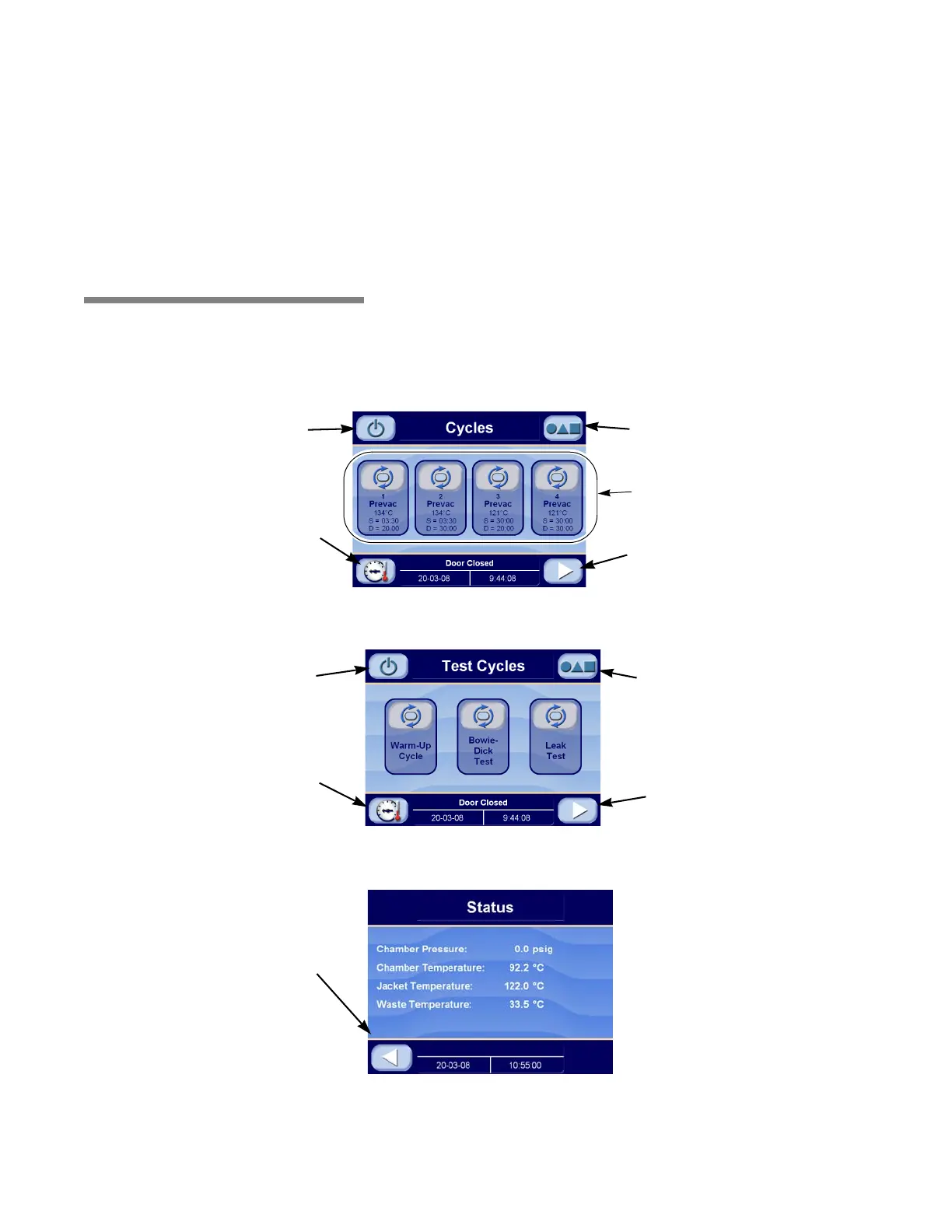
Four cycle selection touch pads are shown on the screen in
Figure 5-6. These buttons display the basic parameters of the cycle
(i.e., cycle name, sterilization exposure temperature, sterilization
exposure time, and dry time), test cycles may be displayed selected
by pressing the right arrow in the lower right-hand corner of the cycle
select screen. Details on individual cycles are in S
ECTION 6,
S
TERILIZER OPERATION.
Figure 5-6. Cycle Selection Screen
Figure 5-7. Test Cycle Screen
Figure 5-8. Out-of-Cycle Status Screen
Press Here to Access
Options
Press Here to Access
Test Cycles
Press Here to Return
to Standby
Press Here to Access
Out-of-Cycle Status
Press These Buttons
To Start a Cycle
Press Here to Access
Out-of-Cycle Status
Press Here to Access
Options
Press Here to Return
to Standby
Press Here to Access
Cycle Selection
Screen
Press Return Button to Return
to Select Cycle Screen






 To Next Page