SIOL-EI8B-USER-M
68
Web Server (WebUI) Powered by
Version 1, May 2022
10.1. Starting the WebUI
Prerequisites
Prerequisite for a correct graphic display of the WebUI:
➔ Current versions of the following browsers are supported:
◼ Mozilla Firefox
◼ Microsoft Edge
◼ Google Chrome
To start the WebUI, proceed as follows:
➔ Start the web browser.
➔ Enter the IP address of the device in the web browser.
The WebUI startup screen is the “Status” page.
Operating areas
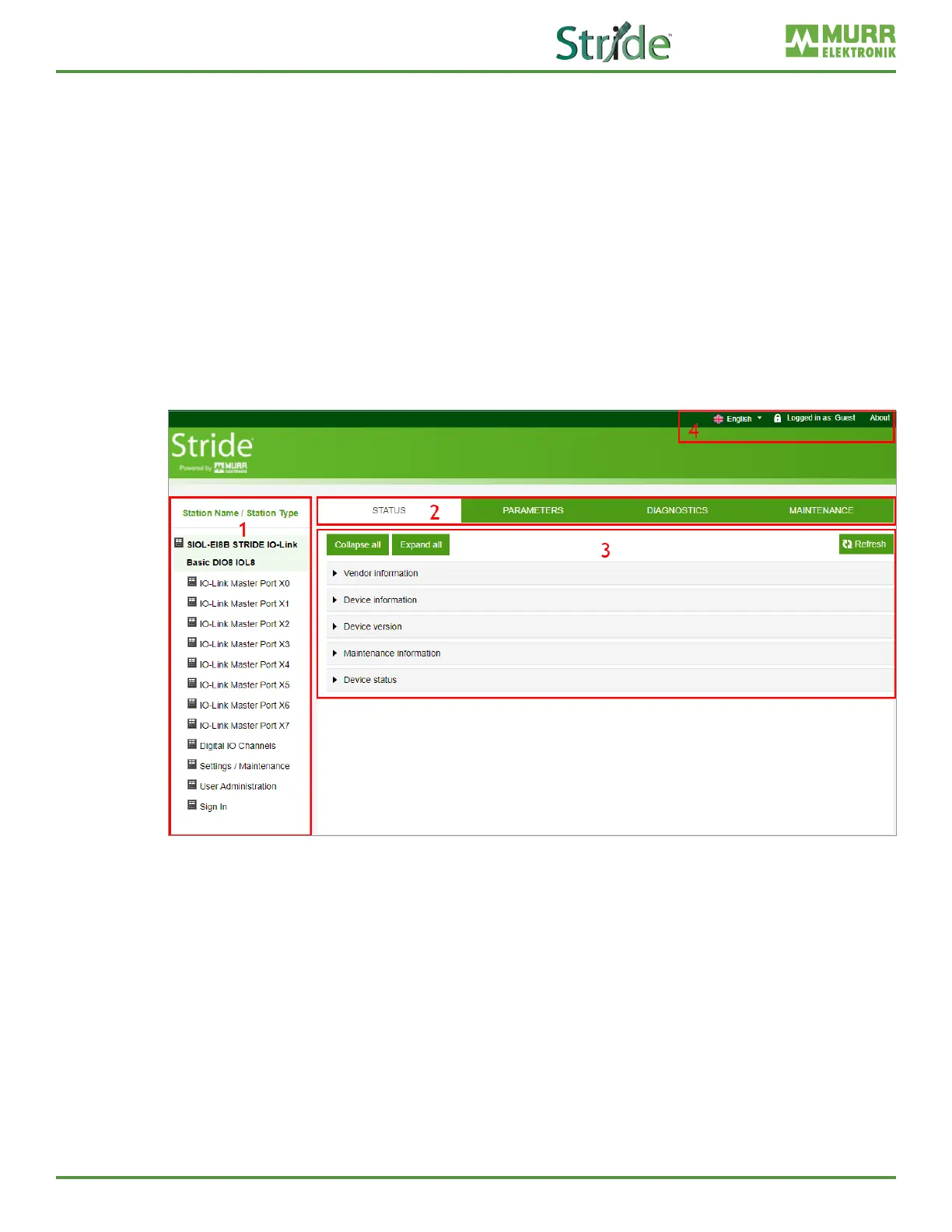
The WebUI is divided into 4 operating areas.
Fig. 10-2: Operating areas.
1. System tree
Shows the device and the available sub-functions.
2. Menu bar
The menu bar enables you to switch between the dierent pages of the device or the sub-function.
In addition, the white tab highlights the current page.
3. Page content
This area shows the contents of the selected page.
4. Header bar
Language and interface settings, system information.



 To Next Page