SIOL-EI8B-USER-M
32
Startup Powered by
Version 1, May 2022
7.2. Adding a module as an EtherNet/IP Device
Now that the EDS le has been imported and is in the EDS Library, you can add the module as an
EtherNet/IP Device from the EtherNet/IP tab of the Hardware Cong.
NOTE
AutomationDirect.com has created quick start code that can be imported into the task library and used
to connect to the module. Code has also been developed for communicating with a variety of IO-Link
eld devices via the IO-Link Master module. To use the quick start code, go to Section 7.3, “Quick start
IO-Link Productivity Code”. Otherwise, follow steps 1 through 7 below to add the IO-Link Master module
as an EtherNet/IP Device.
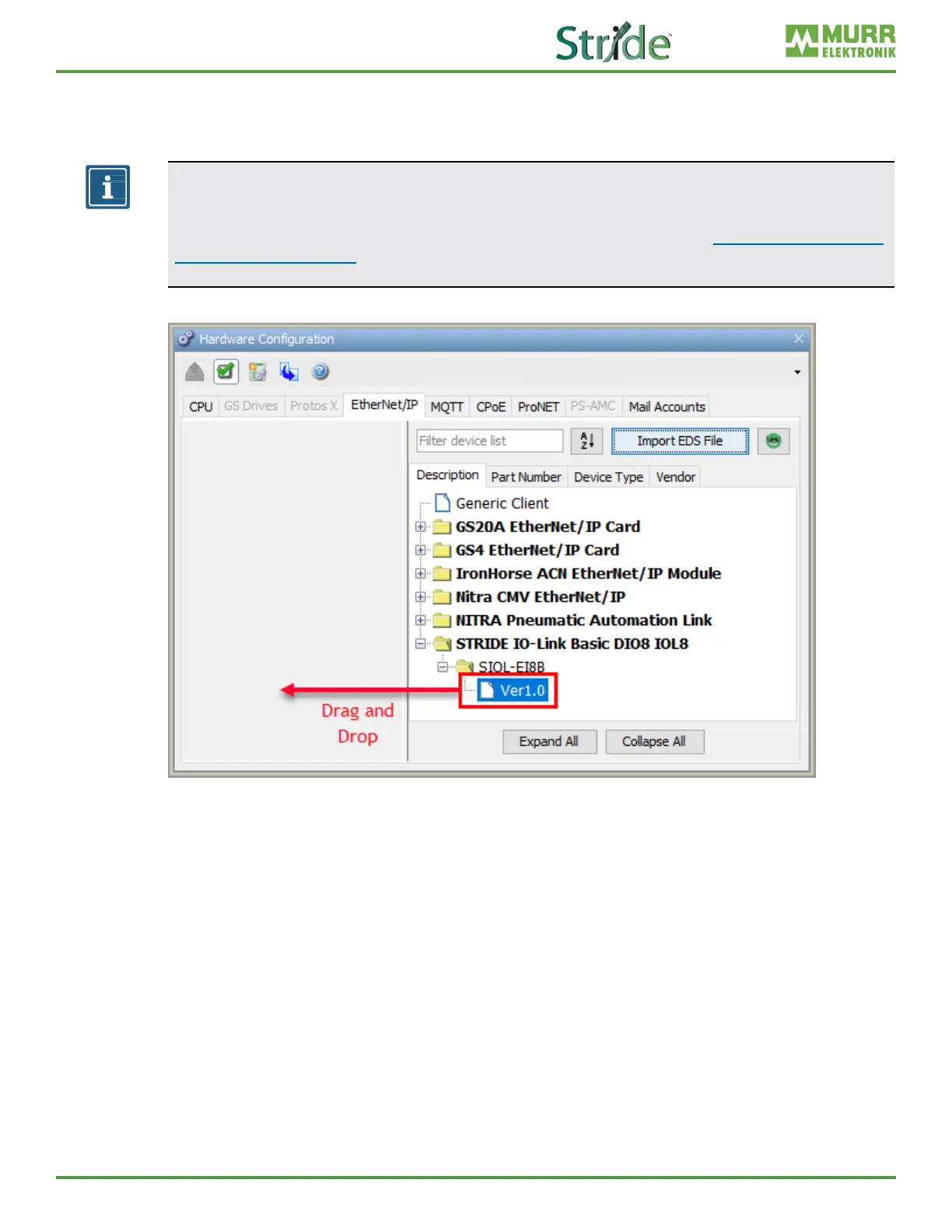
1. Double-click or drag the new entry to the device area underneath the hardware tabs.
Fig. 7-5: Hardware Cong – Drag and Drop new EtherNet/IP Device.
2. Enter tag names for the required elements in your EtherNet/IP device and its IP address, using
Structure to organize tags, if desired.



 To Next Page