SIOL-EI8B-USER-M
76
Web Server (WebUI) Powered by
Version 1, May 2022
10.3.3. CONFIGURATION menu
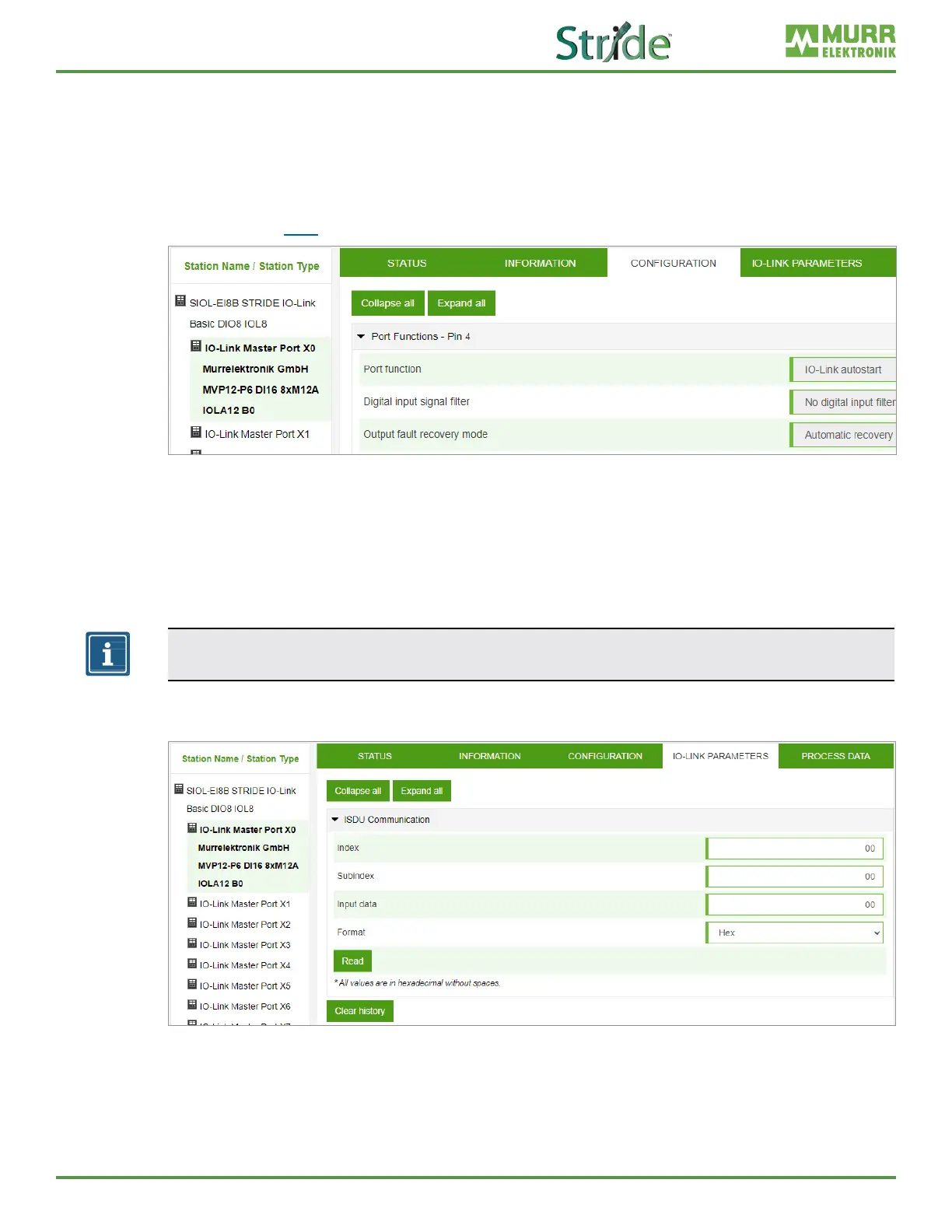
In the “Conguration” menu item of the selected IO-Link port, the setting for pin 1, pin 2 and pin 4 is
indicated at the selected port.
Users can only view the current settings of pin 1, pin 2 and pin 4.
Pin 1, pin 2 and pin 4 settings can only be changed by a controller (via EDS le or Explicit Messaging) or
with the Device Tool software.
Refer to Section 7.4.4 for conguration values.
Fig. 10-12: IO-Link master port – conguration (pin 4).
10.3.4. IO-LINK PARAMETER menu
In this menu item, the ISDU (Index Service Data Unit) of the device can be read during IO-Link operation.
This allows an IO-Link device to be accessed (read-only) without a controller. The user is able enter the
hexadecimal index and subindex values of the parameter to be accessed and view the returned device
data in either hexadecimal or ASCII format.
NOTE
Observe the information in the IO-Link device manufacturer’s manual.
Users with maintenance and admin rights and users with service rights can only read ISDU values.
Fig. 10-13: IO-Link master port – IO-LINK PARAMETER.



 To Next Page