System Time Setup
600-00078-001 Rev 05 -89- Avidyne EX500/EX600 MFD
9.5 System Time Setup
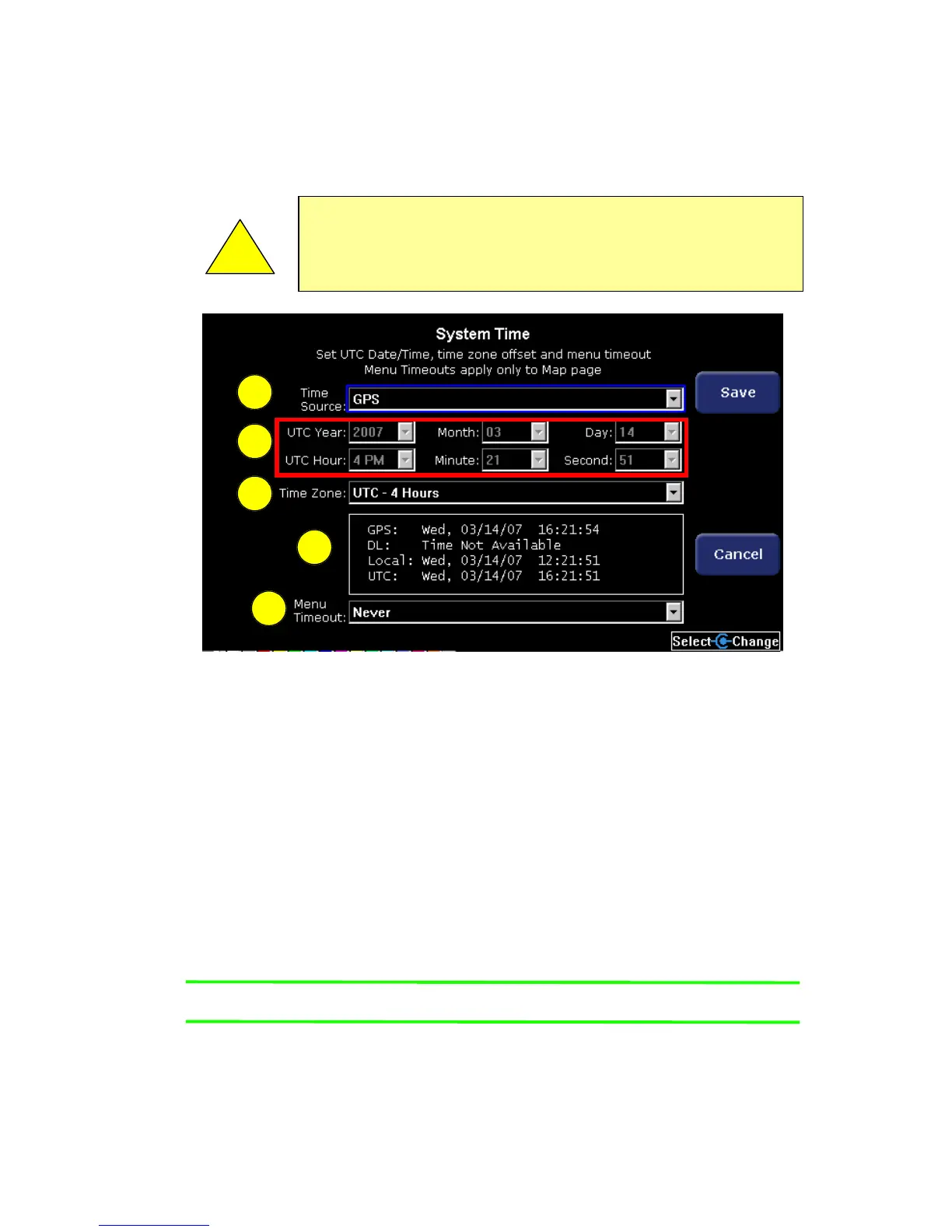
The System Time page allows you to adjust the system time.
Figure 9.5 System Time Edit
1) Time Source - Selects the source of the system time setting.
Possible values:
■ Manual Set - Allows you to manually set the date and time
fields below.
■ Datalink - The system automatically sets the time based on
the UTC time reported by the 2-Way Datalink system.
Requires 2-Way Datalink.
■ GPS - The system automatically sets the time based on input
from the GPS.
Note: Most RS232 GPS interfaces do not provide time data.
■ Auto - The system tries to set the time automatically by
obtaining data first from the GPS and then from the 2-Way
Datalink system, if installed.
!
Before conducting flight operations, verify that time and date
settings are correct and in GMT (UTC). It is critical that you
set the time to GMT to display Datalink weather accurately.
1
2
3
4
5



 To Next Page