CMax Chart Page
600-00078-001 Rev 05 -55- Avidyne EX500/EX600 MFD
Chart page will default to the Chart Selection page to allow you to
select a chart manually.
On landing, if the Chart page is displayed or subsequently selected,
the EX500/EX600 switches automatically to the Airport diagram for
the current location when the GPS Ground Speed drops below 40
knots. The Chart page shows the airport diagram of the current
airport with ownship symbol for current aircraft position, if the airport
diagram is geo-referenced.
6.3.1 CMax Procedure Charts
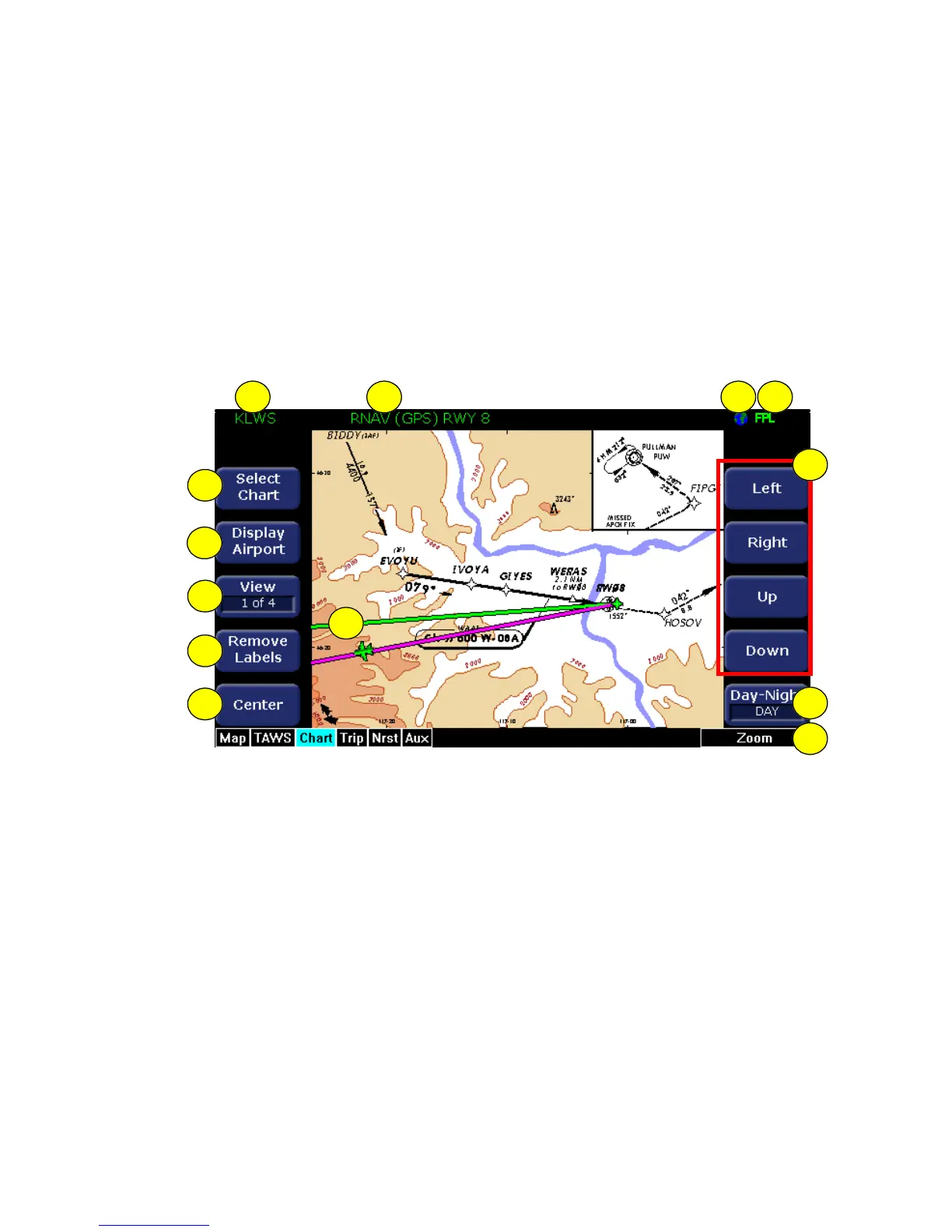
Figure 6.1 CMax Procedure Chart (2-Knob)
1) Airport Identifier - The airport identifier for the current airport is
displayed in green.
2) Chart Name - The name of the current chart being displayed,
also in green.
3) Geo-referenced Symbol - A globe is shown when the displayed
chart is geo-referenced. If the chart is not geo-referenced, the
globe symbol is crossed out, and your flight plan cannot be
displayed on the chart.
4) Flight Plan Symbol - An FPL symbol indicates that the option to
display the current flight plan is turned ON. If the display of flight
plan is turned OFF, the FPL symbol is crossed out. If a chart is
12
10
9
8
4321
6
13
11
7
5



 To Next Page