Orbcomm Text Messaging (Release 4.0 and earlier)
600-00078-001 Rev 05 -119- Avidyne EX500/EX600 MFD
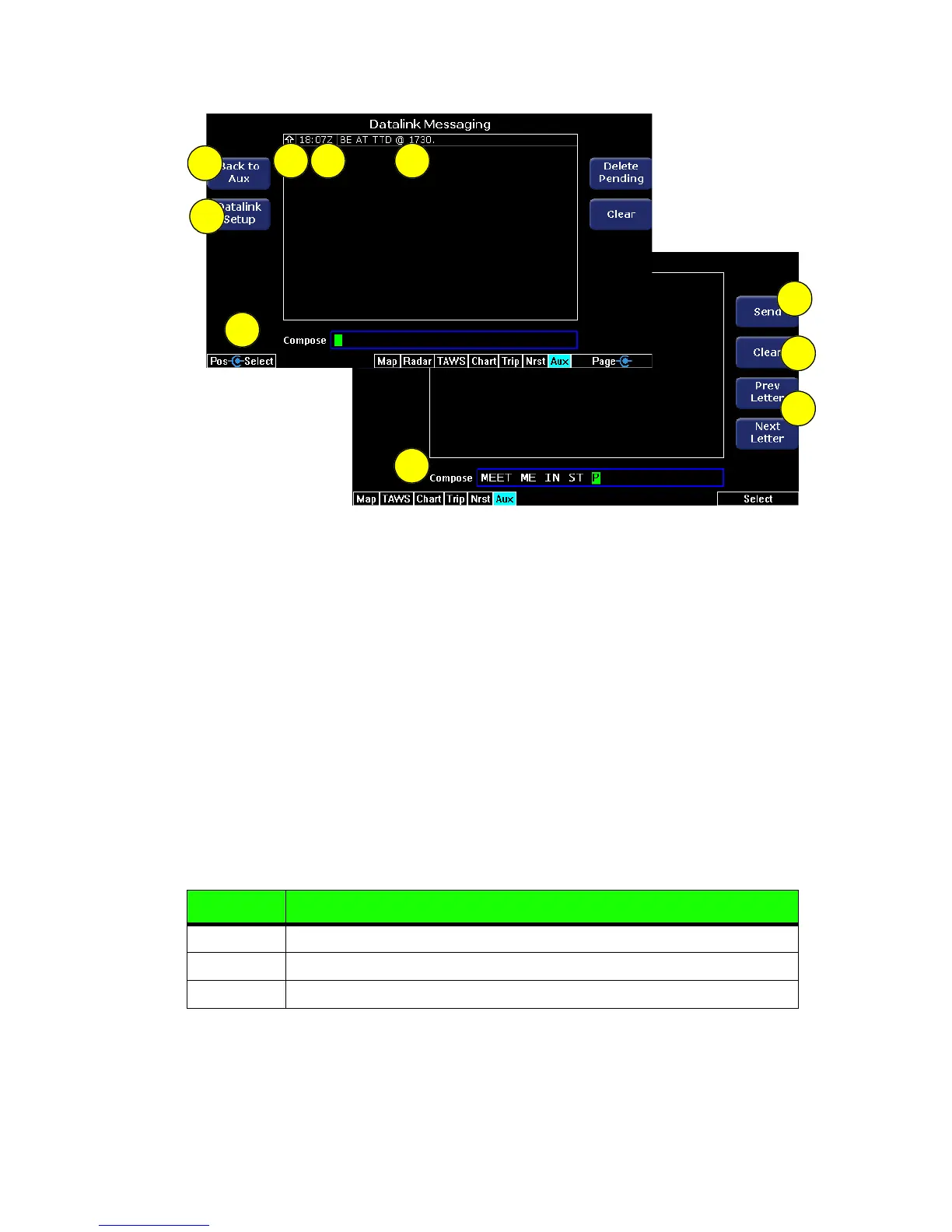
Figure 10.15 Datalink Messaging Page
1) Back to Aux - Returns to the previous Aux page.
2) Datalink Setup - Displays the Datalink Configuration page, which
provides MultiLink options.
3) Message Status Indicator - Indicates the status of the message.
These are the following possible states and arrows. See Table
10.1 Message Status on page 109.
4) Message Timestamp - The time stamp (Zulu) shows the time of
reception for received messages, and the time of entry (queuing
for transmission) for transmitted messages.
5) Message Text - The text of the message. Text color indicates the
source of the message as follows:
Color Heading
Green Messages received from the ground.
White Messages entered into the EX500/EX600 for transmission.
Blue Messages received from the Avidyne NOC.
543
2
1
7
6
4-knob
2-knob
8
9
8



 To Next Page