Traffic Mode and the Traffic Page (Optional)
Avidyne EX500/EX600 MFD -28- 600-00078-001 Rev 05
3.1 Traffic Advisories
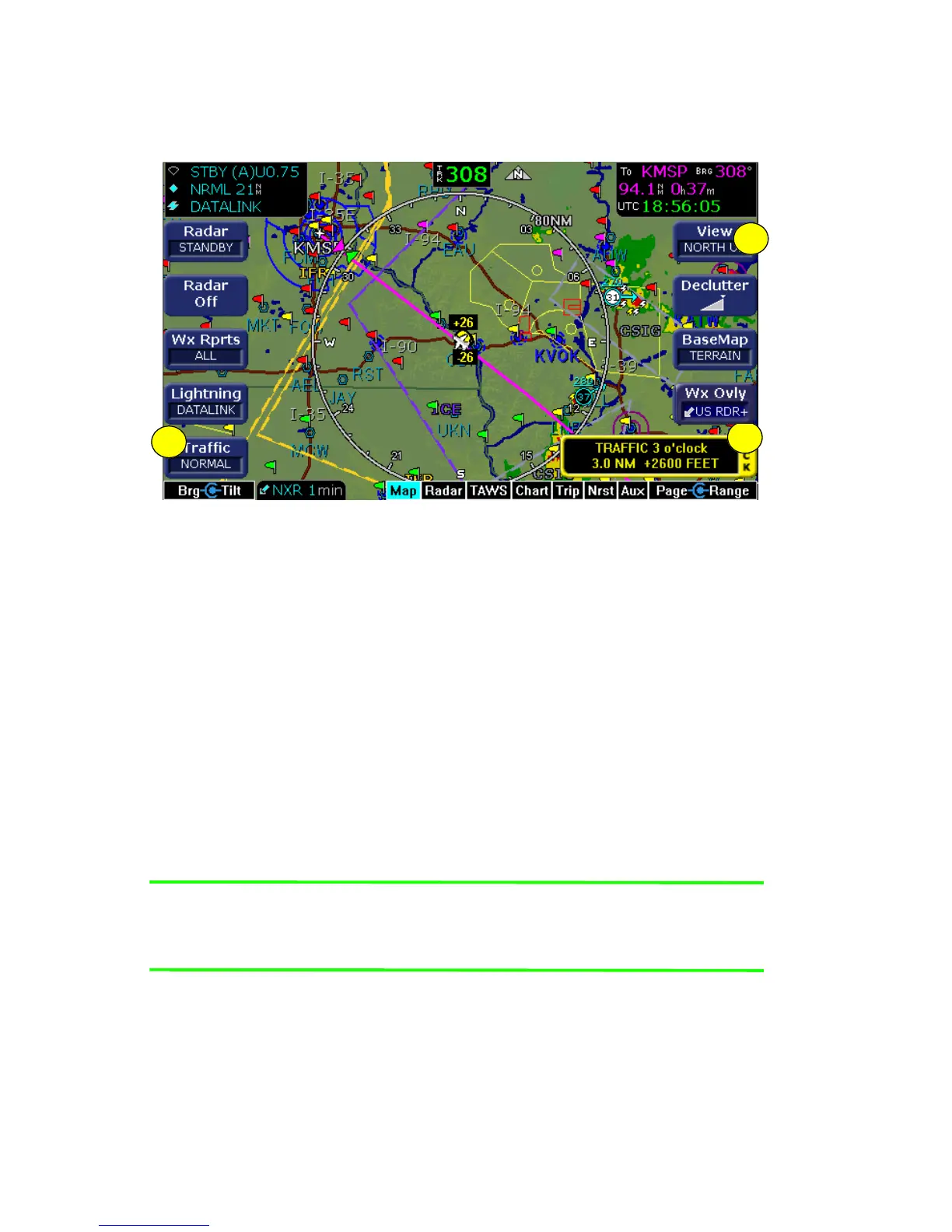
Figure 3.1 Traffic Advisory Message
If your aircraft is equipped with a traffic system such as TAS, TIS,
TCAS, or TCAD, you can see traffic overlaid on the moving map.
1) Traffic key - Basic traffic system control is performed through the
Traffic key on the Map page. Target aircraft are displayed in
standard format relative to current aircraft position. The available
Traffic key modes are:
■ Avidyne TAS600 series (including 9900BX), Skywatch,
and Bendix/King, TCAS - ABOVE, NORMAL, UNLIMTD,
BELOW, and DSPLY OFF.
■ TCAD 9900B - GROUND, TERMINAL, STANDARD,
ENROUTE, UNLIMITD, APPROACH, and DSPLY OFF.
Note: Some TCAD installations will support automatic mode-
switching by the TCAD unit. The current mode is always
reported on the EX500 screen.
■ TIS - DSPLY ON and DSPLY OFF.
For more information on specific traffic sensor modes, consult the
user documentation for your traffic sensor.
1
3
2



 To Next Page