Programming
5-40
HYGROPHIL® F 5673 Operating manual, Software version 1.8.x, 387896MDHEN(14.06.2013)
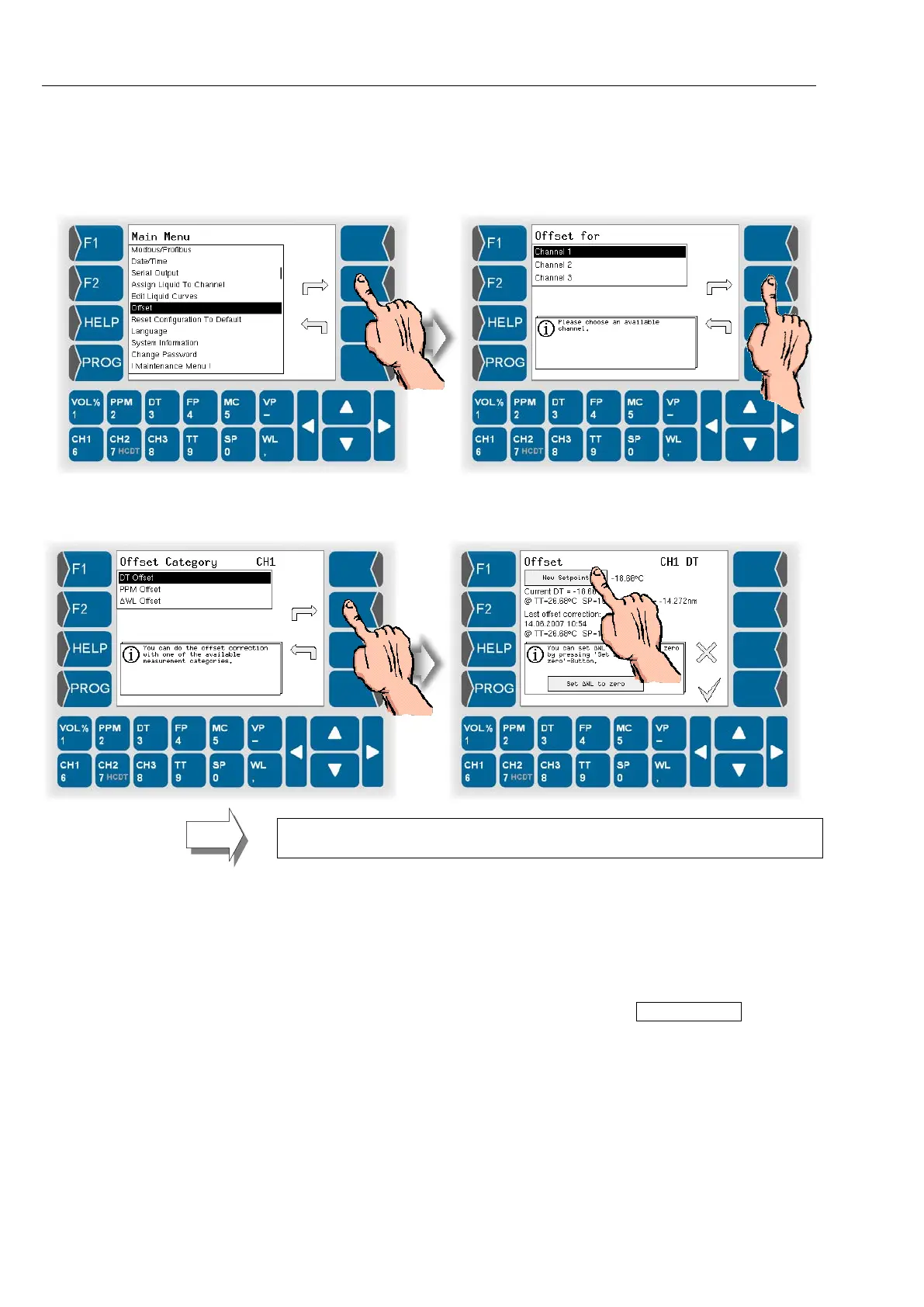
● Open the menu “Offset”.
● Choose one of the three possible measurement channels for which you
want to program an offset.
● Select whether to set the offset for DT or for PPM or if you directly want
to set the wave length shift (∆WL Offset).
When proceeding moisture measurement in liquids you cannot set the DT
Offset.
● Under “New Setpoint“ enter the externally measured reference value for
the displayed value resp. the direct wave length shift.
The display indicates the current measured values, the date of the last
offset correction and the conditions prevailing at that time (TT and SP) as
well as the wave length shift (ΔWL).
Cancel offset
If you want to cancel an offset setting, touch the Set ΔWL to zero field. The
wave length shift is reset to zero, consequently no offset is set any more.


 To Next Page
 Loading...


