Operation
4-1
HYGROPHIL® F 5673 Operating manual, Software version 1.8.x, 387896MDHEN(14.06.2013)
4 Operation
4.1 Start up
The evaluation unit is not equipped with a switch. Connect the evaluation
unit to the mains by the mains cable.
After the supply voltage has been applied, the software is initialised. Then
the automatic sensor equalisation is carried out („Auto-Equalize“).
This process takes about one minute.
Then the measuring variables are displayed.
4.2 Automatic sensor equalizing
The automatic sensor equalizing as it is executed when the system is start-
ed, will be repeated in an interval of 24 hours, when a measuring cycle is fin-
ished.
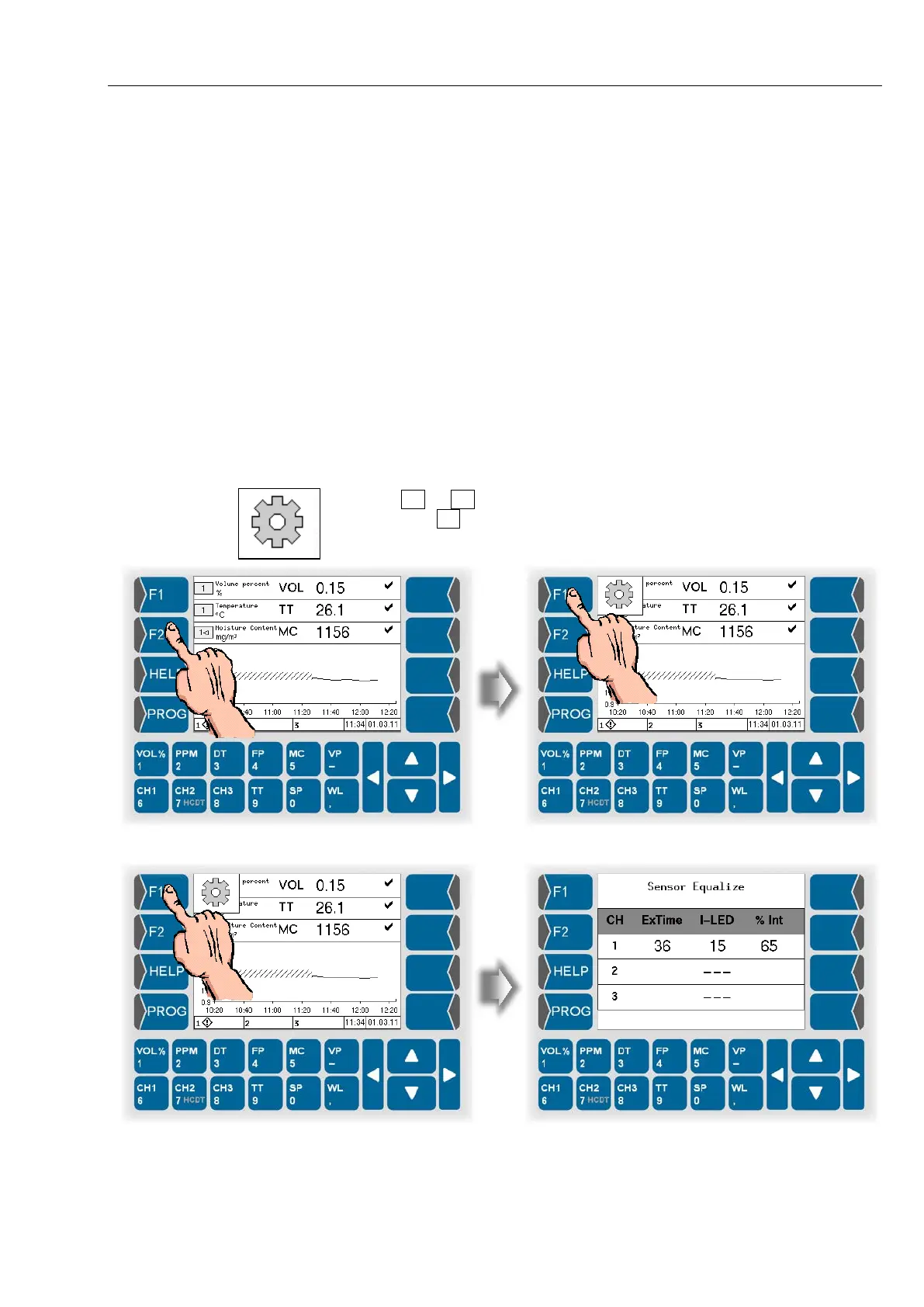
You can trigger the sensor equalizing any time during the measuring mode.
Touch F1 or F2 key. The current functions of theese keys are displayed.
Then touch F1 key, („A. EQUAL.“) to start the automatic sensor equalizing
function.



 To Next Page
 Loading...

