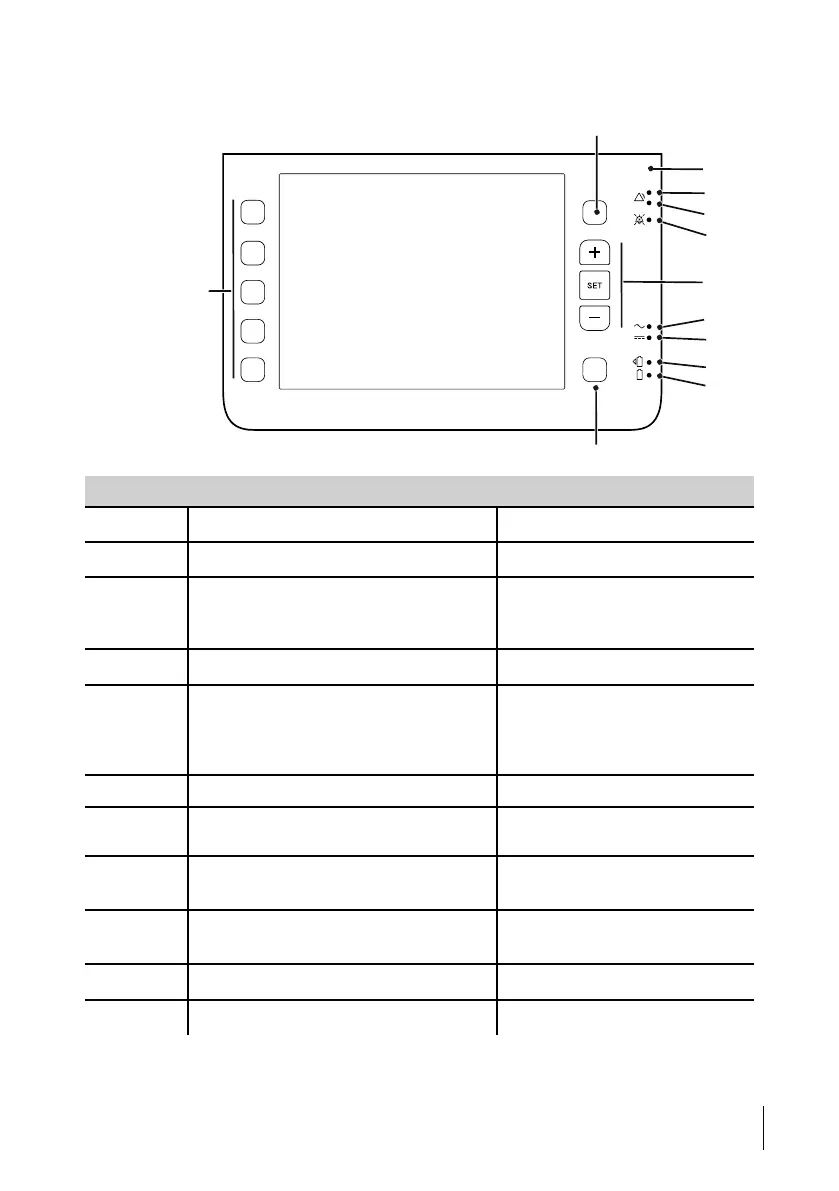
3.2 Front View
No Item Function
1
Alarms button Access to alarm settings
2 Sensor Ambient light sensor
3–4
Alarm (red & yellow) LED Alarm indication:
Red = High priority
Yellow = Medium priority
5
Audio pause LED Paused alarm sound indication
6-8
Plus, Set, Minus buttons Function according to display
Plus = Increase, go up
Set = Enter / Navigation
Minus = Decrease, go down
9 Mains LED
Power source indication: Mains
10 External DC LED Power source indication: External
DC
11
Click-in battery LED Power source indication: Click-in
battery
12
Internal battery LED Power source indication: Internal
battery
13
Menu button
Menu/Navigation
14
Settings, Mode buttons Select settings, modes and profiles
Product Description
27
Doc. 006553 M-6 User Manual



 To Next Page