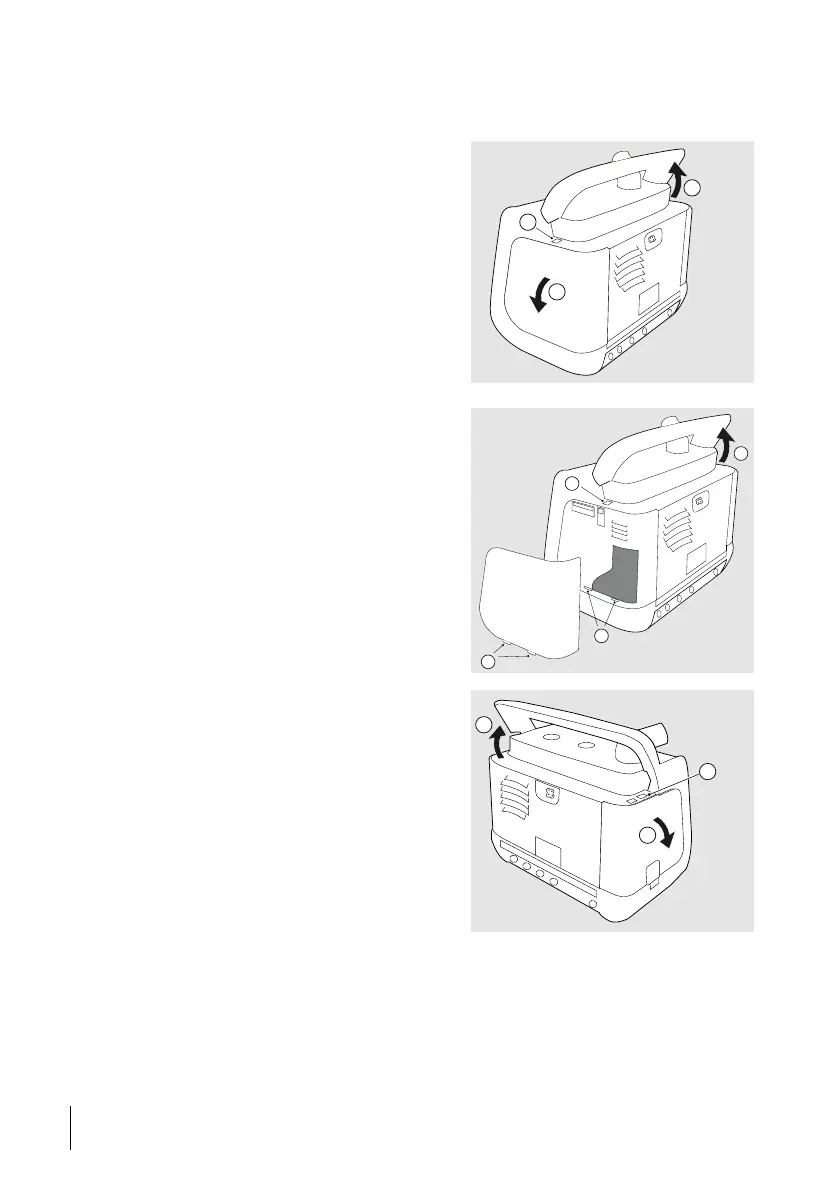
3.3.1 Detaching and Reattaching the Side Panels
Detaching the Filter Side Panel
1 Lift the handle to access the release
button (A).
2 Looking from behind, to dismount the
filter side panel press the button above the
panel (B). The panel is released.
3 Remove the panel. (C)
Reattaching the Filter Side Panel
1 Lift the handle to access the release
button (A).
2 To mount the filter side panel, insert the
tabs (B) on the lower side of the panel into
the holes (C).
3 Press the side panel into the casing until
it clicks in place at the button (D).
Detaching the Click-in
Compartment Side Panel
1 Lift the handle to access the release
button (A).
2 Press the button marked “1”. (B).
⇒The panel is released.
3 Remove the panel (C).
30
Product Description
User Manual
Doc. 006553 M-6



 To Next Page