EasyManua.ls Logo

Brother BAS-600 - Entering a Flap Sewing Program

Brother BAS-600
118 pages
Print Icon
To Next Page IconTo Next Page
To Previous Page IconTo Previous Page
Loading...
2.
Entering a
flap
sewing program
MODE
12\\
PROGRAMMING
~NUMBER
~SEAM
©BOBBIN
...
BOBBIN
COUNTER
WPLENGTH
COUNTER
SET
l·nmJbt.Ui
lt't("f!tt.!M
PROGRAM
KNIFE
CHANGE
&CYCLEPGM.
1 2 3 4 5
©~@©©
SELECT
1[f[j1
~CYCLE
PGM.!J
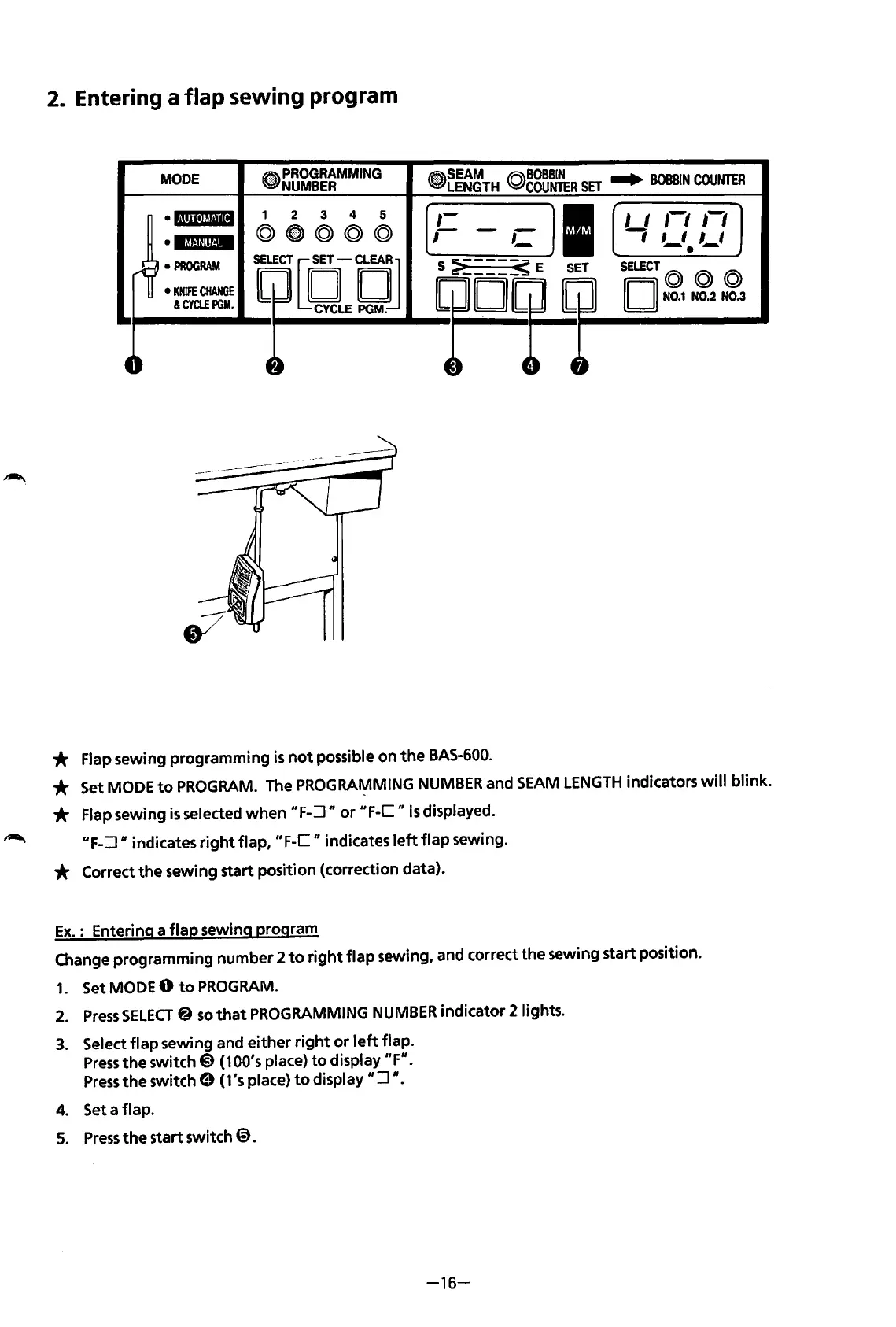
* Flap sewing programming
is
not
possible
on
the
BAS-600.
I I 1-1
,-,
-;
,_,
,_,
SELECT©
© ©
II
II
N0.1
N0.2
N0.3
* Set MODE
to
PROGRAM.
The PROGRAMMING
NUMBER
and
SEAM
LENGTH
indicators
will
blink.
* Flap sewing
is
selected
when
"F-:J n
or
"F-C
II
is
displayed.
UF-:J
n indicates
right
flap,
"F-C
II
indicates
left
flap
sewing.
* Correct
the
sewing start position (correction data).
Ex.
: Entering a
flap
sewing program
Change programming number 2
to
right
flap
sewing, and correct
the
sewing start position.
1.
SetMODEO
to
PROGRAM.
2.
Press
SELECT@
so
that
PROGRAMMING
NUMBER
indicator
2lights.
3.
Select
flap
sewing and
either
right
or
left
flap.
Press
the
switch@
(100's place)
to
display
"F".
Press
the
switch 9 (1's place)
to
display
":J
".
4. Set a flap.
5.
Press
the
start switch
@).
-16-
From the library of: Superior Sewing Machine & Supply LLC

Table of Contents

Related product manuals