EasyManua.ls Logo

Brother BAS-600 - Setting the Bobbin Counter

Brother BAS-600
118 pages
Print Icon
To Next Page IconTo Next Page
To Previous Page IconTo Previous Page
Loading...
~
5.
Setting
the
bobbin counter
MODE
@PROGRAMMING
NUMBER
@~g~TH
.83W~
SET
...
BOBBIN
COUNTER
EMERGENCY
STOP
B
·1·!'11•1!!·!111
1 2
3
4
5
,,,,._
..!'''''''"
I
(
l
...
'I
-,
,-
~
@@@©@
: f
,-
-;:
~~
•IMU!IHM
,..
~
~-
,_,,,,,,,. ,,.,
..
PROGRAM
ocetCJ
s~---~E
KNIFE
CHANGE
DOD
BOBBIN
COUNTER
SET
&CYCLE
PGM.
'
J
v
4,
e
~~2£2
~-
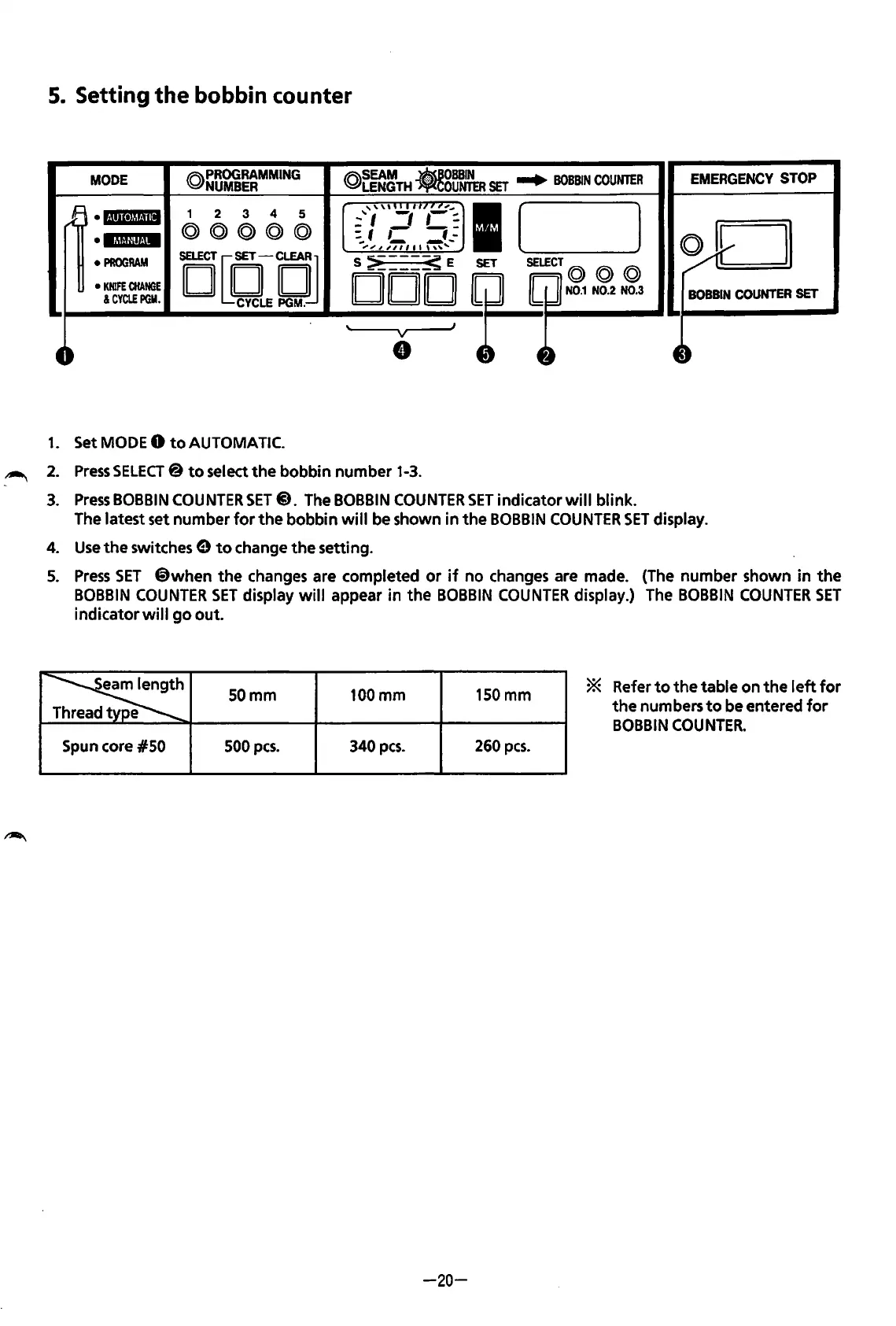
1.
Set MODE 0
to
AUTOMATIC.
2.
3.
4.
5.
Press
SELECT@
to
select
the
bobbin
number
1-3.
Press
BOBBIN
COUNTER
SET@. The BOBBIN
COUNTER
SET
indicator
will
blink.
The latest set
number
for
the
bobbin
will
be shown
in
the
BOBBIN
COUNTER
SET
display.
Use
the
switches 9
to
change
the
setting.
Press
SET
@when
the
changes are completed
or
if
no
changes are made. (The
number
shown
in
the
BOBBIN
COUNTER
SET
display
will
appear
in
the
BOBBIN
COUNTER
display.) The
BOBBIN
COUNTER
SET
indicator
wi
II
go
out.
~
SOmm
e
100mm
150mm
* Refer
to
the
table
on
the
left
for
the
numbers
to
be entered
for
BOBBIN
COUNTER.
Spun core
#50
500
pes.
340
pes.
260
pes.
-20-
From the library of: Superior Sewing Machine & Supply LLC

Table of Contents

Related product manuals