EasyManua.ls Logo

Brother BAS-600 - Operating the Stacker During Cycle Sewing

Brother BAS-600
118 pages
Print Icon
To Next Page IconTo Next Page
To Previous Page IconTo Previous Page
Loading...
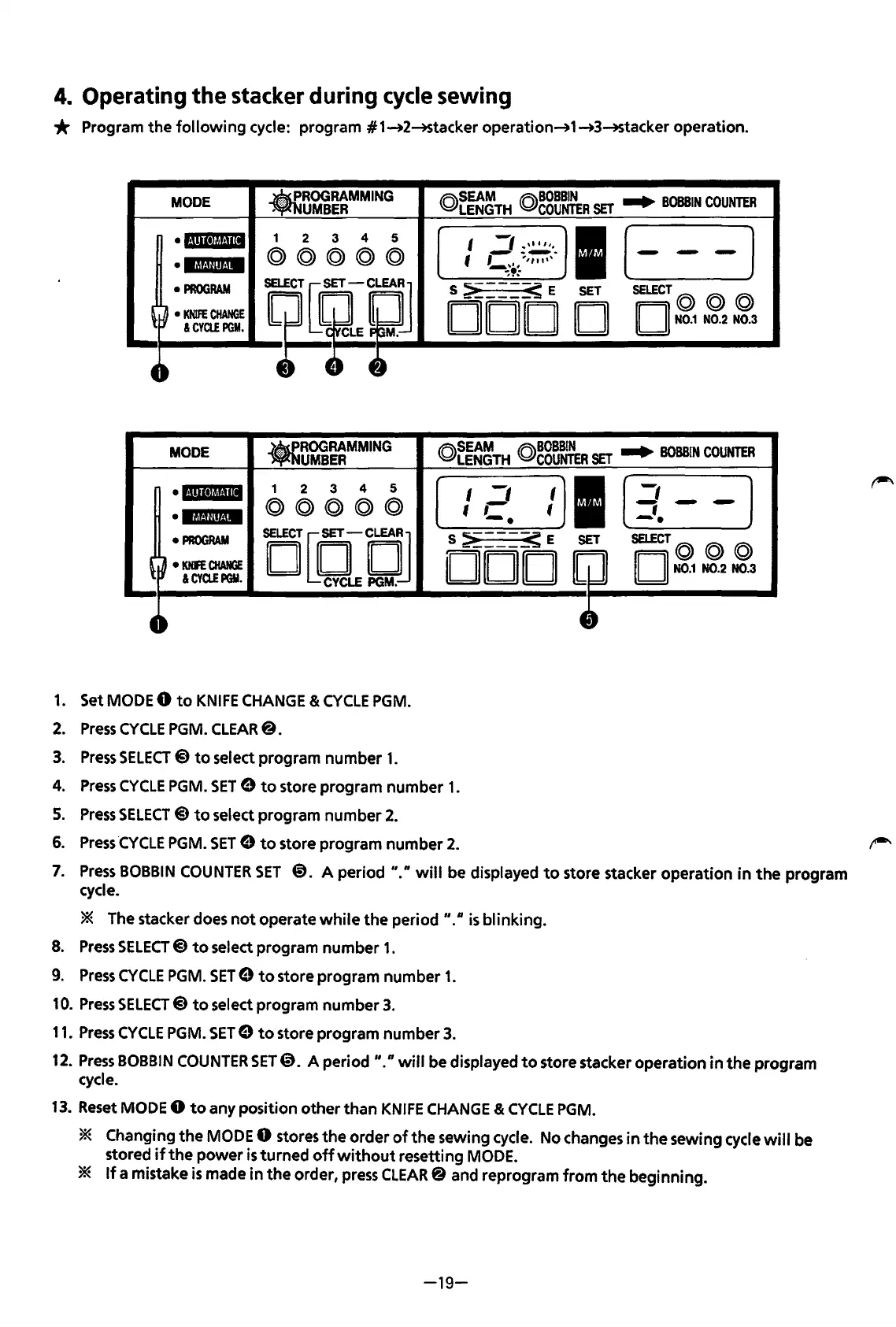
4.
Operating
the
stacker during cycle sewing
* Program
the
following
cycle: program #1_.2-+Stacker operation_.1_.3-+Stacker
operation
.
MODE
ROGRAMMING
UMBER
(Q)~~~TH
(Q)~g~~R
SET
..
BOBBIN
COUNTER
·l·!•ll·l~~!·mt
1
2
3
4
5
I
._,1
_,,,
''·
I
(-
-]
©©@@@
~
-~-
-
•13!-'fllf.!M
'
~\.,
,,,,
,,,
~,
..
PROGRAM
il~?J
S
~---_s
E
SET
SELECT©
© @
~
~
KNIFE
CHANGE
DOD
D
II
II
N0.1
N0.2 N0.3
&CYCLEPGM.
--
MODE
.ROO
RAMMING
UMBER
©~~~~TH
©~g~~R
SET
..
BOBBIN
COUNTER
•l·l!ll•lt!!·lll
1
2 3
4 5
I
-,
I
I
[
-,
-]
lf&Uilto!M
©©©©@
tC
'
-;-
PROGRAM
DQQCJ
S
>-_
___
_s
E
SET
SELECT©
©@
~
~
KNFE
CHANGE
DOD
II II
N0.1
N0.2 N0.3
&CYa.EPGY.
4~
4~
1.
Set MODE 0
to
KNIFE
CHANGE &
CYCLE
PGM.
2.
Press
CYCLE
PGM. CLEAR@.
3.
Press
SELECT@
to
select program
number
1.
4.
Press
CYCLE
PGM.
SET
9
to
store
program
number
1.
5.
Press
SELECT
@
to
select program
number
2.
6.
Press
·cYCLE
PGM.
SET
9
to
store
program
number
2.
,-..
7.
Press
BOBBIN
COUNTER
SET
@.
A
period"."
will
be displayed
to
store stacker
operation
in
the
program
cycle.
* The stacker does
not
operate
while
the
period
"."
is
blinking.
8.
Press
SELECT@)
to
select program
number
1.
9.
Press
CYCLE
PGM.
SET
9
to
store program
number
1.
10.
Press
SELECT@
to
select program
number
3.
11.
Press
CYCLE
PGM.
SET
9
to
store
program
number
3.
12.
Press
BOBBIN
COUNTER
SET@. A period
II.
n
will
be displayed
to
store stacker
operation
in
the
program
cycle.
13.
Reset MODE 0
to
any position
other
than
KNIFE
CHANGE
&
CYCLE
PGM.
* Changing
the
MODE 0 stores
the
order
of
the
sewing cycle. No changes
in
the
sewing cycle
will
be
stored
if
the
power
is
turned
off
without
resetting MODE.
*
If
a mistake
is
made
in
the
order, press CLEAR@ and reprogram
from
the
beginning.
-19-
From the library of: Superior Sewing Machine & Supply LLC

Table of Contents

Related product manuals