EasyManua.ls Logo

Brother BAS-600 - Programming; Entering a Standard Sewing Program

Brother BAS-600
118 pages
Print Icon
To Next Page IconTo Next Page
To Previous Page IconTo Previous Page
Loading...
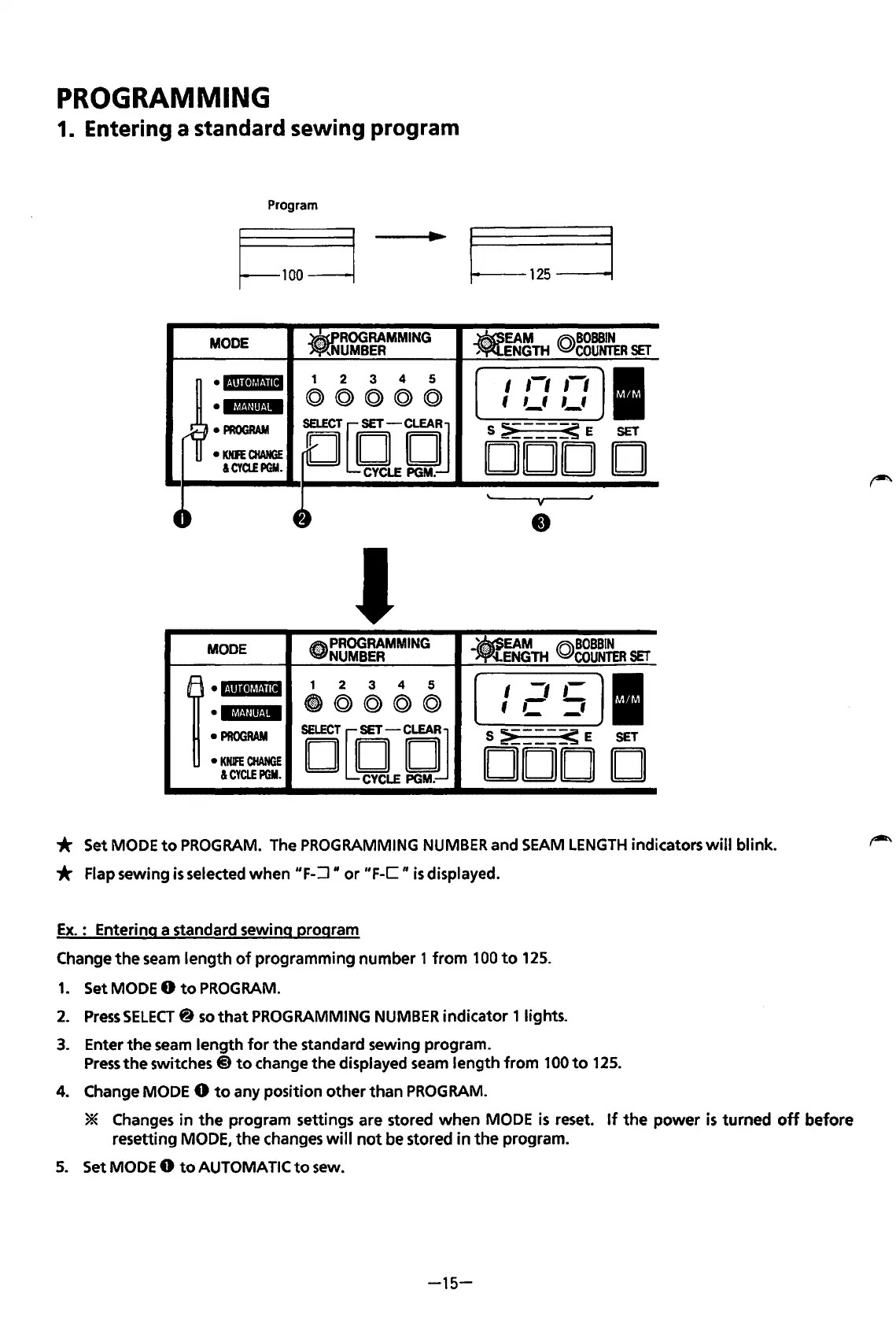
PROGRAMMING
1. Entering a standard sewing program
Program
I~-------.
125
-----~~
MODE
.ROO
RAMMING
UMBER
.EAM
(Q)BOBBIN
ENGTH
COUNTER
SET
•I·~!II•JII·!ill
1 2
3
4 5
,-,
,-,
I
I
el.f,t@if.jM
©@@(Q)@
f
,_,
,_,
PROGRAM
sruCT[O-DJ
S
~----<
E
SET
KNFE
CHANGE
DOD
D
&CYQ!PGM.
CYCLE
PGM.
J
MODE
~PROGRAMMING
NUMBER
__
EAM
@BOBBIN
.<·
~ENGTH
COUNTER
SET
1
•lllli~~Hil
1 2
3
4
5
I
-,
,-
I
'MUI*t.IM
@)@@@©
1 C
='
PROGRAM
iEJ[{jLEtjJ
S
:>
_____
< E
SET
KNIFE
CHANGE
DOD
D
&CYCLEPGM.
* Set MODE
to
PROGRAM.
The PROGRAMMING
NUMBER
and
SEAM
LENGTH
indicators
will
blink.
* Flap sewing
is
selected
when
"F-:J"
or
"F-C"
is
displayed.
Ex.: Entering a standard sewing program
Change
the
seam
length
of
programming
number
1
from
100
to
125.
1.
Set MODE 0
to
PROGRAM.
2.
Press
SELECT@
so
that
PROGRAMMING
NUMBER
indicator 1 lights.
3.
Enter
the
seam
length
for
the
standard sewing program.
Press
the
switches @
to
change
the
displayed seam
length
from
100
to
125.
4.
Change MODE 0
to
any position
other
than
PROGRAM.
* Changes
in
the
program settings are stored
when
MODE
is
reset.
If
the
power
is
turned
off
before
resetting
MODE,
the
changes
will
not
be stored
in
the
program.
5.
Set MODE 0
to
AUTOMATIC
to
sew.
-15-
From the library of: Superior Sewing Machine & Supply LLC

Table of Contents

Related product manuals