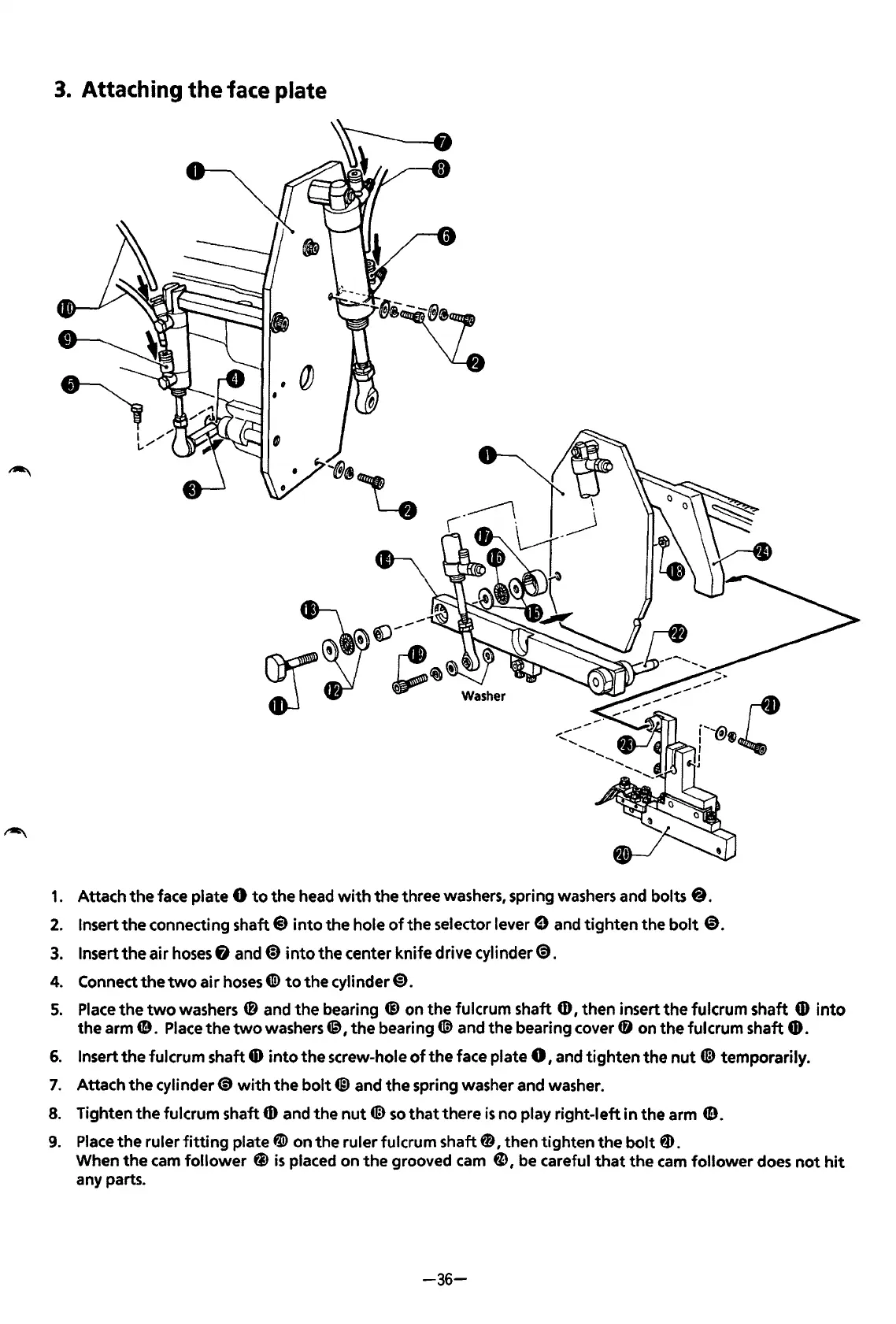
3.
Attaching
the
face plate
1.
Attach
the
face plate 8
to
the
head
with
the
three washers, spring washers and bolts
8.
2.
Insert
the
connecting shaft@
into
the hole
of
the
selector
lever$
and tighten the
bolt
@.
3.
Insert
the
air
hoses
fl
and@)
into
the center knife drive
cylinder~.
4.
Connect
the
two
air
hoses
CID
to
the
cylinder@).
5.
Place
the
two
washers
4D
and
the
bearing ® on the fulcrum shaft
CD,
then insert
the
fulcrum shaft
4D
into
the arm
CD.
Place
the
two
washers~
1
the
bearing®
and the bearing cover
(D
on
the
fulcrum shaft G).
6.
Insert
the
fulcrum shaft
6)
into
the
screw-hole
of
the
face plate 8 I and
tighten
the
nut
@ temporarily.
7.
Attach the
cylinder~
with
the
bolt@
and
the
spring washer and washer.
8.
Tighten
the
fulcrum shaft
6)
and the
nut
®
so
that
there
is
no play right-left in the arm G).
9.
Place
the
ruler
fitting
plate ~ on the ruler fulcrum shaft 0 I then tighten
the
bolt
fD.
When
the
cam
follower
@)
is
placed on
the
grooved
cam
fD
I
be
careful
that
the
cam
follower
does
not
hit
any parts.
-36-
From the library of: Superior Sewing Machine & Supply LLC



 To Next Page