EasyManua.ls Logo

Brother BAS-600 - Adjusting the Foot Switch

Brother BAS-600
118 pages
Print Icon
To Next Page IconTo Next Page
To Previous Page IconTo Previous Page
Loading...
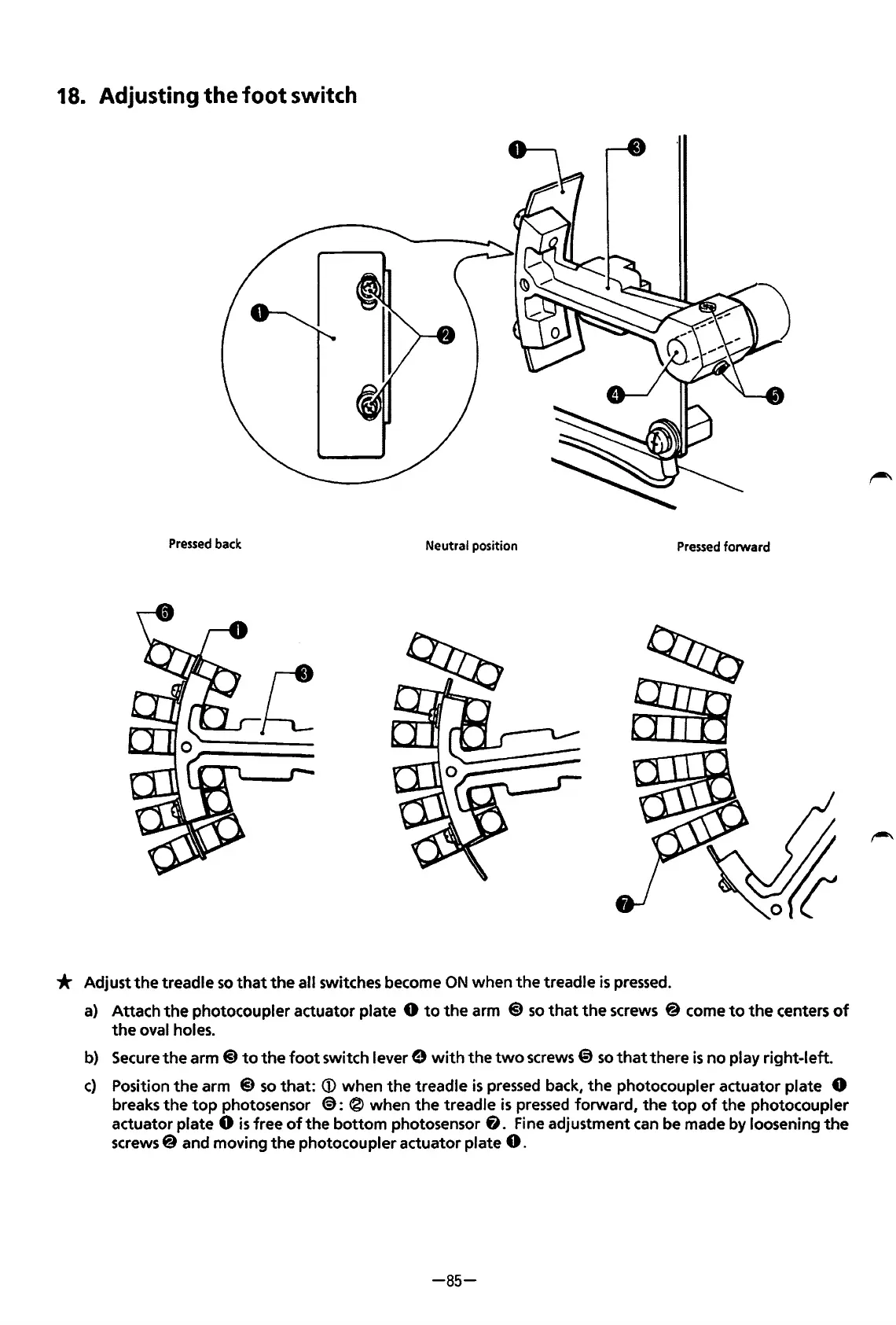
18. Adjusting the
foot
switch
Pressed
back
Neutral position
Pressed
forward
* Adjust
the
treadle so
that
the
all switches become
ON
when
the
treadle
is
pressed.
a) Attach
the
photocoupler actuator plate 0
to
the
arm @ so
that
the
screws @ come
to
the
centers
of
the
oval holes.
b)
Secure
the
arm @
to
the
foot switch lever 9 with
the
two
screws @ so
that
there
is
no play right-left.
c)
Position
the
arm @ so
that:
<D
when
the
treadle
is
pressed back,
the
photocoupler actuator plate 0
breaks
the
top
photosensor
€):
® when
the
treadle
is
pressed forward,
the
top
of
the
photocoupler
actuator plate
0
is
free
of
the
bottom photosensor
fJ.
Fine adjustment can be made
by
loosening
the
screws@ and moving
the
photocoupler actuator plate
0.
-85-
From the library of: Superior Sewing Machine & Supply LLC

Table of Contents

Related product manuals