EasyManua.ls Logo

Brother BAS-600 - Lubrication; Adding Oil to the Rotary Hook Oil Tank; Adjusting the Rotary Hook Lubrication; Filling the Arm Top Oil Tank

Brother BAS-600
118 pages
Print Icon
To Next Page IconTo Next Page
To Previous Page IconTo Previous Page
Loading...
LUBRICATION
Be
sure
to
use
Brother-specified machine oil (High White #70).
Advance the carriage feed when lubricating and adding oil
to
the rotary hook. (Refer
to
page 8.)
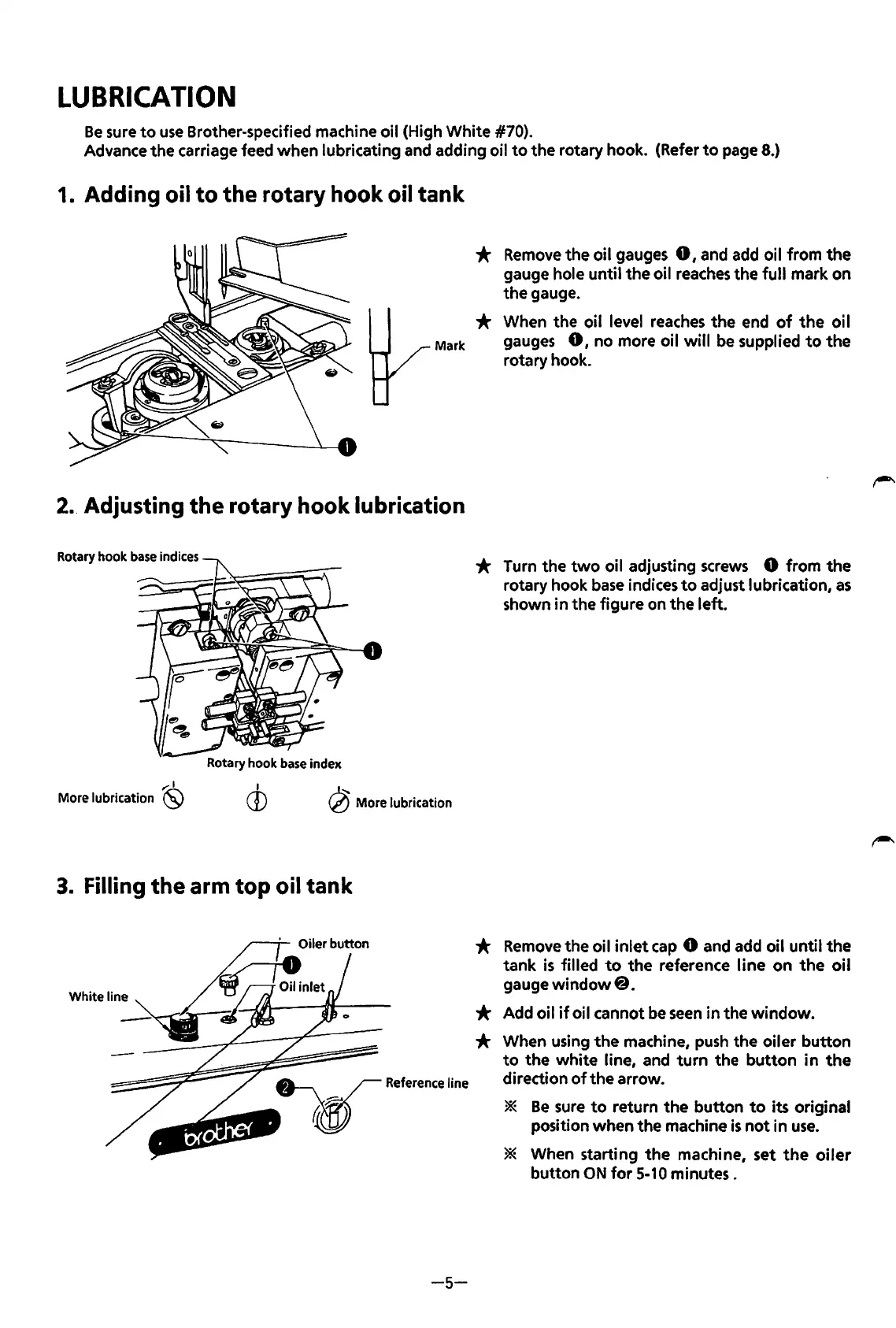
1. Adding oil
to
the rotary hook oil tank
*
Remove
the oil gauges
0,
and add oil from the
gauge hole until the oil
reaches
the full mark on
the gauge.
* When the oil level
reaches
the end
of
the
oi I
Mark
gauges
0,
no more oil
will
be
supplied
to
the
rotary hook.
2. Adjusting
the
rotary hook lubrication
Rotary hook base indices
..-:1
More lubrication
(SJ
Rotary hook base index
I
CD
~
More
lubrication
3. Filling
the
arm top oil tank
White
line
-5-
* Turn the
two
oil adjusting
screws
0 from the
rotary hook
base
indices
to
adjust lubrication,
as
shown in the figure on the left.
*
Remove
the oil
inlet
cap
0 and add oil until the
tank
is
filled
to
the reference line on
the
oil
gauge
window@.
* Add oil
if
oil cannot
be
seen
in the window.
* When using
the
machine,
push
the oiler button
to
the white line, and
turn
the
button
in
the
direction
of
the arrow.
*
Be
sure
to
return the button
to
its original
position when the machine
is
not
in
use.
* When starting
the
machine, set
the
oiler
button
ON
for
5-10
minutes.
From the library of: Superior Sewing Machine & Supply LLC

Table of Contents

Related product manuals