3.
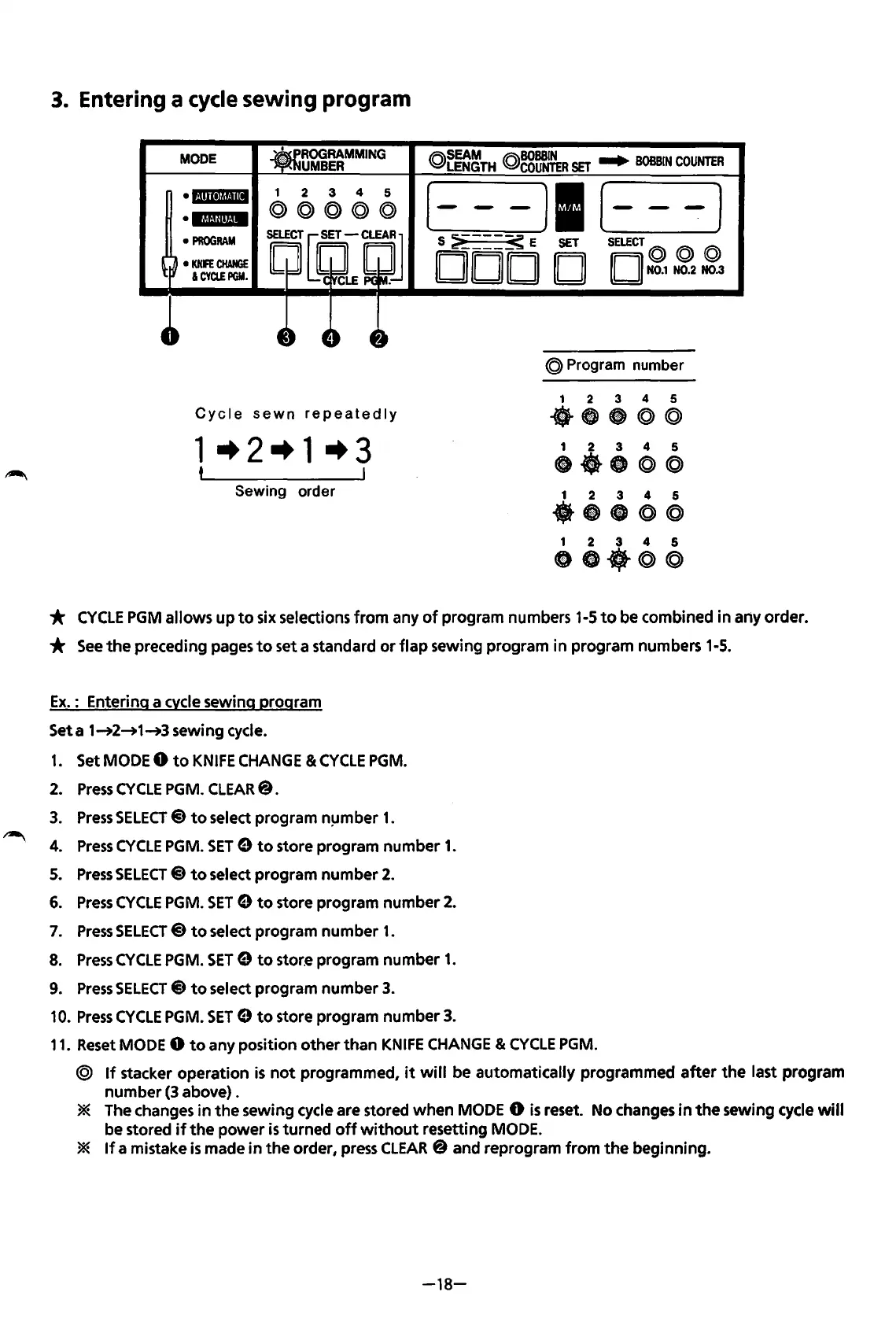
Entering a cycle sewing program
MODE
• i·iliitjij.flli
•
l.jlaU!it·iM
•
PROGRAM
•
KNFE
CHANGE
I
CYClEPGM.
Cycle
sewn
repeatedly
1-+2-+1-+3
t
Sewing order
IR\SEAM
IR\BOBSIN
~LENGTH
Q.,COUNTER
SET
....
BOBBIN
COUNTER
[---)1(---]
S :;i
____
~
E
SET
SELECT@
@ @
DOD D D
N0.1
N0.2 N0.3
@ Program number
1 2 3 4 5
-~-@@
1 2 3 4 5
ct-8©@
1 2 3 4 5
·~-@@
1 2 3 4 5
•••
@©
*
CYCLE
PGM
allows
up
to
six selections
from
any
of
program numbers 1-5
to
be combined
in
any order.
*
See
the
preceding pages
to
set a standard
or
flap
sewing program in program numbers 1-5.
Ex.
: Entering a cvcle sewing program
Seta
1~2~1~3
sewing cycle.
1.
Set MODE 0
to
KNIFE
CHANGE
&
CYCLE
PGM.
2.
Press
CYCLE
PGM. CLEAR@.
3.
Press
SELECT@
to
select program n!Jmber
1.
4.
Press
CYCLE
PGM.
SET
9
to
store program
number
1.
5.
Press
SELECT@
to
select program
number
2.
6.
Press
CYCLE
PGM.
SET
9
to
store program
number
2.
7.
Press
SELECT
@
to
select program
number
1.
8.
Press
CYCLE
PGM.
SET
9
to
store program
number
1.
9.
Press
SELECT@
to
select program
number
3.
10.
Press
CYCLE
PGM.
SET
9
to
store program
number
3.
11.
Reset MODE 0
to
any position
other
than
KNIFE
CHANGE
&
CYCLE
PGM.
@
If
stacker
operation
is
not
programmed,
it
will
be automatically programmed
after
the
last program
number
(3 above) .
* The changes
in
the
sewing cycle are stored
when
MODE 0
is
reset. No changes
in
the
sewing cycle will
be stored
if
the
power
is
turned
off
without
resetting MODE.
*
If
a mistake
is
made
in
the
order, press CLEAR@ and reprogram
from
the
beginning.
-18-
From the library of: Superior Sewing Machine & Supply LLC



 To Next Page