EasyManua.ls Logo

Brother BAS-600 - Adjusting the Corner Knife Position

Brother BAS-600
118 pages
Print Icon
To Next Page IconTo Next Page
To Previous Page IconTo Previous Page
Loading...
2.
Adjusting the
corner
knife
position
MODE
@PROGRAMMING
NUMBER
l·!lll•lt*l~·!il
1
2 3
4 5
©)@@©@
•IMUIIJ.!M
(~
PROGRAM
iD[DfDJ
~
KNIFE
CHANGE
&CYCLEPGM.
CYCLE
PGM.
l
0
Sewing
start
Sewing
end
S E
o~
-9
9-
-o
@SEAM
@BOBBIN
...
0
CO
LENGTH
COUNTER
SET
B
BBIN
UNTER
,-
,-
I
(
)
-,
- -
-
_,
S
~----~
E
SET
SELECT
(Q) (Q)
@
4JD
II
II
N0.1
N0.2
N0.3
~
'
@~~~TH
@~8~~
SET
...
BOBBIN
COUNTER
_,;
__
: I [
_____
)
S
~---~
E
SET
DODD
SELECT
(Q)
@@
II II
N0.1
N0.2
N0.3
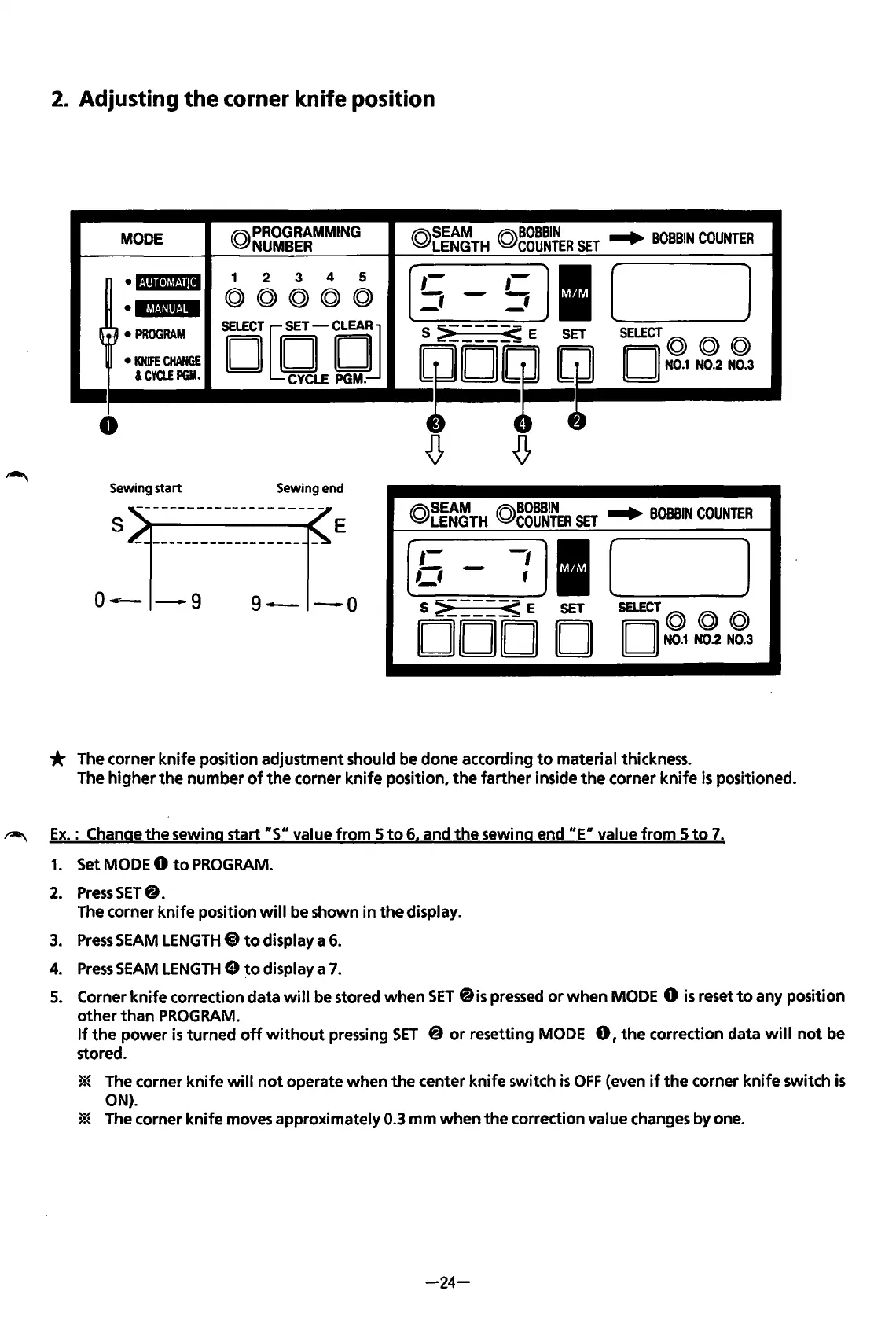
* The corner
knife
position adjustment should be done according
to
material thickness.
The
higher
the
number
of
the
corner
knife
position,
the
farther
inside
the
corner
knife
is
positioned.
~
Ex.: Change
the
sewing start
RS"
value
from
5
to
6. and
the
sewing end
"ER
value
from
5
to
7.
1.
Set MODE 0
to
PROGRAM.
2.
Press
SET@.
The corner
knife
position
will
be shown
in
the
display.
3.
Press
SEAM
LENGTH@)
to
display a
6.
4.
Press
SEAM
LENGTH
8
to
display a 7.
5. Corner
knife
correction data will be stored
when
SET
@is pressed
or
when
MODE 0
is
reset
to
any position
other
than
PROGRAM.
If
the
power
is
turned
off
without
pressing
SET
@
or
resetting MODE
0,
the
correction data
will
not
be
stored.
* The corner
knife
will
not
operate
when
the
center
knife
switch
is
OFF
(even
if
the
corner
knife
switch
is
ON).
* The corner
knife
moves approximately 0.3
mm
when
the
correction value changes by one.
-24-
From the library of: Superior Sewing Machine & Supply LLC

Table of Contents

Related product manuals