EasyManua.ls Logo

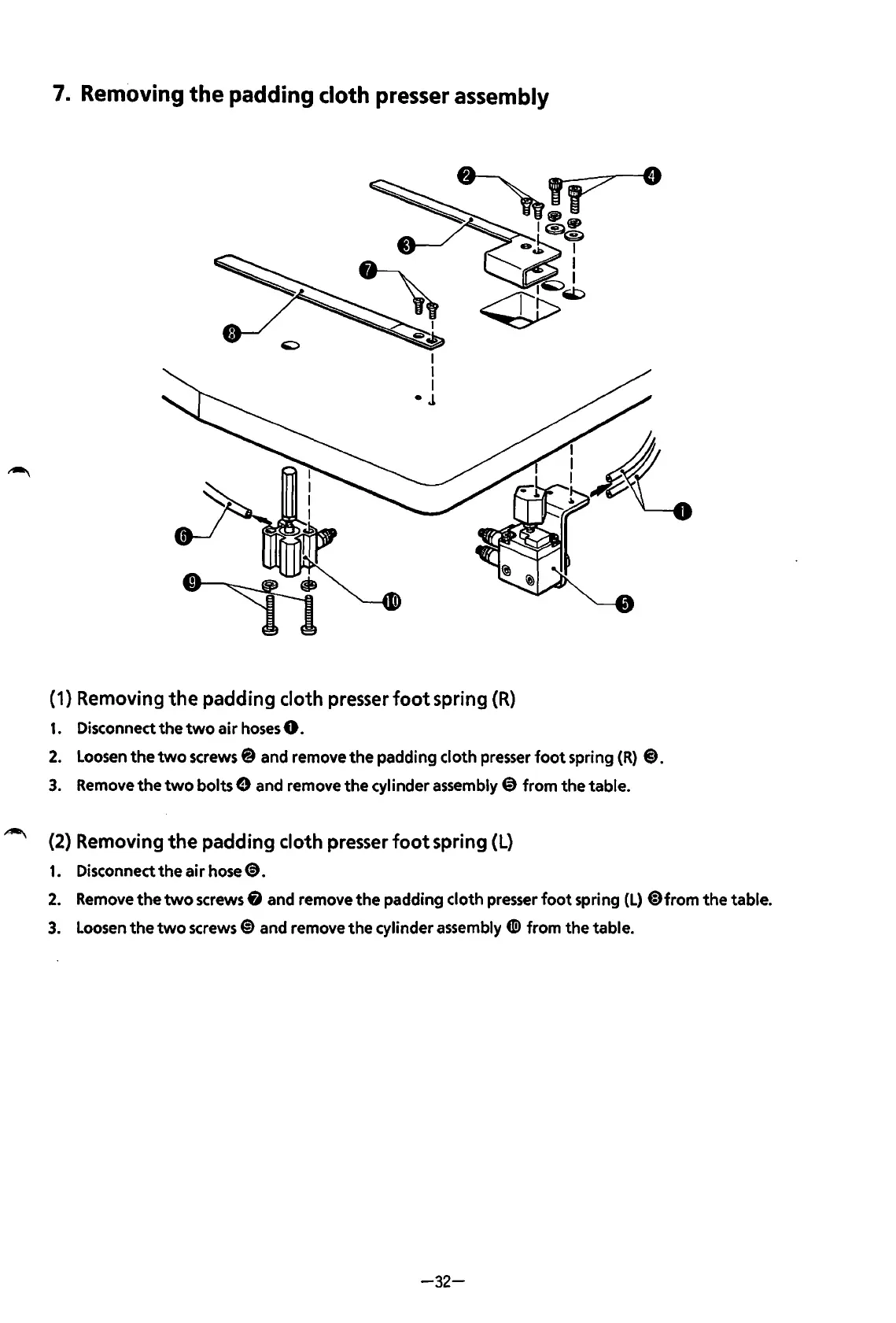
Brother BAS-600 - Removing the Padding Cloth Presser Assembly

Brother BAS-600
118 pages
Print Icon
To Next Page IconTo Next Page
To Previous Page IconTo Previous Page
Loading...
7.
Removing
the padding
cloth
presser
assembly
I
I
I
•J
(1) Removing
the
padding cloth presser
foot
spring
(R)
1.
Disconnect
the
two
air
hoses
0.
2.
Loosen
the
two
screws@ and remove
the
padding cloth presser
foot
spring
(R)
8.
3.
Remove
the
two
bolts 9 and remove
the
cylinder
assembly~
from the table.
(2) Removing
the
padding cloth presser
foot
spring (L)
1.
Disconnect
the
air
hose
<D.
2.
Remove
the
two
screws 8 and remove
the
padding cloth presser
foot
spring
(L)
@)from
the
table.
3.
Loosen
the
two
screws@)
and remove
the
cylinder assembly
tiD
from the table.
-32-
From the library of: Superior Sewing Machine & Supply LLC

Table of Contents

Related product manuals