EasyManua.ls Logo

Brother BAS-600 - Etting the Material

Brother BAS-600
118 pages
Print Icon
To Next Page IconTo Next Page
To Previous Page IconTo Previous Page
Loading...
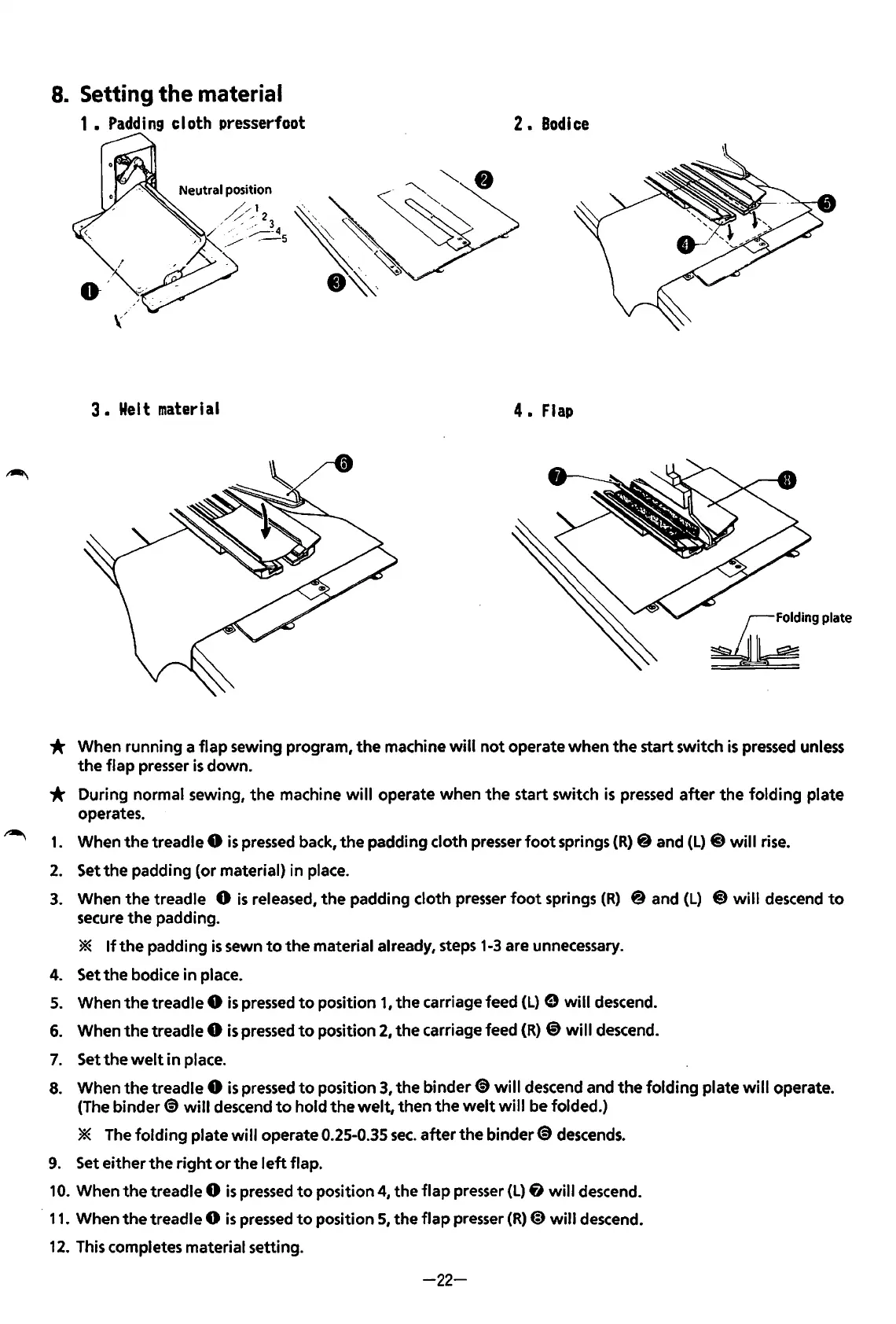
8.
Setting
the
material
1
Padding
cloth presserfoot
2.
Bodice
3
Wei
t
material
4.
Flap
£ingplate
* When running a
flap
sewing program,
the
machine
will
not
operate
when
the
start switch
is
pressed
unless
the
flap
presser
is
down.
* During normal sewing,
the
machine
will
operate when
the
start switch
is
pressed
after
the
folding
plate
operates.
1.
When
the
treadle 0
is
pressed
back,
the
padding cloth presser
foot
springs
(R)
@ and
(L)
@
will
rise.
2.
Set
the
padding (or material) in place.
3.
When
the
treadle 0
is
released,
the
padding cloth presser
foot
springs
(R)
@and
(L)
@will
descend
to
secure
the
padding.
*
If
the
padding
is
sewn
to
the
material already, steps
1-3
are unnecessary.
4. Set
the
bodice in place.
5.
When
the
treadle 0
is
pressed
to
position 1 I
the
carriage feed
(L)
e
will
descend.
6.
When
the
treadle 0
is
pressed
to
position
2,
the
carriage feed
(R)
@)
will
descend.
7.
Settheweltinplace.
8.
When
the
treadle 0
is
pressed
to
position
3,
the
binder~
will
descend and
the
folding
plate
will
operate.
(The
binder~
will
descend
to
hold
the
welt,
then
the
welt
will
be folded.)
* The
folding
plate
will
operate 0.25-0.35
sec.
after
the
binder~
descends.
9.
Set either the
right
or
the
left
flap.
10.
When
the
treadle 0
is
pressed
to
position
4,
the
flap
presser
(L)
fJ
will
descend.
·
11.
When
the
treadle 0
is
pressed
to
position
5,
the
flap
presser
(R)
@)
will
descend.
12.
This completes material setting.
-22-
From the library of: Superior Sewing Machine & Supply LLC

Table of Contents

Related product manuals