EasyManua.ls Logo

Brother BAS-600 - Checking the Number of Work Pieces; Clearing the Work Piece Counter

Brother BAS-600
118 pages
Print Icon
To Next Page IconTo Next Page
To Previous Page IconTo Previous Page
Loading...
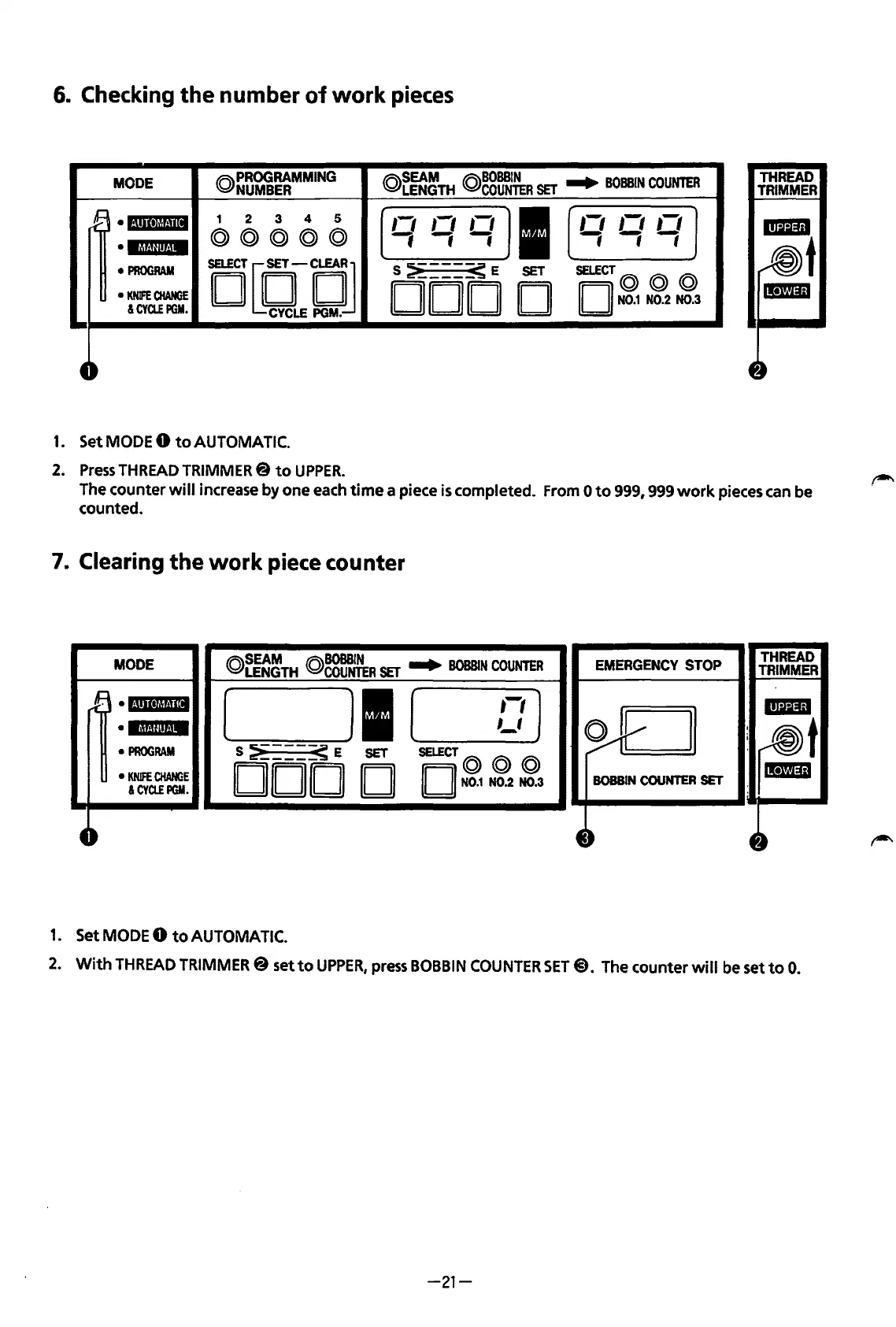
6.
Checking
the
number
of
work
pieces
MODE
@PROGRAMMING
NUMBER
@r~~TH
@gg~~R
SET
...
BOBBIN
COUNTER
I
rB
·l·!•ll•lrll·llll
1 2 3
4 5
,-,
,-,
,,
,-,
,-,
,-,
@@@@@
fff
-,-,-;
•IM!Jin·iM
PROGRAM
DCClCJ
s~---~E
SET
SELECT@
@ @
KNIFE
CHANGE
DOD
D
II II
N0.1
N0.2 N0.3
&CYCLEPGM.
t-
1.
Set
MODE
0
to
AUTOMATIC.
2.
Press
THREAD
TRIMMER@
to
UPPER.
THREAD
TRIMMER
The
counter
will
increase by one
each
time a piece
is
completed.
From
0
to
999,
999
work
pieces
can
be
counted.
7.
Clearing
the
work
piece counter
MODE
(Q)SEAM
@BOBBIN
...
B0BB1
EMERGENCY
STOP
THREAD
LENGTH
COUNTER
SET
N
COUNTER
TRIMMER
rB
•l·llll•lt!!·llll
[
Jl
(
,-,)
-
MMU!it·IM
,_,
~
v
:
rm!t
PROGRAM
S
~---~
E
SET
SELECT@
@@
KNifE
CHANGE
DOD
D
II
II
N0.1
N0.2 N0.3
BOBBIN
COUNTER
SET
:I!Di1
&CYCLEPGM.
4-
4~
4~
1.
Set
MODE
0
to
AUTOMATIC.
2.
With
THREAD
TRIMMER@
set
to
UPPER,
press
BOBBIN
COUNTER
SET@).
The
counter
will
be
set
to
0.
-21-
From the library of: Superior Sewing Machine & Supply LLC

Table of Contents

Related product manuals