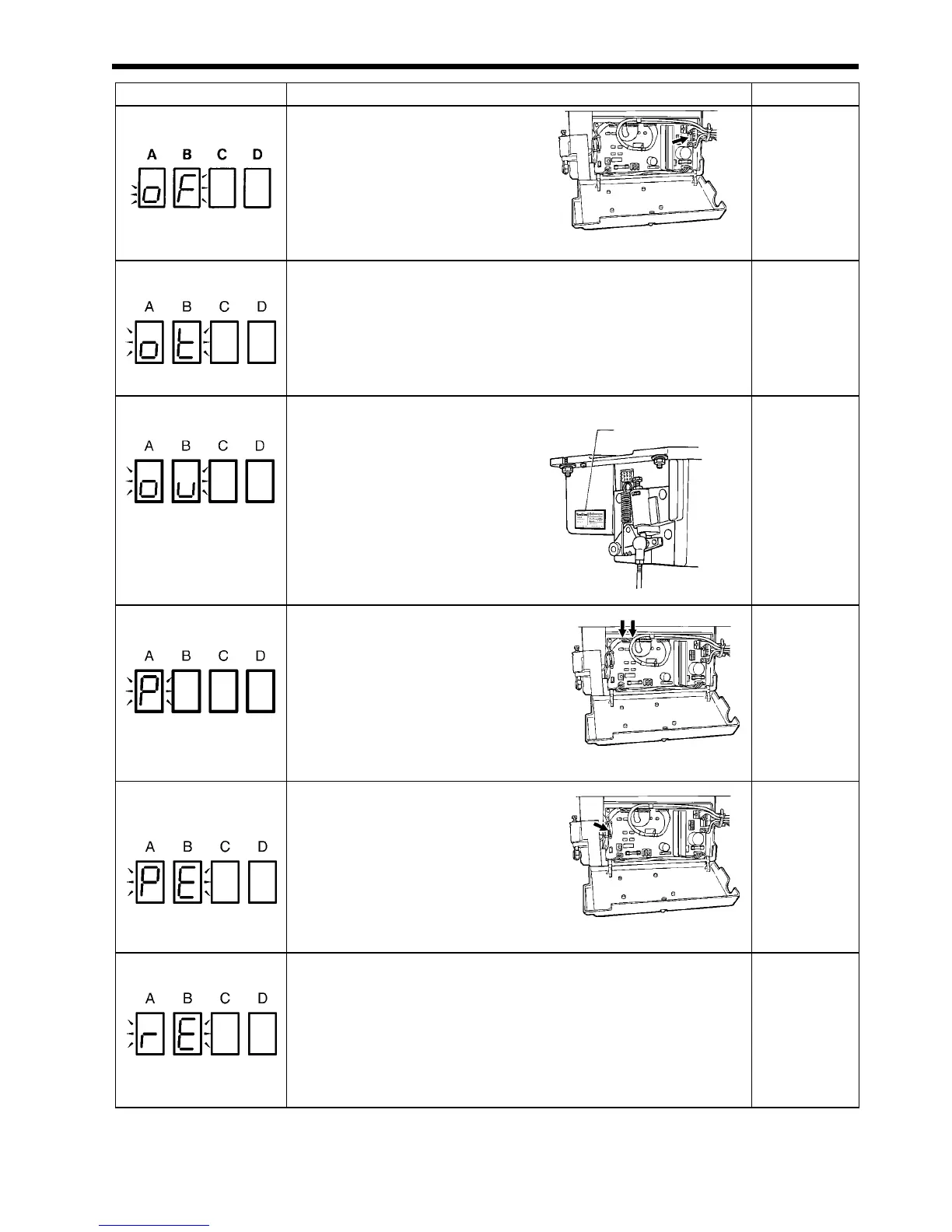
22. TROUBLESHOOTING
SL-710A
144
Error code Possible cause Page
oF
• Is the machine connector inside
the control box disconnected?
Insert the connector securely.
• Is the machine head tilted back?
Return the machine head to its
normal position.
Check the operation of the safety switch.
Instruction manual
62, 104
ot
• This appears on the display when the sewing machine has been
operating continuously for 3 minutes or more.
Turn the power switch off and then back on again, and then operate the
sewing machine normally.
-
ou
• Is the power supply voltage abnormally
high?
Check that the power supply voltage
matches the control box voltage
specifications.
77
P
• Is connector CN7 or CN8 inside
the control box disconnected?
Securely connect the connectors.
• Problem with control box.
Replace the control box.
80
76
PE
• Is the treadle unit connector
inside the control box
disconnected?
Insert the connector securely.
• Treadle unit malfunction.
Replace the treadle unit.
96
96
rE
• Is the power supply voltage too low?
Check the power supply voltage.
• Was the power turned on while the treadle was still depressed?
Return the treadle to the neutral position, and then turn on the power
switch.
103
-
0986M
0991M
0980M
1927M
0997M
0990M
0987M
0981M
0998M
1928M
Voltage rating label



 To Next Page