14. STANDING OPERATION PEDAL
SL-710A
96
14. STANDING OPERATION PEDAL
Some sub-classes are not equipped with
a foot plug set.
In such cases, install the foot plug set
(J02953-001) by the following procedure.
14-1. Installing the foot plug
DANGER
Wait at least 10 minutes after turning off the power switch and disconnecting the power cord from the wall outlet
before opening the face plate of the control box. Touching areas where high voltages are present can result in
severe injury.
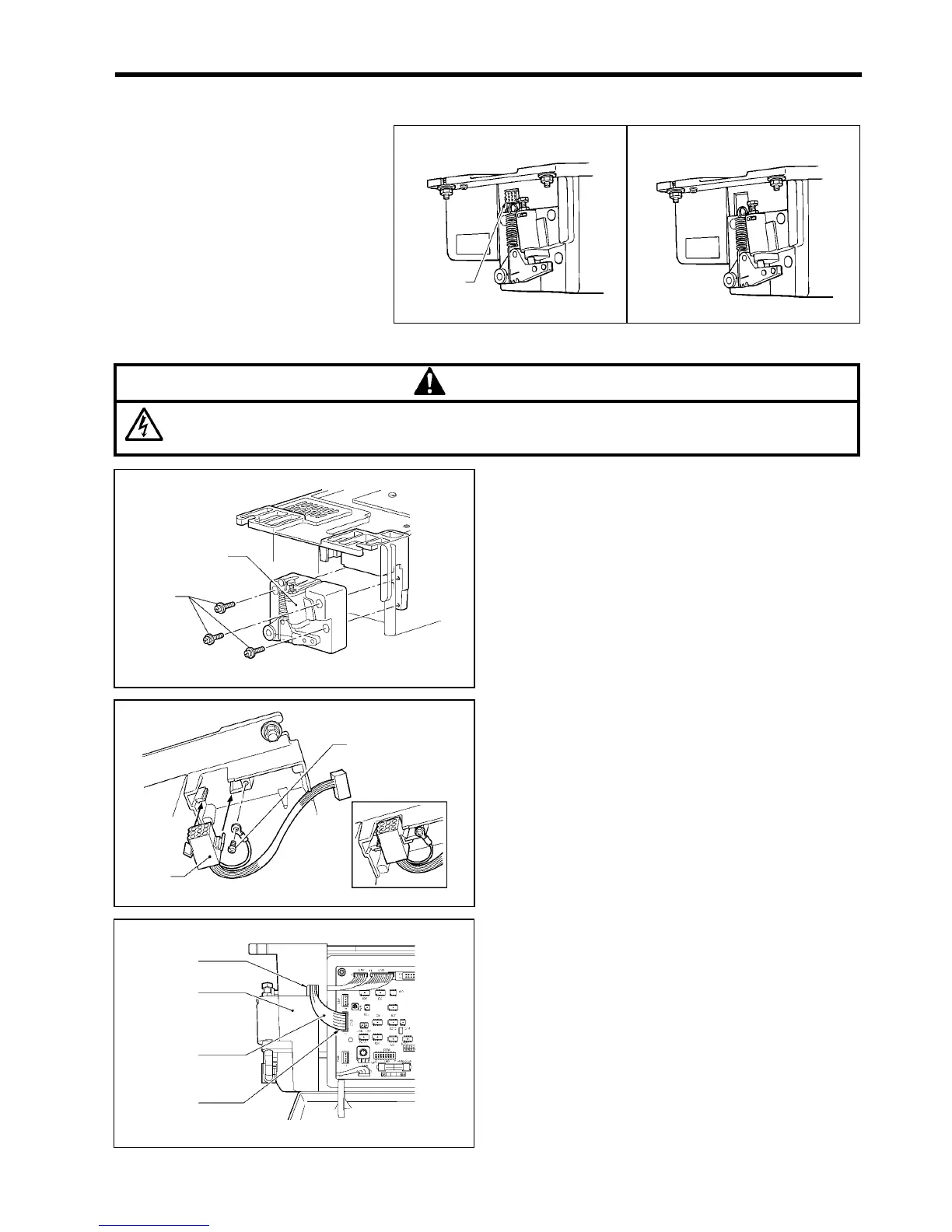
1. Remove the three screws (1), and then remove the
treadle unit (2).
2. Install the foot plug (3).
3. Install the ground wire with the screw (4).
4. Insert the connector (5) of the foot plug (3) into the
CN3 connector of the control circuit board.
5. With the connector (5) passed through the opening (6),
install the treadle unit (2) with the three screws (1).
<With foot plug set> <Without foot plug set>
1861M
1862M
Foot plug
1864M
(3)
(3)
1863M
(2)
(1)
1865M
<CN3>
(6)
(2)
(5)



 To Next Page