12. FUNCTION SETTING METHODS
SL-710A
86
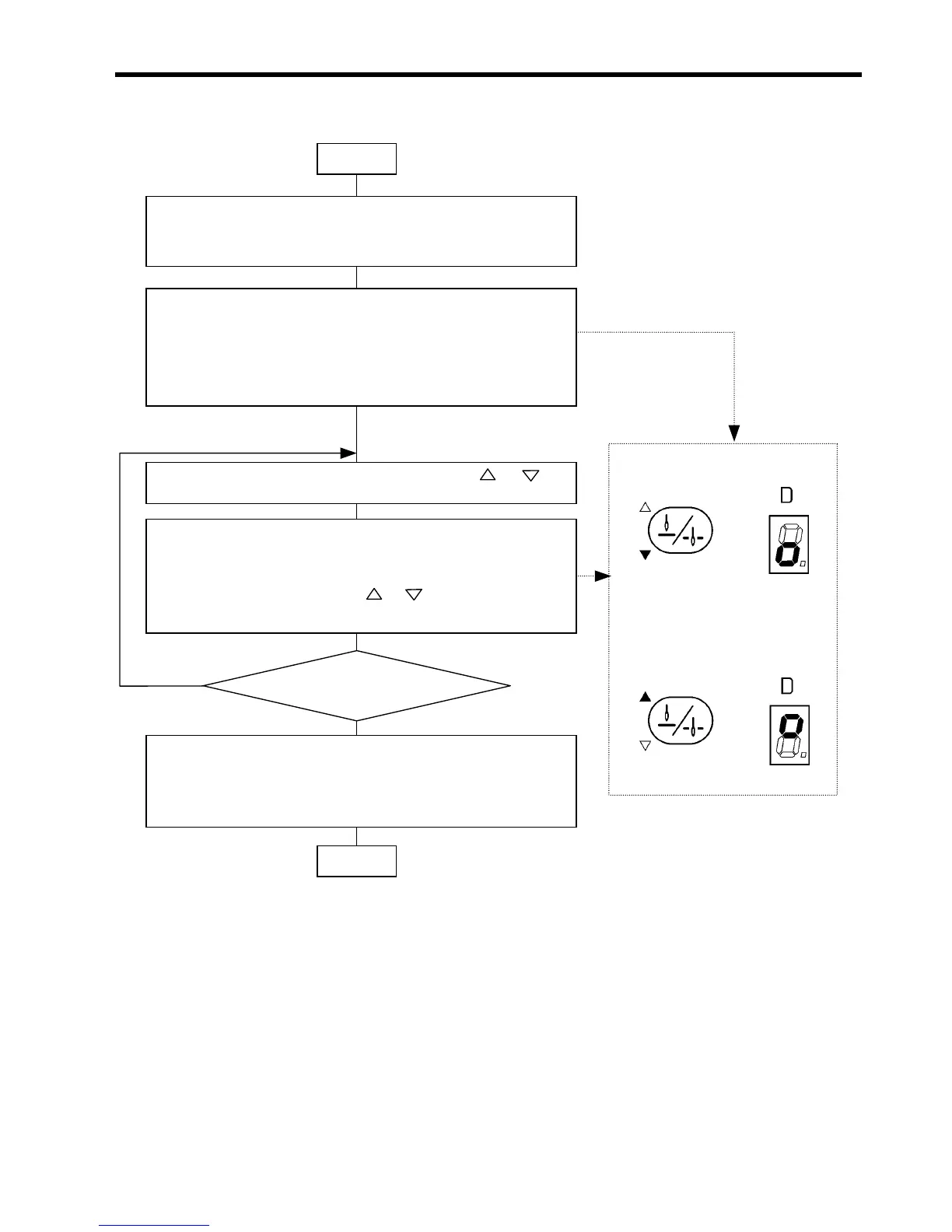
Indication when memory switch is se
to off
Indication when memory switch is se
to on
12-4. Memory switch setting flowchart
(NOTE) If the power is turned off before the end operation, memory switch settings are not renewed.
• Leave the machine stopped after thread trimming
• Turn off all LEDs (except for the LED of the needle up/down stop key).
(For the B-100 operation panel, select pattern 1.)
• Press the needle up/down stop key while pressing the thread trimming
key.
(A memory switch number will appear on the AB displays, and either o
the two LEDs of the needle up/down stop key will be lit to indicate the
direction of movement. On the B-40 or B-100 operation panel, the setting
will be indicated on the D display.)
• Select the desired memory switch number using the and keys
below the AB displays.
• Press the needle up/down stop key to change the setting of the memor
switch.
(Either of the two LEDs of the needle up/down stop key will be lit. On the
B-40 or B-100 operation panel, the and keys below the D displa
can be used instead.)
• Keep pressing the thread trimming key at least for 1 second to cause a
beep to be issued.
(All LEDs except for the LED of the needle up/down stop key will be
turned off.)
Start
End
Change other memory switch setting
or finish setting?
Change
Finish
0975M
0976M



 To Next Page