2-4 User Manual
2.2 Communication Ports
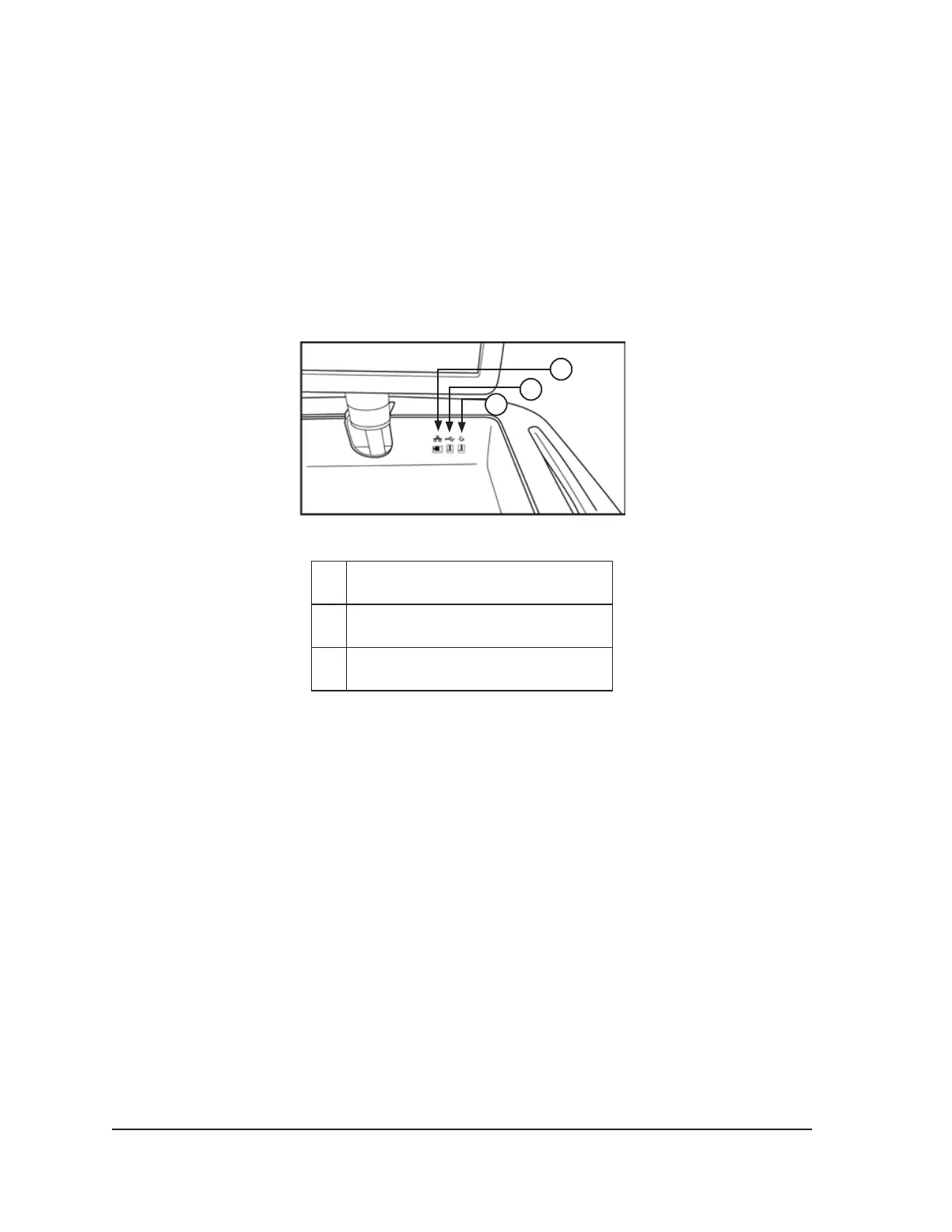
Three communication ports are located on the back panel of the monitor storage compartment
(Figure 2-3).
• The Ethernet port allows connection of the Visual-ICE Cryoablation System to a Galil Medical
remote server for uploading reports and diagnostic data and for downloading software updates
and User Manual updates.
• The USB 2.0 full-speed port allows you to save reports to a Galil Medical USB ash drive for
download to another computer or for printing.
• The USB 2.0 low-speed port is reserved for future system expansion.
1
2
3
Figure 2-3. Monitor Storage Compartment
1 Ethernet Port
2 USB 2.0 Full-speed Port
3 USB 2.0 Low-speed Port
2.3 Mouse Track Pad
The mouse track pad is located within the recessed monitor storage cavity. The mouse track pad
provides an alternative to the touch screen as a means of interacting with the system. Use the track
pad to move and position the cursor on the monitor. To press a button on the screen, position the
cursor over the button and press the left button on the track pad.
2.4 Storage Compartment
The storage compartment may be used to store Visual-ICE System accessories, such as the
gas supply lines and tools. Do not place very heavy objects in the storage compartment. The
weight limit is 23 kg (50 lbs). Do not store liquids in the compartment. Liquids spilled in the storage
compartment may drip into the system; the compartment is not water tight.



 To Next Page