Visual-ICE™ Cryoablation System
5-1
5 ADMINISTRATIVE FUNCTIONS
5.1 Congure Settings
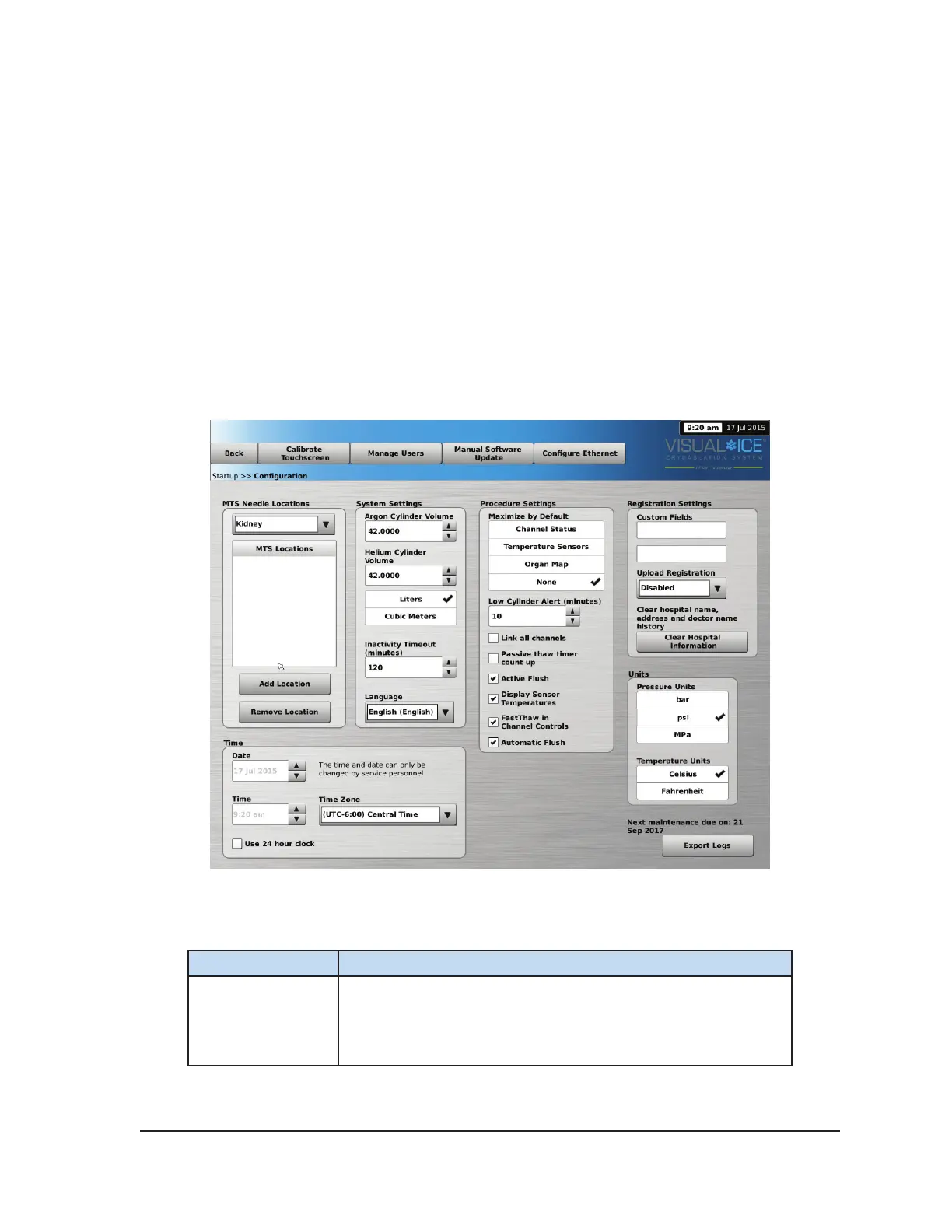
The Congure Settings Screen allows you to change system settings used during a cryoablation
procedure. A maximum of ve (5) user accounts can be congured for each Visual-ICE™ System.
Settings that may be changed include MTS Needle Locations, System, Procedure and Registration
Settings and Units (reference Table 5-1). Only Service personnel have the option to adjust the
system time and date; System Administrators can change the Time Zone.
When settings have been changed, press the Back button to return to the Startup screen. A
message is displayed summarizing the changes made to the settings and asking for conrmation to
save the settings. Press Yes to save the settings, No to exit the screen without saving your changes,
or Cancel to return to the Congure Settings Screen and continue making changes.
Screen 5-1. Congure Settings
Table 5-1. Congure Settings Controls
Setting Description
MTS Needle
Locations
Customize the list of names to be provided for the MTS needles
for each associated organ map. Press Add Location to add
a new name to the list. Press Remove Location to delete a
name from the list.



 To Next Page