Visual-ICE™ Cryoablation System
4-23
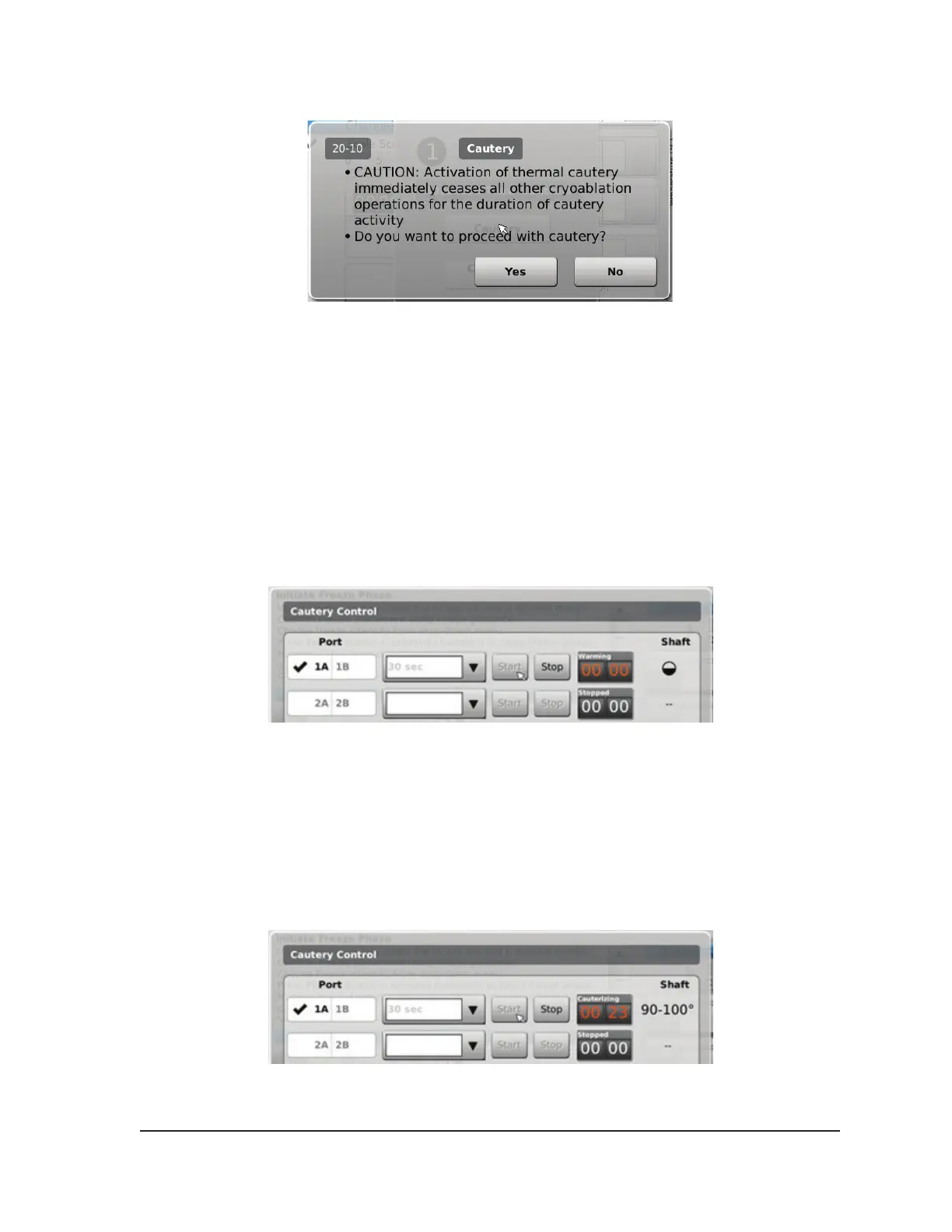
Screen 4-21. Cautery Conrmation message
3. Press the desired needle port (A or B) on each channel containing a needle you wish to track
ablate. Only one needle per channel may activate the cautery function at a given time.
NOTE: The Visual-ICE System uses a pre-set duration of 30 seconds for each cautery phase for
1.5 CX-type needles. This value is not adjustable, but the duration can be stopped in advance of
30 seconds by pressing the Stop button.
NOTE: A maximum of four (4) needles may use the cautery function simultaneously.
4. Press the Start button to initiate track ablation (Cautery).
• During the needle warming phase, the Cautery Control Screen will display a rotating warming
indicator (Screen 4-22).
Screen 4-22. 1.5 CX Needle Warming
• When the cautery threshold temperature is reached, Cauterization automatically begins.
o The timer will display Cauterizing (Screen 4-23).
o The Cautery Control Screen will display the estimated temperature range for the needle
shaft.
NOTE: The shaft temperature is displayed as a temperature range because tissue and
procedural variables aect the temperature.
Screen 4-23. 1.5 CX Needle Cautery In Progress



 To Next Page