Chapter 4 User Interface Page 4-1
4.1 Tabber/Labeler Keypad Interface
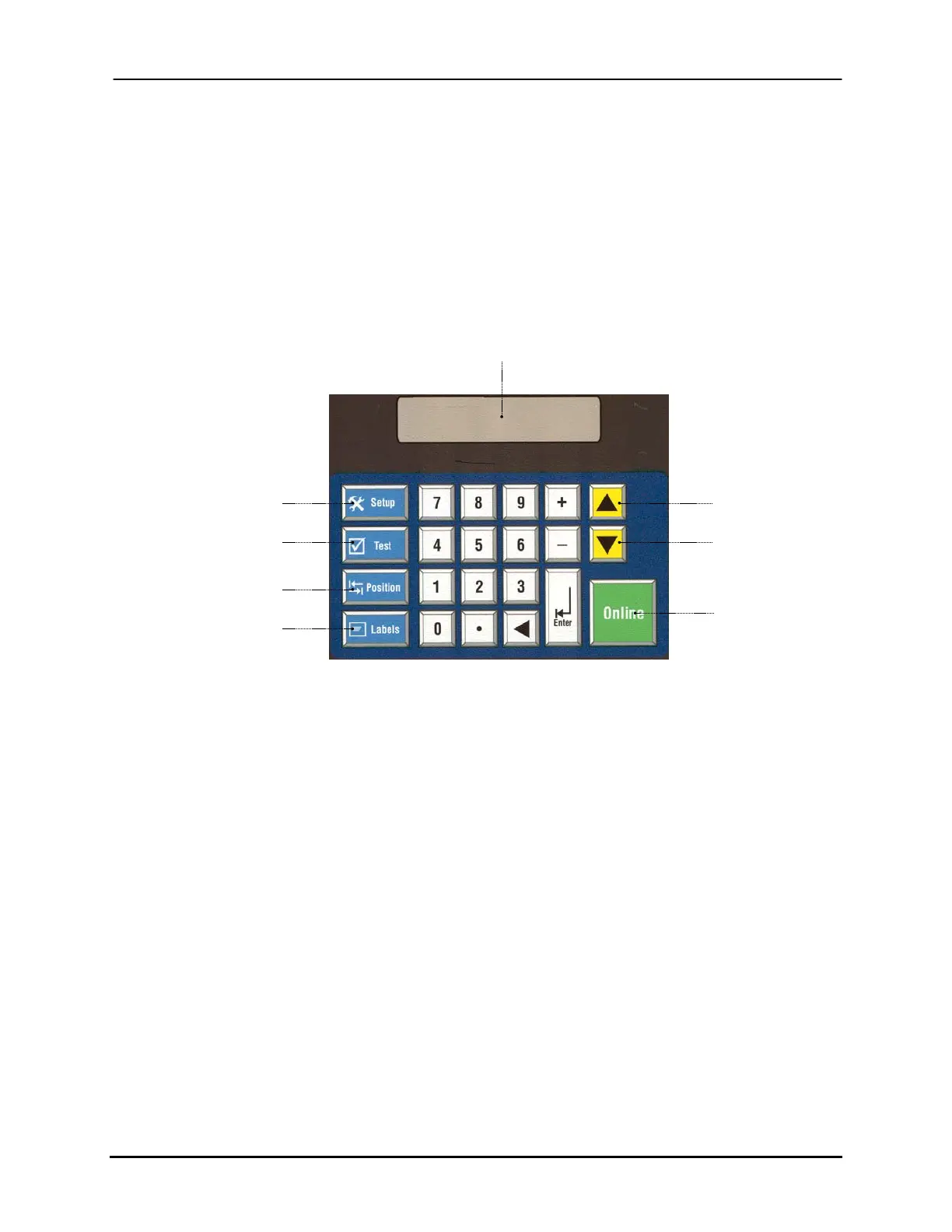
The BK731-2 keypad shown in Figure 4-1 provides the user interface for all setup and
diagnostic functions. The white buttons are for inputting setup changes (number pad,
enter, + and -), the yellow buttons (scroll up and down) are to cycle through menus, the
blue buttons (setup, test, position, and labels) are sub-menus for job setup and diagnostics,
and the green button (online) sets the head operation mode.
Setup Menu
Test Menu (Diagnostics)
Position Menu
On-Screen Display
Production Data
Error Condition
Up Button (Menu
Scroll)
Down Button (Menu
Scroll)
Online Button
(Turn head Online
or Offline)
Label Menu
Figure 4-1: BK731-2 Keypad Controls
Buskro Ltd. BK730-2 Tabber


 To Next Page