Chapter 4 User Interface Page 4-10
4.4.4 Manual Label Position
This section is only relevant if the label spacing is set to the manual setting (Section
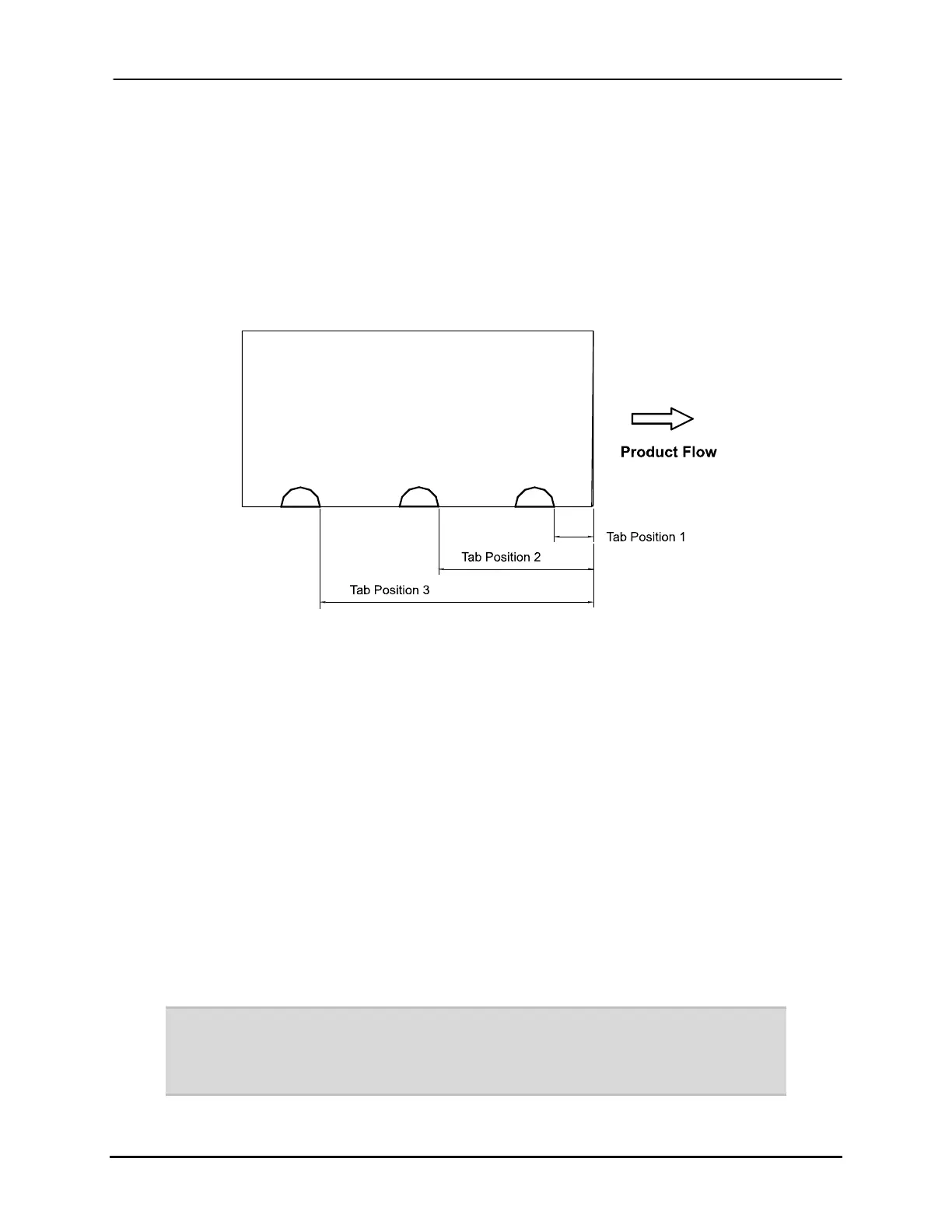
4.4.1). The label position entry is defined as the distance from the leading edge of the
product to the leading edge of the label with label position #1 being closest to the leading
edge of the product (Figure 4-2).
Figure 4-2: Label position
In order to set the label position (assuming 3 labels per product):
1. If the keypad does not say “OFFLINE”, press the <Online> key.
2. Press the <Position> button.
3. Follow the instructions in Section 4.4.1 and set the spacing to manual.
4. Press the Down key until the display reads “POS 1: ##.###” where ##.###
indicates the position of the first label.
5. Using the keypad, enter the desired position of the label and press <Enter>.
6. Press the Down key until the display reads “POS 2: ##.###” and repeat step 5.
7. Press the Down key until the display reads “POS 3: ##.###” and repeat step 5.
8. Press <Online> to exit the Position menu.
Note: 0.00” is the minimum setting.
A material size error condition could occur if the label positions are set too close
together. The result is immediate.
Buskro Ltd. BK730-2 Tabber


 To Next Page