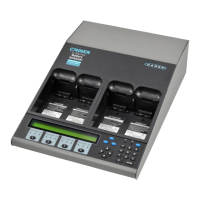
Cadex Electronics Inc. C7000-C Series Battery Analyzers .
BATTERY CONTACTS MUST BE CLEAN BEFORE INSERTING THE BATTERY.
Dirty contacts can increase the resistance in the connection between the adapter and
the battery, causing false voltage and current readings and in extreme cases, melting
of the contacts. To clean the battery contacts, use a lint-free cotton swab dipped in
100% isopropyl alcohol.
The following message appears when the battery is detected:
Note The analyzer can be setup not to display this message
and start service (see Starting Battery Service, page 69).
If the display continues to display an Empty message, this means that the Cadex analyzer
is not recognizing the battery. There are a number of reasons this may happen:
Battery is not inserted correctly. Verify that the battery is correctly and firmly inserted into
the adapter. Make sure that the contacts on the battery connect with the contacts on the
adapter and check for any switches on the battery.
Battery is completely discharged or protection circuits are open. Run the Boost program
by pressing the station key and holding it for two seconds (see Boost, page 33).
4. Press
ENTER
to display the C-Codes (see Chapter 6 - C-Codes (Configuration Codes),
page 41).
5.
If the active C-Code (indicated by “*”) is the correct one for the battery being
serviced, go to step 2 otherwise continue to the next step.


 To Next Page
 Loading...